Best Invoicing Software for Tailors
By the ZeDaq.ai team · · 7 min read
On this page
The best invoicing software for tailors is the one that matches how you get paid and how much else you need to track. If you only need to send bills, a free tool such as Zoho Invoice or Wave's Starter plan covers it; if you also need each invoice tied to a client's measurements, order and delivery date, a tailoring tool fits better.
Below we compare six options using facts from each company's own website, then give a simple way to choose. For the tailoring-tool route, see ZeDaq.ai's tools for tailors.
ZeDaq.ai publishes this blog and is one of the options below. Competitor facts come from their own websites, checked November 2026.
What should tailors look for in invoicing software?
Tailoring invoices have a few quirks that general billing tools don't always handle well. Check each tool against this list.
- Deposits and balances. Most bespoke orders are paid in two or three parts.
- Line items per garment. "Agbada, cap and trousers" should be three lines, not one.
- Multi-currency. Tailors with diaspora clients may bill in naira, pounds and dollars.
- Online payment. Card or bank payment from a link shortens the wait.
- Mobile use. Many tailors send invoices from the shop floor.
- Links to the order. When a client queries a bill, you want the order and fitting dates nearby.
No single tool does everything best. The right choice depends on which items matter most to you.
Which invoicing tools should tailors compare?
1. Zoho Invoice: free billing with limits
When we checked the Zoho Invoice pricing page in November 2026, it showed a single free plan. Limits included up to two users, three projects and 500 invoices a year, with "Powered by Zoho Invoice" branding.
Listed features include recurring invoices, quotes, a self-service customer portal and multiple payment options for customers.
Best for: solo tailors who want free, solid billing with quotes. Our full review of Zoho Invoice for tailors covers its pros and cons.
2. Wave: free invoicing with card processing fees
When we checked the Wave pricing page in November 2026, the Starter plan was $0, with card payments charged at 2.9% + $0.60 per transaction and Amex at 3.4% + $0.60. The Pro plan was $19 a month in the US, or $190 a year, with lower fees on its first 10 card transactions each month.
The page notes that online payments need approval, subject to identity verification and a credit review.
Best for: tailors in markets Wave serves who want free invoices plus card payments. See how Wave compares with a tailoring app for more.
3. FreshBooks: accounting with client limits
When we checked the FreshBooks pricing page in November 2026, regular prices were $23.00 a month for Lite (5 billable clients), $43.00 for Plus (50 clients) and $70.00 for Premium (unlimited clients). It also showed a 30-day free trial and a promotional discount.
Plans include unlimited time tracking, expense tracking and payments by card, ACH bank transfer and digital wallets.
Best for: designers who bill a few business clients for time and projects. Less suited to tailors with many private clients, because of the client caps.
4. Square Invoices: billing for shops already on Square
When we checked the Square Invoices pricing page in November 2026, it listed a Free plan with invoices, recurring invoices, estimates and projects. The Plus plan added payment schedules, custom invoice templates and a $10 cap on ACH bank transfers. Premium added the lowest processing fees and 24/7 phone support.
The page we saw didn't show plan prices or card rates, so check those directly.
Best for: alteration shops already using Square at the counter. Our guide to Square Invoices for alteration shops goes into detail.
5. Canva invoice templates: design first
When we checked in November 2026, Canva's invoice maker page described a free invoice maker with a drag-and-drop editor, PDF, PNG and JPEG downloads, view-only share links and the option to add payment links. It didn't mention automatic totals or payment tracking.
Best for: designers sending a few invoices a month who care most about looks. Our comparison of Canva templates against invoicing software explains the tradeoffs.
6. ZeDaq.ai: invoices joined to clients, measurements and orders
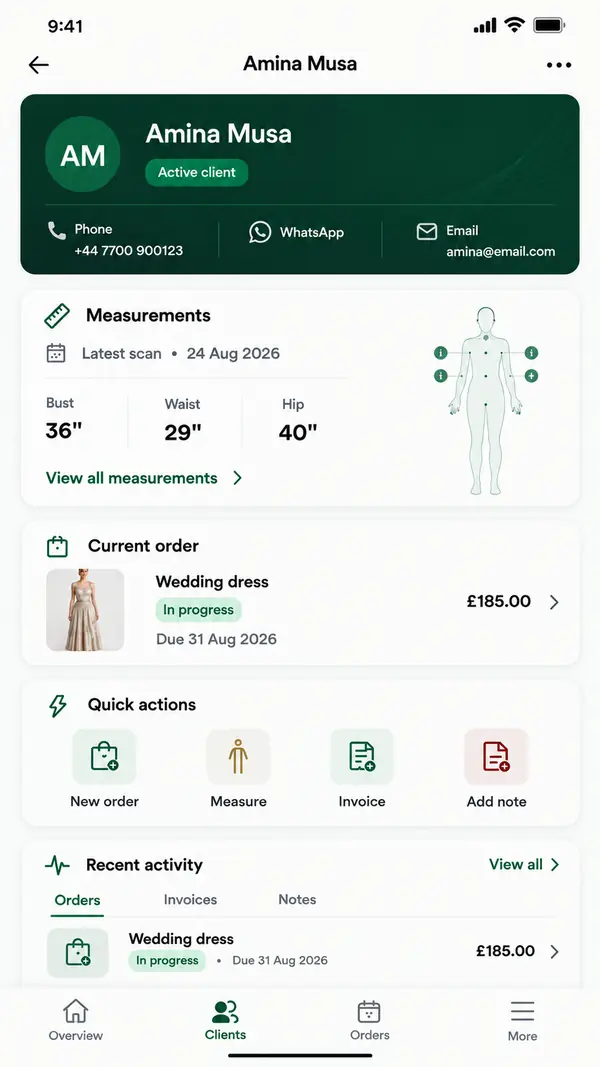
ZeDaq.ai is a tailoring tool with invoicing built in. Its tailor tools include:
- A client CRM.
- Measurements through a link the client opens on their phone.
- Orders and a delivery calendar.
- Invoicing in multiple currencies, including NGN, GBP and USD.
- The ZeDaq Business app for iOS and Android.
The Free plan costs $0 with 3 try-ons, 3 measurements and 5 invoices a month. Paid plans are Micro at $14 a month, Starter at $49, Growth at $129 and Scale at $299. Every paid plan has a 3-day free trial with no card required.
Best for: tailors and designers who want the invoice, client, measurements and order in one place. Payment processing, quotes and accounting are not part of its listed features, so some shops pair it with a payment provider.
How do the six compare side by side?
| Tool | Free option | First paid price shown | Online payments | Measurements and orders | Multi-currency |
|---|---|---|---|---|---|
| Zoho Invoice | Yes, 500 invoices a year | No paid plan shown | Payment options listed | No | Not stated on pricing page |
| Wave | Starter, $0 | Pro, $19/mo | Card, with fees | No | Check Wave's site |
| FreshBooks | 30-day trial | Lite, $23.00/mo regular | Card, ACH, wallets | No | Check FreshBooks' site |
| Square Invoices | Free plan | Not shown on page we saw | Yes, with fees | No | Check Square's site |
| Canva templates | Free invoice maker | Pro for some features | Add payment links | No | Type it yourself |
| ZeDaq.ai | Free, 5 invoices a month | Micro, $14/mo | Not listed | Yes | Yes, NGN, GBP, USD and more |
All competitor details are from each company's own pages, checked November 2026.
How do you pick the right one?
Answer three questions.
- What is your biggest problem: getting paid, or keeping track? Getting paid points to Wave, Square or FreshBooks. Keeping track of clients and orders points to a tailoring tool.
- How many invoices do you send a month? Under ten, a template or free tool is fine. Above that, automation saves real time.
- Who are your clients? Many private clients point away from tools with client caps. A few business clients suit FreshBooks or Zoho.
Quick picks
- Free and simple: Zoho Invoice.
- Free invoices plus card payments: Wave Starter, if available where you work.
- Already on Square at the counter: Square Invoices.
- Freelance designer billing brands: FreshBooks.
- Beautiful invoices, low volume: Canva.
- Invoices tied to measurements and orders: ZeDaq.ai.
Does invoicing software make a tailor look more professional?
Yes, in small ways that add up. Consistent invoice numbers, itemized garments, clear deposits and on-time reminders tell a client you run a proper business. Our guide on looking more professional with the right software covers the other touches that matter.
A worked example
Femi runs a tailoring shop in Abuja and serves clients in Lagos, London and Atlanta. He sends about 40 invoices a month, most with a deposit and a balance.
A free billing tool would handle his volume. But Femi's real pain is matching each invoice to the right order and measurements when a London client asks, "Is my second suit ready?" A tool that keeps invoices next to orders answers that in one screen, and lets him bill the London client in pounds and Lagos clients in naira.
What should you test during a trial?
Before you commit to any of these, run one real week through it:
- Send an invoice with a deposit and a balance.
- Bill one client in a second currency, if you use one.
- Change a price after a fitting and resend.
- Find every unpaid invoice in under a minute.
- Do all of the above on your phone.
The tool that makes those five steps easy is the best one for your shop.
Ask a client for feedback
Send your first trial invoice to a loyal client and ask two questions: was it clear, and was it easy to pay? Clients notice things you won't, such as a confusing balance line or a payment step that fails on their phone.
Plan the switch for a quiet week
Moving invoicing tools in the middle of wedding season invites mistakes. Pick a slower week, finish open invoices in your old tool, and start every new order in the new one.
Send invoices from the same place as your orders
FAQs
What is the cheapest invoicing software for tailors?
Several options have free plans, including Zoho Invoice, Wave Starter, Square Invoices and ZeDaq.ai. Payment processing fees can still apply when clients pay online.
Can invoicing software handle tailoring deposits?
Some can. Square lists payment schedules on its Plus plan. With other tools, you may show the deposit and balance as separate lines or separate invoices.
Do I need a separate payment provider with ZeDaq.ai?
If you want clients to pay online by card, yes. Payment processing is not one of ZeDaq.ai's listed features, so many tailors add a payment link from their provider to the invoice.
Which invoicing tools support naira?
ZeDaq.ai supports invoices in NGN, GBP, USD and other currencies. For other tools, check their sites, since currency support can vary by country.
Try ZeDaq.ai free
Virtual try-on and Find my size for your store, plus client, order and invoicing tools for tailors, in one subscription.

