
Zoho Invoice for Tailors: Pros, Cons and Alternatives
By the ZeDaq.ai team · · 7 min read
On this page
- What is Zoho Invoice, and what does it cost?
- What does Zoho Invoice do well for a tailor?
- Where does Zoho Invoice fall short for tailors?
- How does Zoho Invoice compare with a tailoring app?
- Which alternatives should a tailor consider?
- How do you decide in 10 minutes?
- What does ZeDaq.ai cost if you switch?
Zoho Invoice is a solid choice for tailors who only need to send invoices and quotes, because its main plan costs nothing. Its weak spot for tailors is everything around the invoice: it doesn't store body measurements, fitting dates or garment orders, so you still need somewhere else for those.
This guide looks at what Zoho Invoice does well, where it falls short for a sewing business, and which alternatives fit different shops. If you want to see a tool built around tailoring work instead, look at the ZeDaq.ai tools for tailors as you read.
ZeDaq.ai publishes this blog. Facts about Zoho come from Zoho's own website, checked November 2026.
What is Zoho Invoice, and what does it cost?
Zoho Invoice is an online invoicing tool from Zoho, the company behind Zoho CRM, Zoho Books and many other business apps. You create a client, add line items, and send the invoice by email or link.
When we checked the Zoho Invoice pricing page in November 2026, it showed a single free plan with these limits:
- Up to two users.
- Up to three projects.
- Up to 500 invoices a year.
- Up to two organizations under one account.
- "Powered by Zoho Invoice" branding on invoices.
The same page lists recurring invoices, quotes, a self-service customer portal and several payment options for customers. It also notes that data from users who are inactive for more than 180 days may be deleted after a warning, so don't park the account for a season and forget it.
What does Zoho Invoice do well for a tailor?
For many small workshops, Zoho Invoice covers the billing side with very little effort. Here is where it shines.
It costs nothing to start
A free plan matters when you are a one-person alterations shop. You can send professional invoices without adding another monthly bill.
Quotes turn into invoices
Bespoke work usually starts with a price conversation. Zoho Invoice lets you send a quote first, then turn it into an invoice once the client agrees, so you don't type the same details twice.
Recurring invoices suit regular clients
If a uniform supplier, school or hotel sends you alterations every month, a recurring invoice saves you from rebuilding the same bill. You set it up once and it repeats.
Clients get a portal
The customer portal gives clients one place to see what they owe and what they have paid. That can cut down on "can you resend that invoice?" messages.
It sits inside a bigger family of apps
If you already use other Zoho apps, adding Zoho Invoice keeps your logins and data in one ecosystem. Our comparison of ZeDaq.ai versus HubSpot and Zoho covers the CRM side of that family.
Where does Zoho Invoice fall short for tailors?
The limits show up when you look at a tailor's full day, not just the billing step. An invoice is the last thing you send, but the job starts with measurements and a fitting date.
No place for body measurements
Zoho Invoice is built for line items and payments. It has no measurement profile for a client, so chest, waist, hip, inseam and sleeve length end up in a notebook, a phone note or a separate form.
Many tailors patch this gap with a shared form. Our look at using Google Forms for measurements explains why that works at first and gets messy later.
No garment orders or delivery dates
A tailoring order has stages: measured, cut, first fitting, final fitting, ready. An invoice can say "two-piece suit," but it can't show where that suit is or when it is due.
Branding on the free plan
The free plan adds "Powered by Zoho Invoice" to your invoices, according to the pricing page. For a brand-led design studio, that small line may matter.
Volume limits for busy shops
Five hundred invoices a year is plenty for most solo tailors. A busy alterations counter that bills every hem and zip could reach it, so count your past year's jobs before you commit.
How does Zoho Invoice compare with a tailoring app?
The table below sets Zoho Invoice beside a general accounting tool and a tool built for tailors. Zoho details come from its pricing page, checked November 2026.
| What you need | Zoho Invoice | General accounting software | ZeDaq.ai for tailors |
|---|---|---|---|
| Send invoices | Yes | Yes | Yes |
| Quotes and estimates | Yes | Usually | Not listed |
| Client records | Basic contact details | Basic contact details | Client CRM |
| Body measurements | No | No | Yes, by a link the client opens on their phone |
| Garment orders and due dates | No | No | Orders and a delivery calendar |
| Mobile app for the tailor | Check Zoho's site | Varies | ZeDaq Business for iOS and Android |
| Multi-currency invoices | Not stated on pricing page | Varies | Yes, including NGN, GBP and USD |
| Entry price | Free plan | Varies | Free plan, paid from $14/mo |
The honest takeaway: Zoho Invoice is better at pure billing features such as quotes and recurring invoices. A tailoring app is better at the work that happens before the invoice.
Which alternatives should a tailor consider?
There isn't one right answer. Pick by the problem that costs you the most time today.
If billing is your only problem: stay on Zoho Invoice
If you already keep measurements in a well-organized book and you rarely miss a delivery date, Zoho Invoice may be all you need. It is free and does the billing job properly.
If you want a free design-led invoice: a template
Some tailors prefer a designed invoice made from a template. Our tailor invoice template guide shows what to include, such as deposits, balances and fitting dates. The tradeoff is that templates don't track who has paid.
If measurements and orders are the mess: a tailoring app
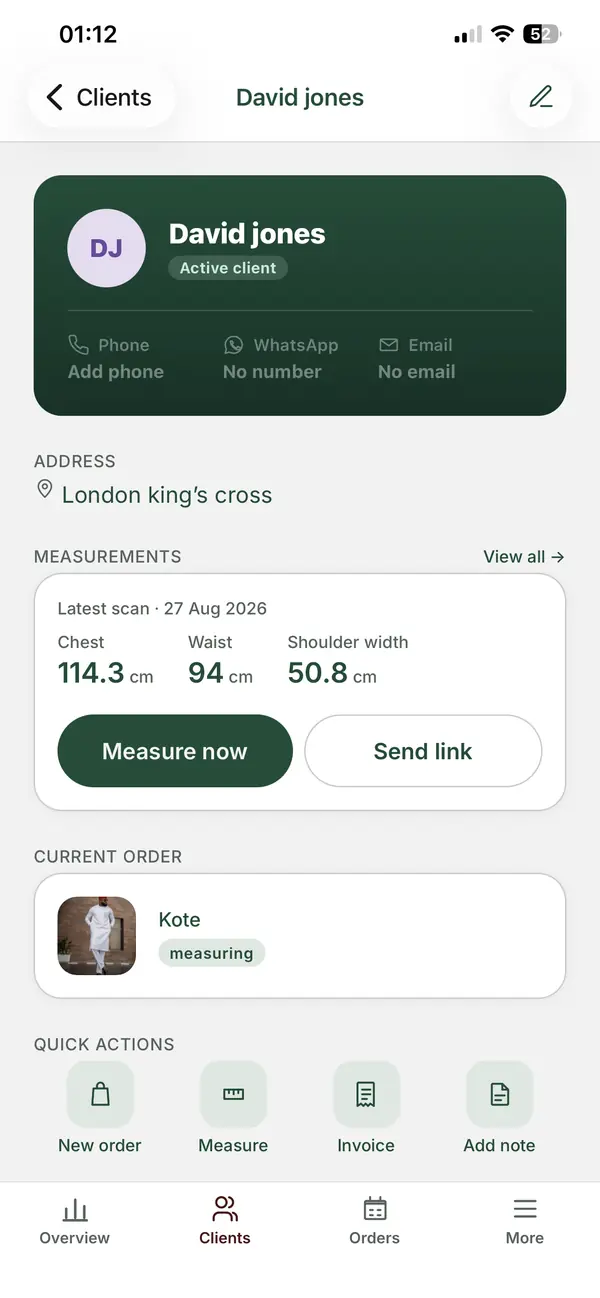
When the real headache is finding a client's measurements or remembering which dress is due Friday, a tool built for tailors fits better. ZeDaq.ai includes:
- A client CRM for contact details and notes.
- Measurements through a link the client opens on their own phone.
- Orders with a delivery calendar.
- Invoicing in multiple currencies, including NGN, GBP and USD.
- The ZeDaq Business app for iOS and Android.
If you want both: run them side by side
Some shops keep Zoho Invoice for accounting-style billing and use a tailoring app for clients, measurements and orders. That works, but you will enter each client twice, so decide which tool is your "main" record.
How do you decide in 10 minutes?
Answer these five questions with a yes or no. They take less time than a free trial.
- Do you lose client measurements, or ask clients to re-measure, more than once a month?
- Have you missed or nearly missed a delivery date in the last three months?
- Do you bill in more than one currency, such as naira and pounds?
- Do you need quotes and recurring invoices more than anything else?
- Do you work mostly from your phone at the cutting table?
If you said yes to question 4 only, Zoho Invoice is likely enough. If you said yes to questions 1, 2, 3 or 5, a tailoring app will probably save you more time than another billing tool.
A worked example
Ada runs a two-person bridal and alterations studio. She sends about 40 invoices a month, so Zoho's yearly cap is not a problem. Her real issue is that measurements live in three notebooks and her assistant can't read her handwriting.
For Ada, switching invoicing tools changes little. Moving clients and measurements into one shared record fixes the problem she actually has. She could keep Zoho Invoice for billing, or move everything into one tailoring tool to avoid double entry.
What does ZeDaq.ai cost if you switch?
ZeDaq.ai has a Free plan at $0 with 3 try-ons, 3 measurements and 5 invoices a month. That is enough to test the measurement link and send a few invoices to real clients.
Paid plans are Micro at $14 a month, Starter at $49, Growth at $129 and Scale at $299. Every paid plan has a 3-day free trial with no card required. You can compare plans on the ZeDaq.ai pricing page.
See tailor tools built around measurements and orders
FAQs
Is Zoho Invoice really free?
Zoho's pricing page showed a single free plan when we checked in November 2026, with limits such as two users and 500 invoices a year. Check the page for current terms before you sign up.
Can Zoho Invoice store client measurements?
Not as a measurement profile. You could type measurements into a notes field, but there is no structure for chest, waist or inseam, and no way for clients to send them in.
Can I use Zoho Invoice and a tailoring app together?
Yes. Many shops do. Just pick one tool as the main client record so names and phone numbers don't drift apart.
Does ZeDaq.ai send quotes like Zoho Invoice?
Quotes are not part of ZeDaq.ai's listed tailor features. ZeDaq.ai focuses on clients, measurements, orders, a delivery calendar and multi-currency invoices.
Try ZeDaq.ai free
Virtual try-on and Find my size for your store, plus client, order and invoicing tools for tailors, in one subscription.

