Square Invoices for Tailors and Alteration Shops
By the ZeDaq.ai team · · 8 min read
On this page
- Why do alteration shops look at Square Invoices?
- What does Square Invoices include on each plan?
- Where does Square Invoices fit an alteration shop?
- Where does Square Invoices fall short for tailors?
- How does Square Invoices compare with a tailoring app?
- Can you use Square and a tailoring tool together?
- How should an alteration shop decide?
- What should an alteration invoice include?
- How can a small shop look more established?
- What does ZeDaq.ai cost?
Square Invoices works well for tailors and alteration shops that mainly want to bill clients and take card or bank payments, especially if they already use Square at the counter. It is less complete for bespoke work, because it doesn't hold body measurements, fitting stages or a delivery calendar for each garment.
This guide explains what Square Invoices offers on each plan, where it suits an alterations counter, and where a tailoring tool fills the gaps. To compare, see ZeDaq.ai's tools for tailoring businesses.
ZeDaq.ai publishes this blog. Square details come from Square's Invoices pricing page, checked November 2026.
Why do alteration shops look at Square Invoices?
Many alteration shops and tailors already take card payments in person with Square. Once that is in place, adding Square Invoices for bigger jobs feels like a small step.
Typical reasons include:
- One system for payments. Counter sales and invoiced jobs land in the same account.
- Card and bank payments online. Clients can pay an invoice without coming back to the shop.
- Estimates before work starts. Useful for a suit rebuild, a wedding party's alterations or a uniform contract.
- Recurring billing. Handy for regular business clients such as hotels, schools or theaters.
What does Square Invoices include on each plan?
When we checked the Square Invoices pricing page in November 2026, it listed four plans. The page we saw described features but did not show the plan prices or card processing rates, so check those on Square's site directly.
| Plan | Features listed on the page |
|---|---|
| Free | Invoices and recurring invoices, estimates and contracts, projects |
| Plus ("Best value") | Adds a payment schedule, custom invoice templates and a $10 cap for ACH bank transfers |
| Premium | Adds the lowest processing fees and 24/7 phone support |
| Square Pro | Custom pricing for businesses processing over $250,000 a year |
Processing fees are charged when clients pay invoices online, and they vary by payment method and plan. Before you choose, work out what those fees mean for your typical job size.
Where does Square Invoices fit an alteration shop?
Fast billing for routine jobs
An alteration counter handles many small jobs: hems, zips, taking in a waist. If a client pays at pickup, a counter sale is enough. If they want a bill first, an invoice is quick to send.
Estimates for larger jobs
For a full wedding party, a uniform contract or a coat relining, an estimate sets expectations. On the Free plan, estimates and contracts are listed alongside invoices.
Payment schedules for deposits and balances
Bespoke work is often paid in parts: a deposit at order and the balance at collection. The Plus plan lists a payment schedule, which suits that pattern.
Recurring invoices for business clients
A hotel that sends uniforms every month, or a theater with regular costume repairs, can be billed on a recurring invoice. That saves you rebuilding the same bill.
Where does Square Invoices fall short for tailors?
No measurement records
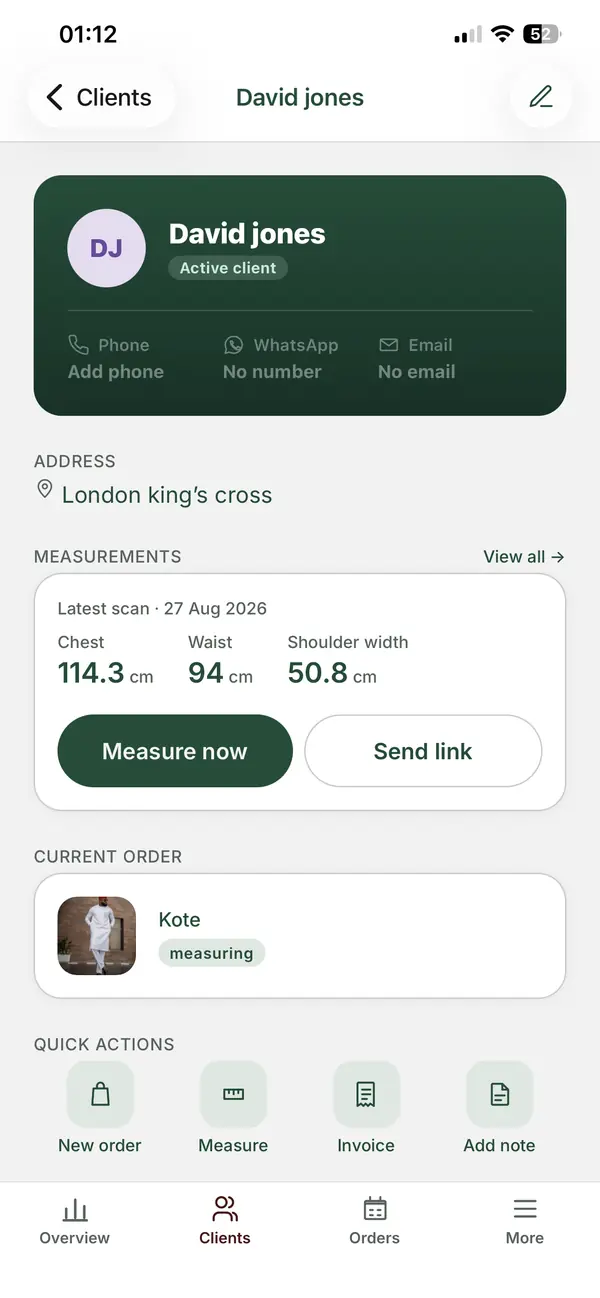
Square Invoices tracks what you charged and what was paid. It doesn't hold a client's chest, waist, inseam or sleeve length, or let a client send measurements in.
No garment stages or delivery calendar
A bespoke suit goes through measurement, cutting, fittings and collection. Square Invoices "projects" help group work, but they are not a tailoring order with fitting dates and a promised delivery day.
Fees depend on how clients pay
Online card payments carry processing fees. For small jobs, that cost is a bigger share of the price, so decide when to encourage cash or bank transfer instead.
Multi-currency needs
If you serve clients abroad and bill in several currencies, check how Square handles that in your country before you commit.
How does Square Invoices compare with a tailoring app?
| Need | Square Invoices | ZeDaq.ai for tailors |
|---|---|---|
| Send invoices | Yes | Yes |
| Estimates | Yes, on Free | Not listed |
| Payment schedules | On Plus | Not listed |
| Online card payments | Yes, with processing fees | Not listed |
| Client records | Customer details | Client CRM |
| Body measurements | No | Yes, by a link the client opens on their phone |
| Orders and delivery dates | Projects, not tailoring orders | Orders and a delivery calendar |
| Multi-currency invoices | Check Square's site | Yes, including NGN, GBP and USD |
| Mobile app for the tailor | Check Square's site | ZeDaq Business for iOS and Android |
Square Invoices is stronger on getting paid. A tailoring app is stronger on everything that happens to the garment before payment.
If you are comparing several billing tools, our list of the best invoicing software for tailors sets them side by side.
Can you use Square and a tailoring tool together?
Yes, and for many alteration shops this is the most practical setup.
- Take the order in the tailoring tool. Record the client, their measurements and the due date.
- Track the garment through fittings on the delivery calendar.
- Bill in whichever tool fits the client. Use Square when a client wants to pay online by card. Use the tailoring tool's invoices when you need a currency Square doesn't cover for you.
- Take counter payments in Square as usual.
The cost of this split is some double entry. Keep each client's name and phone number identical in both tools so you can match records.
Alternatives for shops outside the US
Check that Square serves your country before you plan around it. Tailors in Nigeria, for example, often use payment links from a local provider instead. Our comparison of Paystack links and proper invoices explains when a link is enough and when you need a full invoice.
How should an alteration shop decide?
Ask what costs you the most time each week.
- Chasing payments? Square Invoices or a similar billing tool helps most.
- Finding measurements and due dates? A tailoring tool helps most.
- Both? Use both, or choose the tool that fixes the bigger problem first.
A worked example
Grace runs an alteration shop in Texas with one seamstress. She uses Square at the counter. Most jobs are hems and fittings paid at pickup.
Twice a month she takes a bespoke order, such as a bridesmaid set. For those, she needs a deposit, two fittings and a firm delivery date. Square's payment schedule handles the deposit and balance. Her notebook handles the measurements and dates, and that is where things go wrong.
For Grace, adding a client and order record for bespoke jobs fixes the real gap. She can keep Square for payments.
A checklist before you switch tools
- List the last 20 jobs and note how each client paid.
- Count how many were bespoke orders with fittings.
- Note any job where you lost measurements or missed a date.
- Total the processing fees you paid last month.
- Ask your seamstress which step slows her down most.
This short exercise often shows that the billing tool isn't the problem.
What should an alteration invoice include?
Whichever tool you use, a clear invoice prevents most payment disputes. For alterations and tailoring, include these details:
- Your shop name, address and contact number.
- The client's name and phone number, written the same way every time.
- An invoice number and date, so you can find it again.
- Each garment and each change, such as "Navy suit trousers: shorten hem, taper leg."
- The price for each line, plus any rush fee.
- Deposit paid and balance due, if the job was split.
- The collection or delivery date you agreed.
- How to pay, including bank details or a payment link.
- Your policy on uncollected items, in one short sentence.
Line-by-line detail matters most for alterations. A client who sees "hem, waist, sleeves" is far less likely to question the total than one who sees a single figure.
Keep the wording consistent
Use the same names for common jobs on every invoice, such as "Hem: plain" or "Hem: blind stitch." Consistent names make it easier to look back and see which jobs earn the most.
How can a small shop look more established?
Online alteration services make it easy for clients to compare. Clear invoices, reliable dates and remembered measurements help an independent shop stand out. Our guide to competing with online alteration services covers more ways to do that.
What does ZeDaq.ai cost?
ZeDaq.ai's Free plan costs $0 and includes 3 try-ons, 3 measurements and 5 invoices a month. Paid plans are Micro at $14 a month, Starter at $49, Growth at $129 and Scale at $299.
Each paid plan has a 3-day free trial with no card required. The ZeDaq.ai pricing page lists what each plan includes.
Track every garment from measurement to collection
FAQs
Is Square Invoices free?
Square listed a Free plan with invoices, recurring invoices, estimates and projects when we checked in November 2026. Processing fees apply when clients pay online.
Can I take deposits with Square Invoices?
The Plus plan lists a payment schedule, which lets you split a job into parts such as a deposit and a balance. Check Square's site for how it works today.
Does Square Invoices store client measurements?
No. It is a billing tool. Measurements need to live somewhere else, such as a tailoring app's client profile.
Does ZeDaq.ai process card payments?
Card processing is not part of ZeDaq.ai's listed tailor features. ZeDaq.ai covers clients, measurements, orders, a delivery calendar and invoices in multiple currencies.
Try ZeDaq.ai free
Virtual try-on and Find my size for your store, plus client, order and invoicing tools for tailors, in one subscription.

