
Google Forms for Client Measurements: Pros and Cons
By the ZeDaq.ai team · · 7 min read
On this page
- Why do tailors use Google Forms for measurements?
- What does Google Forms offer for a measurement form?
- What are the pros of Google Forms for measurements?
- What are the cons of Google Forms for measurements?
- How does Google Forms compare with a tailoring app?
- How do you build a better Google Form if you keep using one?
- When is it time to move off Google Forms?
- What does ZeDaq.ai cost compared with a free form?
Google Forms is a fast, familiar way for tailors to collect client measurements, and most clients can fill one in on their phone without help. The downside is what happens after: answers land as rows in a spreadsheet, with no measurement history per client, no link to their orders and no guidance on how to measure correctly.
This guide covers what Google Forms does well for measurements, where it breaks down as your client list grows, and what a measurement tool built for tailors does differently. For that tailor-specific side, see ZeDaq.ai's tools for tailors.
ZeDaq.ai publishes this blog. Google Forms features come from Google's own product page, checked November 2026.
Why do tailors use Google Forms for measurements?
Tailors reach for Google Forms because it solves an urgent problem quickly. A client abroad wants a kaftan, a bride lives in another city, or a busy customer can't come in this week. You need their numbers now.
With a form you can:
- Build a measurement form in under an hour.
- Share one link on WhatsApp, Instagram or email.
- Let the client fill it in on their phone, in their own time.
- See every answer in one place when they submit.
For a tailor who has been copying measurements out of WhatsApp messages, that is a big step up.
What does Google Forms offer for a measurement form?
When we checked the Google Forms product page in November 2026, it described these features:
- Multiple question types, which you can arrange and customize.
- Branching logic, so later questions depend on earlier answers.
- Export to a spreadsheet for deeper analysis.
- Real-time charts built from respondents' answers.
- Saved drafts for signed-in users, who have their progress saved for 30 days.
Branching is useful for tailors. You can ask "Is this for a top, trousers or a dress?" and then show only the measurements that garment needs.
What are the pros of Google Forms for measurements?
It is familiar to you and to clients
Many clients have filled in a Google Form before. They know how it works, so you spend less time explaining.
It's quick to set up and change
You can add a "back length" question in seconds when a new style needs it. There is nothing to install.
Branching keeps the form short
A trouser client doesn't need to see bust and shoulder questions. Branching hides what doesn't apply, which makes clients more likely to finish.
Answers can go into a spreadsheet
Exporting to a spreadsheet gives you one table of every response. You can sort, filter and print it for the cutting table.
What are the cons of Google Forms for measurements?
The problems are rarely visible on day one. They show up after your fiftieth client.
Every submission is a new row, not a client profile
When a client re-measures before their next order, you get a second row. Now you have two sets of measurements and need to work out which is current. A form has no idea that both rows are the same person.
No connection to orders or due dates
The form knows the numbers, but not the garment. You still need another place to note "lace gown, final fitting on the 14th, due on the 20th."
No help measuring correctly
Clients measuring themselves often pull the tape too tight, measure over thick clothes or confuse waist with hip. A text question can describe a measurement, but it can't watch the client do it. Wrong numbers in a tidy spreadsheet are still wrong numbers.
Units and typos slip through
One client types "34", another types "86cm" and a third types "thirty four." Unless every question makes the format clear, your sheet mixes inches, centimeters and words.
Privacy and access get messy
Body measurements are personal. With a shared form and sheet, think about who in your team can open it, and whether old responses ever get cleaned up.
It sits apart from your billing
Measurements in one tool and invoices in another means typing each client's name twice. Our look at Zoho Invoice for tailors shows the same gap from the billing side.
How does Google Forms compare with a tailoring app?
| What you need | Google Forms + spreadsheet | ZeDaq.ai for tailors |
|---|---|---|
| Share a link the client fills in on their phone | Yes | Yes |
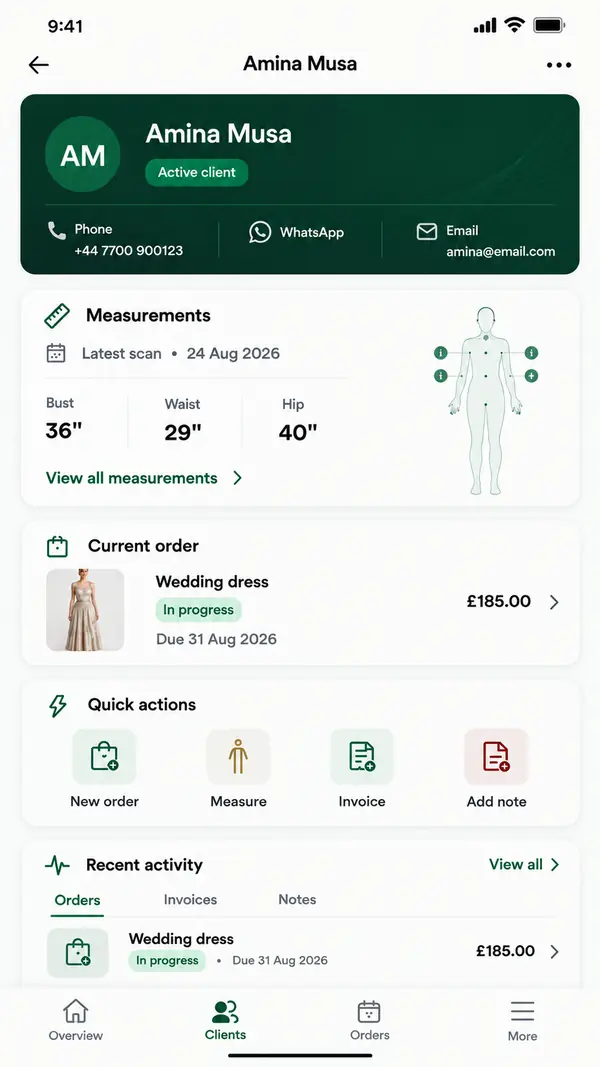
| Measurements saved to the client's profile | No, one row per submission | Yes, in the client CRM |
| Orders and delivery dates | No | Orders and a delivery calendar |
| Invoices | No | Yes, in multiple currencies including NGN, GBP and USD |
| Mobile app for the tailor | Check Google's site | ZeDaq Business for iOS and Android |
| Setup | Build your own form | Ready-made |
Forms are flexible and general. A tailoring app is narrower but already joined up around the client.
If you are also weighing other form builders, our comparison of Jotform against a tailoring app covers a form tool with more templates and paid plans.
How do you build a better Google Form if you keep using one?
If a form is the right choice for now, a few changes make the data far more reliable.
Checklist for a measurement form
- Ask for units once, at the top. Make it a required choice between centimeters and inches.
- Ask for numbers only. Write "numbers only, for example 86" in each question so "thirty four" and "86cm" don't slip in.
- Add a short "how to measure" line under each question. For example: "Waist: around the narrowest part of your torso, tape snug but not tight."
- Ask what they wore. A light T-shirt and a thick jumper give different chest numbers.
- Collect a phone number and full name in the same format every time. It makes matching rows to clients much easier.
- Use branching by garment type. Show tops, bottoms and dress sections only when they apply.
- Add a date field for when they measured. Bodies change, so you need to know how fresh the numbers are.
Keep a separate client list
Make a second tab in your spreadsheet with one row per client. When a new form response arrives, copy the latest numbers into that client's row. It is manual, but it gives you something close to a profile.
For what else to keep about each person, our guide on recording client details for tailors lists the fields worth tracking beyond measurements.
Test the form on a real person first
Before you send the form to clients, ask a friend or family member to fill it in while you watch. Then measure them yourself with a tape and compare the two sets of numbers.
Wherever their numbers differ from yours by a lot, rewrite that question's instruction. This 20-minute test catches confusing wording before it reaches a paying client, and it shows you which measurements people find hardest to take alone.
When is it time to move off Google Forms?
Use these signs as your trigger. If two or more apply, a dedicated tool will likely save you time.
- You have caught yourself cutting from an old measurement row.
- You ask returning clients to re-measure because you can't find their last set.
- You keep a separate notebook just for due dates.
- More than one person in your shop needs to see client details.
- You bill clients in more than one currency.
A worked example
Zainab runs a modest-wear studio and serves clients in Lagos and London. She has used a Google Form for two years and her sheet has hundreds of rows.
A London client re-orders an abaya. Zainab finds three rows for her, all with slightly different hip measurements and no dates. She messages the client to measure again, and the order loses four days. With measurements stored on the client's profile, she would open one record, see the latest numbers and start cutting.
What does ZeDaq.ai cost compared with a free form?
ZeDaq.ai's Free plan costs $0 and includes 3 try-ons, 3 measurements and 5 invoices a month. You can send a few measurement links and see how the results compare with your form.
Paid plans are Micro at $14 a month, Starter at $49, Growth at $129 and Scale at $299. All paid plans include a 3-day free trial with no card required. See the ZeDaq.ai pricing details for the current plans.
Move measurements from rows to client profiles
FAQs
Can clients fill in a Google Form on their phone?
Yes. Clients open the form link in their phone's browser and submit their answers. Signed-in users also get drafts saved, according to Google's product page.
How do I stop clients mixing inches and centimeters?
Ask for the unit as a required question at the top, and say "numbers only" in each measurement question. Then check new rows before you cut.
Can I import my Google Form measurements into a tailoring app?
That depends on the app, so ask before you switch. With ZeDaq.ai, a simple route is to add each active client to the client CRM and send them a fresh measurement link to open on their phone.
Are body measurements sensitive data?
Treat them as personal data. Limit who can open your sheet, avoid sharing it widely, and delete responses you no longer need.
Try ZeDaq.ai free
Virtual try-on and Find my size for your store, plus client, order and invoicing tools for tailors, in one subscription.

