Loop Returns vs AfterShip Returns
By the ZeDaq.ai team · · 7 min read
On this page
- What are Loop and AfterShip Returns?
- How do their plans compare?
- What would each cost at different volumes?
- How do they differ on exchanges?
- How do they handle labels and shipping?
- What else does each app bundle in?
- Which should you pick?
- What should you test during a trial or demo?
- What happens to returns that start with the wrong size?
- How should you measure whether your returns app is working?
In the Loop vs AfterShip Returns choice, AfterShip suits stores that want to start free or pay a small fee per return, while Loop suits higher-volume stores that want a large monthly allowance built around exchanges. Both apps cover the core returns jobs on Shopify, so the deciding factors are your return volume, how you want to pay and which extras you need.
Everything below comes from each app's Shopify App Store listing, checked November 2026. If you want to compare tools that help before an order ships, see our roundup of try-on apps for Shopify.
What are Loop and AfterShip Returns?
Both are Shopify apps that give shoppers a self-service returns center. The shopper finds their order, picks items and chooses a refund, exchange or store credit.
- Loop Returns & Exchanges is built by Loop. Its listing leads with instant exchanges, bonus credit and a "Shop Now" option. Source: Loop on the Shopify App Store.
- AfterShip Returns & Exchanges is built by AfterShip, which also makes shipment tracking software. Its listing leads with "converting refunds into exchanges or store credit" and prepaid return labels. Source: AfterShip Returns on the Shopify App Store.
How do their plans compare?
| Loop | AfterShip Returns | |
|---|---|---|
| Free option | "Free for brands with 5k+ annual orders" | Free plan with "All Premium features", "Shopper-funded returns", "Return labels handled by AfterShip" and "Revenue share" |
| Entry paid plan | Returns, "Starting at $340 / month" | Essentials, $19/month or $192/year |
| Higher paid plan | Not listed separately | Premium, $119/month or $1,188/year |
| Returns included | Up to 1k monthly returns on Returns | Essentials 20/month, Premium 100/month |
| Extra returns | Not listed | $0.50 each on Essentials, $1 each on Premium |
| Trial | Not stated | 7 days on paid plans, with "$1 for the first month" listed |
| Source | Loop listing | AfterShip listing |
Checked November 2026. Prices in USD.
The two pricing models are very different. AfterShip charges a low base fee plus a fee per return. Loop charges a higher base fee with a large allowance included.
What would each cost at different volumes?
This worked example uses only the listed plan prices. It leaves out label costs, taxes and add-ons.
| Monthly returns | AfterShip Essentials | AfterShip Premium | Loop Returns |
|---|---|---|---|
| 30 | $19 + (10 × $0.50) = $24 | $119 | From $340 |
| 80 | $19 + (60 × $0.50) = $49 | $119 | From $340 |
| 400 | $19 + (380 × $0.50) = $209 | $119 + (300 × $1) = $419 | From $340 |
At low volume, AfterShip's paid plans cost less on these numbers. At 400 returns a month, Loop's starting price sits between AfterShip's two plans. Features still matter, so use this as a first filter, then compare what each plan includes.
Note that Loop's free tier may change the picture entirely if your store qualifies. Read the condition on its listing carefully.
How do they differ on exchanges?
Both apps push exchanges over refunds, which keeps revenue in the store.
Loop lists:
- Instant exchanges, where the shopper gets the new item before the old one is returned.
- Bonus credit to make exchanges more attractive than refunds.
- "Shop Now", which lets the shopper browse the store during the return.
AfterShip Returns lists:
- Exchanges for the same item in a different variant, or for "similar or other items".
- Bonus credits for choosing an exchange.
- AI-powered exchanges on the Premium plan.
For a clothing store, the key test is the size swap. Try exchanging a medium for a large in each app's demo or trial and count the taps.
How do they handle labels and shipping?
Loop's free tier lists "US and Canada domestic return labels" and package protection. If you ship mostly within the US or Canada, that coverage may be enough.
AfterShip lists "Generate Prepaid Return Labels", mentions discounted labels and includes in-app automatic labels on Essentials. Its free plan lists "Return labels handled by AfterShip".
If you sell internationally, confirm which carriers and countries each app supports for your store before you commit. Neither listing gives a full country list.
What else does each app bundle in?
| Extra | Loop | AfterShip Returns |
|---|---|---|
| Fraud prevention | Listed, including customer blocklists | Listed on Premium |
| Order tracking | Real-time tracking and a branded tracking page | Not covered in the returns listing |
| Package protection | Listed on free tier | Not listed |
| Advanced workflows | Not described separately | Listed on Premium |
| Return analytics | Not described separately | Listed on Essentials |
Checked November 2026 on each Loop and AfterShip listing.
Which should you pick?
Here is a simple way to decide.
- Count your monthly returns. Use an average month and a peak month.
- Check Loop's free tier condition. If you qualify, test it first.
- If you don't qualify and you're under about 100 returns a month, price AfterShip Essentials and Premium using the formula in the table above.
- If you're well above that, compare AfterShip's overage costs against Loop's starting price at your peak month.
- Test the size exchange flow in both, on a phone, from an order email.
- Check label coverage for every country you ship to.
If neither one fits, our list of alternatives to Loop Returns includes ReturnGO and Redo with a cost example. The full four-app returns comparison also has a fit table by store type.
What should you test during a trial or demo?
Listings tell you what an app offers. A trial tells you how it feels for your shoppers and your team. Run the same script in both apps so the comparison is fair.
Shopper-side tests
- Start a return from an order confirmation email on a phone.
- Exchange one item for a different size of the same product.
- Exchange one item for a different product that costs more, and check how the extra payment works.
- Choose store credit and see whether a bonus is offered.
- Try to return an item you marked final sale, and check the message the shopper sees.
Team-side tests
- Find the return in the admin and approve it.
- Change a rule, such as the return window, and see how quickly it applies.
- Issue a refund and check that it matches in your Shopify orders.
- Export a report of return reasons for the month.
- Check who on your team can see which settings.
Write down the number of steps and any confusing screens for each test. Small differences in the shopper flow add up over hundreds of returns.
Questions for the vendor
- Which carriers and countries are supported for our labels?
- What happens to open returns if we change plans or uninstall?
- How are overage returns counted when a return has several items?
What happens to returns that start with the wrong size?
Both apps make a size exchange easier. Neither one helps the shopper choose the right size before ordering, and that's where many clothing returns start.
Product-page tools close that gap:
- Size recommendation suggests a size from your own chart.
- Virtual try-on shows the garment on the shopper's photo.
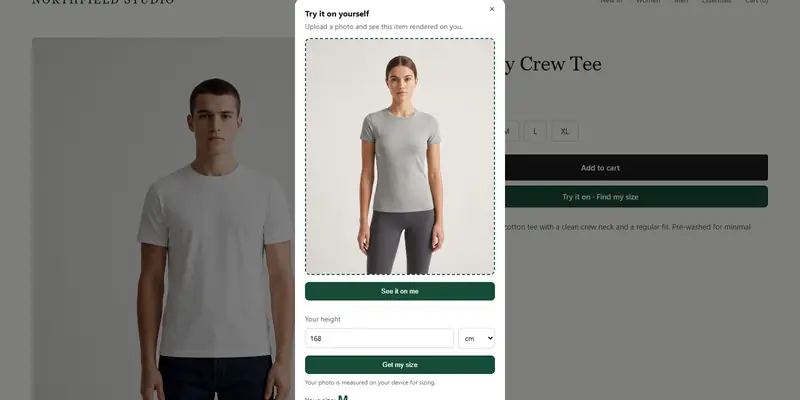
ZeDaq.ai provides both in one Shopify app, and it runs next to Loop or AfterShip. The shopper uploads one photo and sees your real garment on their body. "Find my size" uses one photo plus height for a 30-second scan, then matches the measurements to the size chart you enter in the app.
Setup takes a few steps in the Theme Editor. The guide to adding try-on to a Shopify store walks through each one.
ZeDaq.ai's Free plan includes 3 try-ons and 3 measurements a month. Paid plans are Micro at $14/mo, Starter at $49/mo, Growth at $129/mo and Scale at $299/mo, each with a 3-day free trial and no card required.
How should you measure whether your returns app is working?
Pick a few numbers and check them monthly, whichever app you choose:
- Exchange share. Out of all returns, how many become exchanges or store credit instead of refunds?
- Return reasons by product. Which styles come back most, and for which reason?
- Time to resolve. How long from request to refund or new item shipped?
- Support tickets about returns. Are fewer shoppers emailing to ask where their refund is?
Both apps include reporting, so start with what each shows by default. If a single style dominates "too small" returns, fix that product's size chart or fit note first. It's the fastest win you'll find.
Help shoppers choose the right size the first time
FAQs
Does AfterShip Returns have a free plan?
Yes. Its Shopify App Store listing, checked November 2026, shows a free plan that lists shopper-funded returns and revenue share. Read those terms so you know who covers each cost.
Is Loop free for any stores?
Loop's listing shows a free tier described as "Free for brands with 5k+ annual orders". Check the listing for the current condition.
Can I move my return history from one to the other?
Ask the vendor you're moving to. At minimum, export your history and reasons from the old app before you uninstall it.
Do these apps replace a size chart?
No. They process returns after delivery. Your size chart and any sizing tool work on the product page, before the order.
Try ZeDaq.ai free
Virtual try-on and Find my size for your store, plus client, order and invoicing tools for tailors, in one subscription.