Shopify Returns Apps Compared: Loop, AfterShip, ReturnGO and Redo
By the ZeDaq.ai team · · 8 min read
On this page
- What does a Shopify returns app actually do?
- How do Loop, AfterShip, ReturnGO and Redo compare on pricing?
- Which features does each app highlight?
- Which returns app fits which kind of store?
- How do you choose without guessing?
- What can you do before a return is ever started?
- Should you track return reasons by size?
- What should a fashion store look for in a returns portal?
When Shopify returns apps are compared on price and plan limits, AfterShip Returns and Redo both list free plans, ReturnGO starts at a fixed monthly fee with a set number of returns, and Loop lists a free tier alongside a paid Returns plan from $340 a month. All four handle exchanges, store credit and return labels, so the real differences are how they charge and how much of the process they automate.
Every price and feature below comes from each app's Shopify App Store listing, checked November 2026. Plans change often, so confirm on the listing before you install. Returns apps work after the sale, so this guide also points to tools that help shoppers pick the right item first, such as the apps in our roundup of AI try-on apps for Shopify.
What does a Shopify returns app actually do?
A returns app replaces the "email us to start a return" process. It gives shoppers a self-service portal where they look up an order, pick the items, choose a reason and choose how they want to be made whole.
Most apps then handle four jobs:
- Return options. Refund, exchange for another size or item, or store credit.
- Labels. Generating a prepaid shipping label or QR code.
- Rules. Automatically approving, rejecting or routing returns based on reason, item or customer.
- Reporting. Showing which products come back most and why.
The four apps below all cover these basics. Where they differ is pricing model, how far automation goes and what else is bundled in.
How do Loop, AfterShip, ReturnGO and Redo compare on pricing?
| App | Plans listed | Return allowance | Free trial | Source |
|---|---|---|---|---|
| Loop Returns & Exchanges | Free tier described as "Free for brands with 5k+ annual orders"; Returns plan "Starting at $340 / month" | Returns plan includes up to 1k monthly returns | Not stated | Shopify App Store listing |
| AfterShip Returns & Exchanges | Free; Essentials $19/month; Premium $119/month | Essentials: 20 returns/month, $0.50 per extra. Premium: 100 returns/month, $1 per extra | 7 days on paid plans | Shopify App Store listing |
| ReturnGO Returns & Exchanges | Premium $147/month; Pro $297/month | Premium: 110 returns/month, $1.25 per extra. Pro: 300 returns/month, $0.90 per extra | 14 days | Shopify App Store listing |
| Redo | Returns plan listed as Free; other modules priced separately | No limit listed for Returns | Not stated | Shopify App Store listing |
Checked November 2026. All prices are in USD as shown on the listings.
How to read the per-return fees
Per-return pricing means your bill grows with your returns, not your sales. If you sell fitted clothing, run a quick estimate before choosing. Take last quarter's monthly return count and apply each plan's allowance and overage fee to it.
Which features does each app highlight?
Each listing leads with slightly different strengths. Here is what each one emphasizes, in its own words where possible.
Loop
Loop's listing describes instant exchanges, bonus credit to encourage exchanges, and a "Shop Now" option on its Returns plan. The free tier lists returns software, US and Canada domestic return labels, Return Bars and package protection. It also lists fraud prevention, including customer blocklists, and a branded tracking page. Source: Loop on the Shopify App Store.
AfterShip Returns
AfterShip's listing focuses on "converting refunds into exchanges or store credit", bonus credits for exchanges and prepaid return labels. Its free plan lists "Shopper-funded returns", "Return labels handled by AfterShip" and "Revenue share". Premium adds advanced workflows, AI-powered exchanges and fraud prevention. Source: AfterShip Returns listing.
ReturnGO
ReturnGO lists variant and product exchanges, Shop Now exchanges, store credit and gift cards, and automation rules for auto-exchange, auto-refund and auto-approval. Its Pro plan adds item validation, ERP integrations, unlimited languages, advanced analytics and API access. Source: ReturnGO listing.
Redo
Redo's free Returns plan lists a returns and claims portal, an AI exchange agent, variant-level returns analytics and a monthly AI returns analysis report. The listing describes "return coverage and an exchange first experience". Redo also sells checkout, email and SMS, and fulfillment modules on separate pricing. Source: Redo listing.
Which returns app fits which kind of store?
Use your store's size and return pattern to narrow the list. This is a starting point, not a verdict.
| If your store… | Look first at | Why |
|---|---|---|
| Is small and wants to start free | AfterShip Returns or Redo | Both list a free plan |
| Has predictable monthly volume and wants a fixed fee | ReturnGO | Plans bundle a set number of returns |
| Wants exchanges to come first | Loop, Redo | Both lead their listings with exchange features |
| Needs ERP links or API access | ReturnGO Pro | Listed on the Pro plan |
| Wants returns plus email, SMS or fulfillment from one vendor | Redo | Lists those as separate modules |
For a closer two-way look, read Loop versus AfterShip Returns or ReturnGO versus Redo.
How do you choose without guessing?
Follow these steps to make the choice with your own numbers.
- Pull last quarter's returns. Note the monthly count and the top three return reasons.
- Price each plan. For per-return plans, add the overage fee for every return above the allowance.
- List your must-have options. For example, size exchanges, store credit with a bonus, or labels for a specific country.
- Check labels for your market. Loop's free tier, for example, lists US and Canada domestic labels. Confirm coverage if you ship elsewhere.
- Install on a development store or trial. Run three test returns: a size exchange, a store credit return and a refund.
- Read the data terms. Some free plans use shopper-funded returns or revenue share. Make sure you understand who pays what.
Write the results in one table. The cheapest plan on paper isn't always the cheapest once overage and label costs are added.
What can you do before a return is ever started?
Returns apps make returns smoother. They don't change why an item comes back. For clothing, the most common reason is size or fit, and that problem starts on the product page.
Two tools work at that earlier point:
- Size recommendation. The shopper gets a size from your own size chart before adding to cart.
- Virtual try-on. The shopper sees the garment on a photo of themselves before buying.
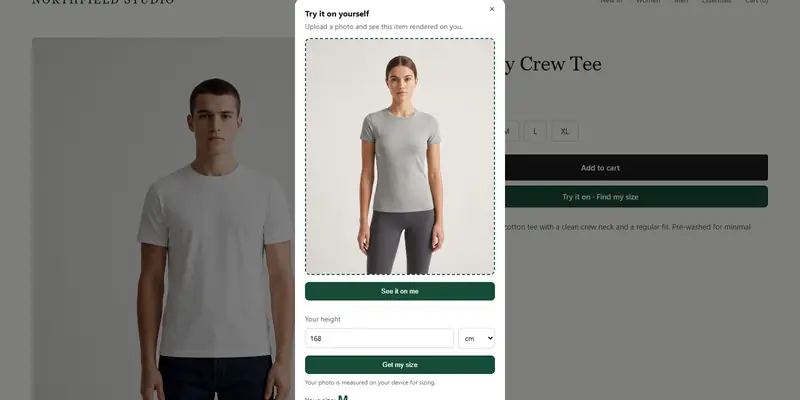
ZeDaq.ai does both inside one Shopify app. The shopper uploads one photo and sees your real garment on their body, then taps "Find my size" for a recommendation matched to your chart. It works alongside any of the returns apps above. For how a virtual fitting room for clothing sites works on non-Shopify stores too, see that guide.
ZeDaq.ai's Free plan includes 3 try-ons and 3 measurements a month. Paid plans start with Micro at $14/mo, then Starter at $49/mo, Growth at $129/mo and Scale at $299/mo. Every paid plan has a 3-day free trial with no card required.
Should you track return reasons by size?
Yes. Whichever returns app you pick, set up return reasons that separate "too small" from "too big". A single "didn't fit" reason hides which way your size chart is off.
Review those reasons each month by product. If one style keeps coming back as "too small", update the size chart or add a fit note on that product page. Those small fixes help both your returns app data and any sizing tool you add.
What should a fashion store look for in a returns portal?
Clothing returns have their own quirks. A portal built for electronics or home goods may not handle them well. Before you pick an app, test it against these fashion-specific needs.
Size exchanges in one step
The most common clothing exchange is the same item in a different size. The shopper should be able to pick the new size in the portal without starting a separate order. Check that the app reserves stock for the new size, or at least warns when it is sold out.
Exchanges across colors and styles
Some shoppers want a different color or a similar style instead. Several of the listings above mention exchanges for other items or a "Shop Now" flow. Test how the price difference is handled when the new item costs more or less.
Clear rules for final-sale items
Swimwear, underwear, altered pieces and sale items are often non-returnable. Make sure the app can block these by tag or collection, so shoppers see the rule before they start.
Photos for damage claims
When a shopper reports a fault, a photo saves a back-and-forth email. Check whether the portal lets the shopper attach one.
Reasons that describe fit
You want reasons such as "too small", "too big", "too long" and "fabric felt different". Generic reasons make it hard to fix the size chart later.
Mobile-first design
Most shoppers start a return from the order email on their phone. Walk through the whole flow on a phone before you choose.
Help shoppers pick the right size before they buy
FAQs
Do these returns apps work with each other?
You would normally run one returns app at a time, because each one owns the return portal. You can run a returns app alongside a sizing or try-on app without conflict.
Which returns app is free?
On their listings checked November 2026, AfterShip Returns and Redo each list a free plan, and Loop lists a free tier with conditions. ReturnGO lists paid plans with a 14-day trial.
Does ZeDaq.ai process returns?
No. ZeDaq.ai doesn't handle return requests or labels. It works before the sale with try-on and size recommendation.
How often do these prices change?
Often enough that you should recheck before installing. Use the listing links in the pricing table above for the current plans.
Try ZeDaq.ai free
Virtual try-on and Find my size for your store, plus client, order and invoicing tools for tailors, in one subscription.