
Is Calendly Enough for Booking Fitting Appointments?
By the ZeDaq.ai team · · 7 min read
On this page
- What does a tailor need from a fitting booking tool?
- What does Calendly include on each plan?
- Is Calendly's free plan enough for a small alteration shop?
- Where does Calendly stop for tailors?
- What should you pair Calendly with?
- Are there booking apps built more for shops?
- How do you decide in five minutes?
- What does ZeDaq.ai cost alongside Calendly?
Calendly is enough for booking fitting appointments if all you need is a link where clients pick a time. It is not enough on its own if you also need to see each client's measurements, the garment's stage and the delivery date when they walk in, because Calendly is a scheduling tool, not a tailoring record.
Below we look at what Calendly does for a fitting schedule, which plan features matter to tailors, and what to pair it with. If you want the client and order side covered, see how ZeDaq.ai works for tailors.
ZeDaq.ai publishes this blog. Calendly facts come from Calendly's own pricing page, checked November 2026.
What does a tailor need from a fitting booking tool?
Before judging any app, list what a fitting booking actually involves. For most tailors and alteration shops, it is more than a time slot.
- A link clients can open from WhatsApp, Instagram or email. Most bookings start in a chat.
- Different appointment types. A first measurement, a first fitting, a final fitting and a collection all take different amounts of time.
- Reminders. A missed fitting wastes a slot you could have sold, and it can push the garment's delivery date.
- Deposits or prepayment. Some shops take a booking fee to reduce no-shows.
- Context at the appointment. When the client arrives, you want their measurements, the garment and the due date in front of you.
Calendly is built for the first four. The fifth is where a scheduling tool runs out.
What does Calendly include on each plan?
When we checked the Calendly pricing page in November 2026, it listed four plans:
| Plan | Price shown | What matters for tailors |
|---|---|---|
| Free | "Always free" | One event type, one calendar connection, one-on-one scheduling, customizable booking page |
| Standard | $10 per seat/month | Adds automated meeting reminders and Stripe and PayPal payments |
| Teams | $16 per seat/month | Adds forms that screen and route invitees based on their answers |
| Enterprise | Starts at $15k per year | Large organizations |
The page has a toggle for yearly and monthly billing, so check which one the price you see applies to. Calendly changes plans from time to time, so confirm on the day you sign up.
Is Calendly's free plan enough for a small alteration shop?
For a very small shop, the free plan can work. You get a booking page, a calendar connection and one-on-one bookings, which is the core of a fitting appointment.
The main limit is the single event type. A tailor usually needs at least three: measurement, fitting and collection. On the free plan you would have to offer one generic slot length and adjust by hand.
The comparison table on the pricing page also shows no automated reminders on the free plan. If your clients often forget fittings, that gap matters more than any other.
When the free plan is fine
- You only offer one kind of appointment, such as 30-minute alteration drop-offs.
- Your clients rarely miss appointments.
- You already send reminders yourself in WhatsApp.
When you will want Standard or higher
- You need separate slots for measurements, fittings and collections.
- You want automatic reminders.
- You want to take a payment through Stripe or PayPal at booking.
Where does Calendly stop for tailors?
Calendly does scheduling well. The gaps appear before and after the booking.
It doesn't know the garment
A Calendly booking says "Funmi, Thursday 3 pm." It doesn't say "Funmi, second fitting, agbada, hem still to shorten, due in nine days." You still need to look up that information somewhere else.
It doesn't hold measurements
At a fitting you compare the garment with the client's measurements. Calendly has no measurement record. Intake forms that screen invitees are listed only on the Teams plan, and even then a form answer is not the same as a measurement history you can update.
It doesn't track delivery dates
The most important date in a tailoring job is the delivery date, not the fitting date. Calendly shows your appointments, but not when each garment is promised.
It doesn't put a price on your time
A no-show costs you the slot and often a rush later. If you haven't worked out what a fitting hour is worth, our guide on pricing tailoring work for profit helps you set a booking fee that makes sense.
What should you pair Calendly with?
The practical answer for many shops is Calendly for the booking plus a tailoring tool for everything about the client and the garment. Here is how the work splits.
| Task | Calendly | A tailoring tool such as ZeDaq.ai |
|---|---|---|
| Client picks a time | Yes | Not listed |
| Booking reminders | Standard plan and up | Not listed |
| Payment at booking | Stripe or PayPal on Standard | Not listed |
| Client record and notes | Name and email from the booking | Client CRM |
| Body measurements | No | Yes, by a link the client opens on their phone |
| Garment orders and due dates | No | Orders and a delivery calendar |
| Invoices | No | Yes, in multiple currencies including NGN, GBP and USD |
| Mobile app for the tailor | Check Calendly's site | ZeDaq Business for iOS and Android |
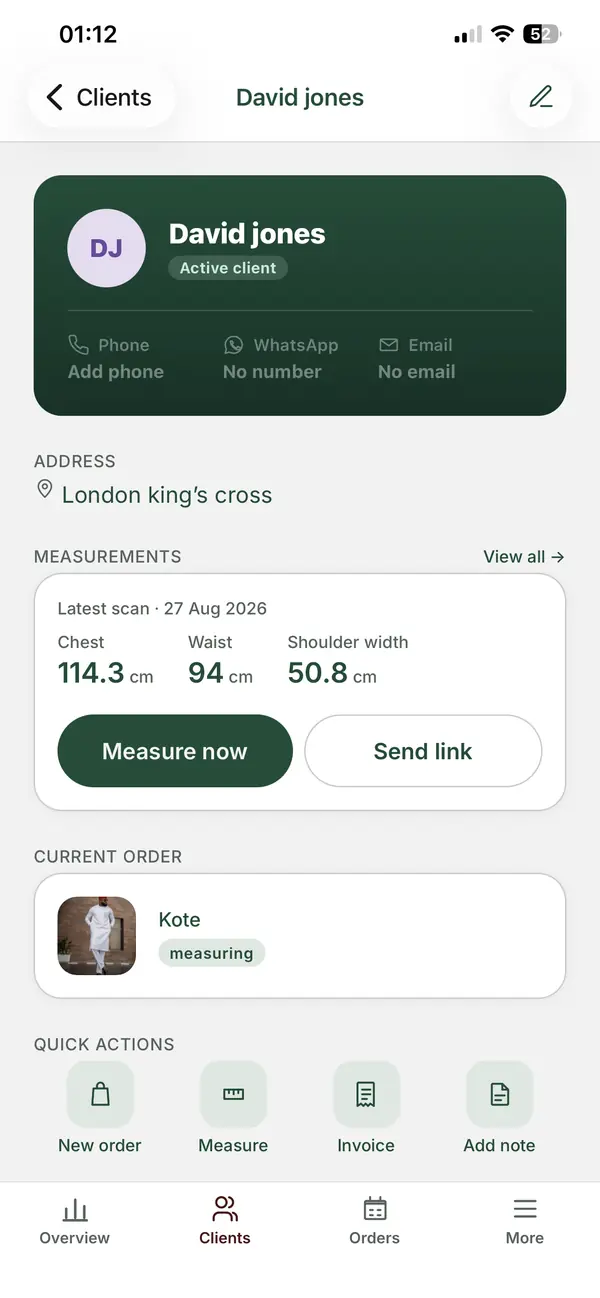
To be clear, ZeDaq.ai doesn't book appointments. It holds the client, the measurements, the order and its delivery date, so the appointment Calendly booked has all its context.
A simple routine that links the two
- Client books a "First measurement" slot in Calendly.
- Before the appointment, you send them a ZeDaq.ai measurement link to open on their phone.
- At the appointment, you check the measurements and create the order with its delivery date.
- Client books "First fitting" and "Final fitting" in Calendly, timed against the delivery date.
- At collection, you send the invoice.
This keeps each tool doing what it does best, and you only type the client's name twice.
Are there booking apps built more for shops?
Calendly started as a meeting scheduler, so some of its language is about calls and meetings. Other booking apps are designed around salons and service counters, with features like deposits, no-show fees and walk-ins.
If you want to compare those, our roundup of the best booking apps for tailors looks at several options side by side, with their current plan features.
Some stores selling online also ask whether a virtual fitting can replace a physical one. For ready-to-wear, shoppers can preview garments on themselves before buying. Our guide to virtual fitting room software explains how that works, though bespoke garments still need an in-person fitting.
How do you decide in five minutes?
Answer these questions honestly:
- Do you offer more than one type of appointment? If yes, plan on a paid Calendly plan or a shop-focused booking app.
- Do more than a few clients a month miss fittings? If yes, you need automated reminders.
- Do you scramble to find measurements or the due date when a client arrives? If yes, add a tailoring tool alongside the booking tool.
- Do you take deposits at booking? If yes, check payment support on the plan you choose.
If you answered no to all four, Calendly's free plan may be all you need right now.
A worked example
Tunde runs a menswear alteration shop with one assistant. He offers drop-offs, suit fittings and collections. Clients book through his Instagram bio link.
On Calendly's free plan, he can only offer one event type, so all three appointments look the same. On Standard, he can split them and turn on reminders. But on fitting days, Tunde still flips through a notebook for each client's jacket and trouser measurements. Adding a client and order record solves that part, while Calendly keeps handling the bookings.
What does ZeDaq.ai cost alongside Calendly?
ZeDaq.ai's Free plan costs $0 and includes 3 try-ons, 3 measurements and 5 invoices a month. That is enough to test the measurement link with a few clients who book through Calendly.
Paid plans are Micro at $14 a month, Starter at $49, Growth at $129 and Scale at $299. Every paid plan comes with a 3-day free trial and no card required. See the current ZeDaq.ai plans for details.
Give every fitting its measurements and due date
FAQs
Can clients pay a fitting deposit through Calendly?
Calendly's pricing page lists Stripe and PayPal payments on the Standard plan, checked November 2026. The free plan doesn't list payments.
Does Calendly send fitting reminders on the free plan?
The comparison table on Calendly's pricing page showed automated reminders on Standard and Teams, not on the free plan, when we checked in November 2026.
Can ZeDaq.ai replace Calendly?
No. ZeDaq.ai doesn't offer appointment booking. It covers clients, measurements, orders, a delivery calendar and invoices, so many tailors use it next to a booking tool.
Can I collect measurements before the first appointment?
Yes, with a tool that sends a measurement link. In ZeDaq.ai, the client opens the link on their own phone, so you arrive at the appointment with numbers to check.
Try ZeDaq.ai free
Virtual try-on and Find my size for your store, plus client, order and invoicing tools for tailors, in one subscription.

