
Best Appointment Booking Apps for Tailors
By the ZeDaq.ai team · · 7 min read
On this page
- What should a tailor look for in a booking app?
- Which booking apps should tailors compare?
- How do the four compare for fittings?
- Which booking app suits which tailoring business?
- What does a booking app still leave out?
- How do you set up a booking app for fittings?
- What does ZeDaq.ai cost alongside a booking app?
The best appointment booking app for tailors is one that handles several appointment types, sends reminders and can take a deposit, because those three features matter most when clients book fittings. Calendly, Setmore, Acuity Scheduling and Square Appointments all cover booking, but they differ in which of those features you get on the free or entry plan.
Below we compare the four using each company's own website, then show how a booking app fits with the client and order side of a tailoring business. For that side, see ZeDaq.ai's tools for tailors.
ZeDaq.ai publishes this blog. ZeDaq.ai doesn't offer appointment booking, so it isn't ranked here. Competitor facts come from their own websites, checked November 2026.
What should a tailor look for in a booking app?
A fitting booking is different from a sales call. Before you compare apps, decide which of these you need.
- Multiple appointment types. Measurement, first fitting, final fitting and collection take different lengths of time.
- Reminders. Email at least, and ideally SMS, since many clients ignore email.
- Deposits or prepayment. A small booking fee makes no-shows less likely.
- No-show or cancellation policies. Clear rules you can enforce.
- Intake questions. Garment type, event date and any style notes.
- More than one staff calendar. If you have an assistant or a second tailor.
- A booking page clients can open from WhatsApp or Instagram.
Keep your top three in mind as you read the comparisons.
Which booking apps should tailors compare?
1. Calendly: simple booking links
When we checked the Calendly pricing page in November 2026, the Free plan included one event type, one calendar connection, one-on-one scheduling and a customizable booking page.
Standard was listed at $10 per seat a month and added automated meeting reminders and payments through Stripe and PayPal. Teams, at $16 per seat a month, added forms that screen and route invitees based on their answers.
Strengths for tailors: clean booking links that are easy to share in a chat.
Watch out for: a single event type on the free plan, and no automated reminders until Standard. Our deeper look at whether Calendly is enough for fittings covers this in detail.
2. Setmore: a free plan for small teams
When we checked the Setmore pricing page in November 2026, the Free plan covered up to 4 users. It included a custom booking page, email confirmations and email reminders, plus online and in-person payments through Square, Stripe, PayPal and LawPay.
The Free plan did not include SMS reminders, deposits, recurring appointments or two-way calendar sync, and it kept Setmore branding on the booking page. The Pro plan added SMS reminders, a second reminder, deposits and branding removal. The Pro price appeared in more than one form on the page, so check it directly.
Strengths for tailors: free for a small team, with payments included.
Watch out for: deposits and SMS reminders are Pro-only.
3. Acuity Scheduling: intake forms and packages
When we checked the Acuity Scheduling homepage in November 2026, it listed custom intake forms, secure payments, deposits to reduce no-shows, appointment reminders and cancellation policies. It also listed packages, subscriptions, gift certificates, add-ons and coupons.
The homepage said "No credit card needed" to start, but didn't show plan prices or a trial length. Check its pricing page before you choose.
Strengths for tailors: intake forms that can ask about garment type and event date, plus deposits.
Watch out for: you'll need to check which plan includes which feature.
4. Square Appointments: built for service counters
When we checked the Square Appointments pricing page in November 2026, it described a first tier "for solo professionals taking payments and managing schedules," with an online booking site, appointment reminders and unlimited staff calendars.
The Plus tier added cancellation policies, no-show fees, multi-staff booking and a waitlist. Premium added resource management and reports. The page described appointment deposits but didn't say which plan includes them, and it didn't show plan prices.
Strengths for tailors: a good fit for alteration shops already taking payments with Square.
Watch out for: no-show fees sit on Plus, and prices weren't shown on the page we saw. If you use Square for billing too, our guide to Square Invoices for tailors covers that side.
How do the four compare for fittings?
| Feature | Calendly | Setmore | Acuity Scheduling | Square Appointments |
|---|---|---|---|---|
| Free option | Free plan | Free plan, up to 4 users | "No credit card needed" to start | First tier for solo professionals |
| Multiple appointment types | Paid plans | Check Setmore's site | Check Acuity's site | Check Square's site |
| Reminders | Standard and up | Email on Free, SMS on Pro | Yes | Yes, on first tier |
| Deposits | Payments on Standard | Pro only | Yes | Described, plan not stated |
| No-show fees or policies | Not listed | Not listed | Cancellation policies | No-show fees on Plus |
| Intake questions | Forms on Teams | Check Setmore's site | Custom intake forms | Check Square's site |
| Payments | Stripe, PayPal on Standard | Square, Stripe, PayPal, LawPay | Yes | Yes |
All details are from each company's own pages, checked November 2026. Where a cell says "check," the page we saw didn't state it clearly.
Which booking app suits which tailoring business?
- Solo tailor on a tight budget: Setmore's free plan or Calendly's free plan. Setmore includes email reminders free.
- Shop that loses money to no-shows: an app with deposits or no-show fees, such as Acuity, Setmore Pro or Square Appointments Plus.
- Alteration shop already on Square: Square Appointments, to keep payments and bookings together.
- Bridal or occasion wear studio: Acuity, for intake forms that capture the event date and garment type.
- Small team with an assistant: Setmore Free covers up to 4 users, and Square's first tier lists unlimited staff calendars.
What does a booking app still leave out?
Every app above books time. None of them, from what their pages describe, hold a client's body measurements, the garment's stage or the promised delivery date.
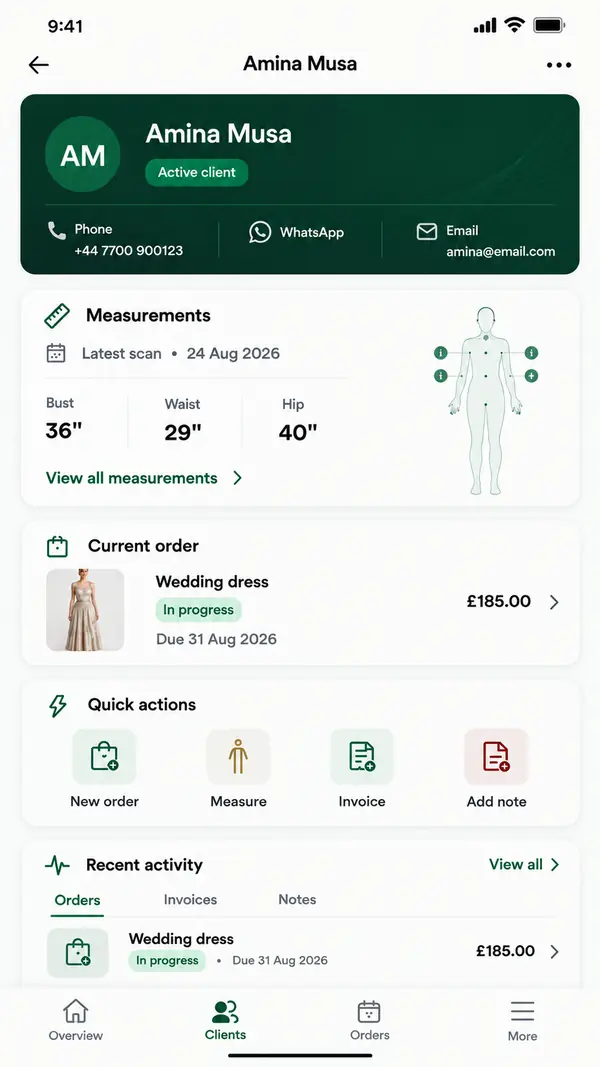
That is the gap a tailoring tool fills. ZeDaq.ai's tailor tools include a client CRM, measurements through a link the client opens on their phone, orders with a delivery calendar, invoicing in multiple currencies including NGN, GBP and USD, and the ZeDaq Business app for iOS and Android.
A routine that joins the two
- Client books a measurement appointment in your booking app.
- You send a measurement link before the visit, so you arrive with numbers to check.
- At the visit, you create the order with its delivery date.
- Client books fittings in the booking app, timed against the delivery date.
- At collection, you send the invoice. Our guide to invoicing clients by email and WhatsApp covers how to present it.
A worked example
Ngozi runs a two-person tailoring studio. She loses roughly one fitting a week to no-shows, and clients often arrive without her knowing which garment they are there for.
She moves bookings to an app with SMS reminders and deposits. Clients now get a nudge before each visit and have a small amount at stake if they skip it. For the second problem, she keeps each client's measurements and order in a tailoring tool, and puts the order name in the booking note. When a client arrives, she opens one record and sees the garment, measurements and due date.
How do you set up a booking app for fittings?
- Create separate appointment types for measurement, fitting and collection.
- Set realistic lengths, with buffer time if your app supports it.
- Turn on reminders the day before and, if possible, a few hours before.
- Add one intake question: "Which garment is this appointment for?"
- Write a short cancellation policy and show it on the booking page.
- Share the booking link in your WhatsApp business profile and Instagram bio.
What does ZeDaq.ai cost alongside a booking app?
ZeDaq.ai's Free plan costs $0 and includes 3 try-ons, 3 measurements and 5 invoices a month. Paid plans are Micro at $14 a month, Starter at $49, Growth at $129 and Scale at $299.
Every paid plan has a 3-day free trial with no card required. The ZeDaq.ai pricing page has current details.
Give every booked fitting its client record
FAQs
Which booking app is free for tailors?
Calendly and Setmore both listed free plans when we checked in November 2026, and Square Appointments described a first tier for solo professionals. Free plans usually limit reminders or deposits.
Can a booking app take fitting deposits?
Several can. Acuity listed deposits on its homepage, Setmore listed deposits on Pro, and Square Appointments described appointment deposits. Check which plan includes them.
Does ZeDaq.ai have appointment booking?
No. ZeDaq.ai covers clients, measurements, orders, a delivery calendar and invoices. Most tailors pair it with one of the booking apps above.
Do clients need to download an app to book?
The booking apps above describe booking pages or booking sites that clients open from a link. Check each provider's site for how clients book on mobile.
Try ZeDaq.ai free
Virtual try-on and Find my size for your store, plus client, order and invoicing tools for tailors, in one subscription.

