How Does AI Virtual Try-On Actually Work?
By the ZeDaq.ai team · · 5 min read
On this page
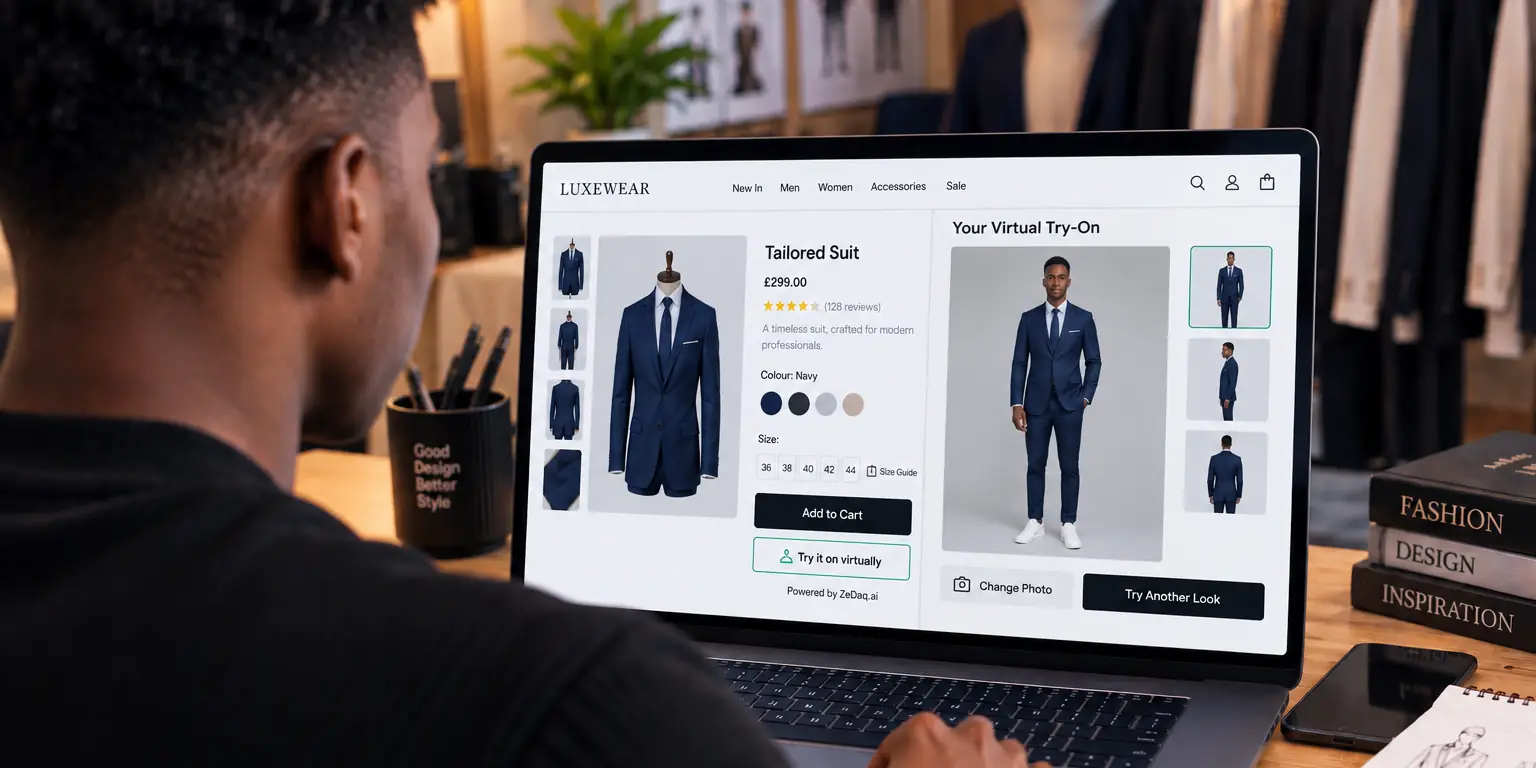
AI virtual try-on actually works by taking a photo of the shopper and an image of a garment, then producing a new picture that shows that garment on the shopper's body. The shopper does not need a 3D model or special gear, only a photo. This guide explains the steps in plain language, without hype, so you know what to expect before adding it to a store.
If you want the wider picture first, our guide to a virtual fitting room for clothing websites covers what a store gets and what it needs to set up.
What goes in and what comes out?
Two inputs go in, and one picture comes out.
- Input one: a photo of the shopper, ideally full length in a simple pose.
- Input two: the store's own image of the garment.
- Output: a picture of the shopper wearing that garment.
With ZeDaq.ai, the shopper uploads one photo and sees the store's real garment on their body. The garment comes from your catalog, so the shopper tries what you actually sell.
Try it yourself and see the result
Try it on yourself
Live renderUpload a photo, pick a piece, see it rendered on you.
Pick something to try on
What happens step by step?
Systems differ in the details, but most follow the same broad stages.
- The photo is checked. The system looks for a body in the image, and may reject photos where the person is cropped or hidden.
- The body is understood. Software finds the head, shoulders, arms and legs, so it knows where the garment should go.
- The garment is isolated. The product image is separated from its background.
- The garment is fitted to the pose. An image model redraws the person's body wearing the garment, adjusting for folds, angle and drape.
- The result is shown. The shopper sees the new picture on the product page.
Each stage can fail. A cluttered photo or an unusual pose may reduce quality, which is why a clear photo gives the best result.
What does "garment transfer" mean?
Garment transfer is the common name for step four. The model keeps the person's face, pose and background, and replaces their clothes with the product.
It is a generated image, not a physical simulation. The picture shows a plausible look, but it does not measure how tight a seam would be. For fit, you need measurements.
Is a try-on image the same as a size recommendation?
No, and the difference matters. A try-on image shows how a garment looks. A size recommendation tells the shopper which size to order.
ZeDaq.ai offers both. For sizing, the shopper gives one photo plus a height in a roughly 30-second scan, and the measurements are matched to the store's own size chart. A generic UK, US, EU and AU chart is used as a fallback if no chart is set up. For more on that, see AI size recommendation for fashion stores.
How is AI try-on different from 2D and 3D tools?
Older tools often overlay a flat garment image on a photo (2D) or build a 3D avatar of the shopper (3D). AI try-on generates a new image instead. Each approach has trade-offs in realism, effort and cost.
Our guide to 2D, 3D and AI virtual try-on compares them side by side.
What does AI try-on do well and badly?
Be honest with your team about the limits.
Usually works well for:
- Showing color and overall style on the shopper's body.
- Plain garments with clear shapes, such as tees, dresses and jackets.
- Giving shoppers confidence to explore a product.
Is harder for:
- Fine textures, such as chunky knit, where a generated image may simplify the detail. See virtual try-on for knitwear.
- Photos that are cropped, blurry or heavily filtered.
- Judging exact fit, which needs measurements.
Treat the image as a visual aid, and keep your size chart on the page.
What can a store do to get better results?
You control more of the result than you might think, because the product image is one of the two inputs.
- Use clean product images. A garment on a plain background, shown flat or on a model, is easier to separate than a busy lifestyle shot.
- Show the whole garment. If a sleeve or hem is cut off in the image, the system has less to work from.
- Keep photos consistent. Use the same style of image across a collection so results look alike.
- Guide the shopper. Tell them on the page to use a full-length photo in good light, standing straight.
- Test your own products. Run a few garments yourself, across colors and cuts, before you switch it on for everyone.
None of this requires technical skill, only care with your photography.
How does a store add it?
The method depends on your platform. ZeDaq.ai is available as a Shopify app, a REST API (POST /api/v1/tryon with an x-api-key header) and a script-tag widget for WooCommerce, Wix, Squarespace, BigCommerce and custom sites. The widget adds "Try it on" and "Find my size" to the product template.
Squarespace stores have a few extra questions, which we cover in virtual try-on on Squarespace. The API reference is at /en/docs/api.
See AI try-on on a real garment
FAQs
Does the shopper need to create an account?
Not for ZeDaq.ai on your product page. The shopper uploads a photo on your store, with no app to download.
Does AI try-on need a 3D model of the garment?
No. It starts from the store's garment image, so you do not need to build a 3D asset for every product.
Is the try-on picture a true likeness of fit?
It shows how the garment may look, not how tight or loose it will be. Use a size chart or size recommendation for fit.
What photo gives the best result?
A clear, full-length photo in good light, with the body fully in view. Cropped or blurry photos tend to give weaker results.
Try ZeDaq.ai free
Virtual try-on and Find my size for your store, plus client, order and invoicing tools for tailors, in one subscription.

