
Google Sheets for Tailors: When a Spreadsheet Stops Working
By the ZeDaq.ai team · · 8 min read
On this page
- Why do so many tailors start with Google Sheets?
- How should a tailor set up a Google Sheet?
- Which spreadsheet habits keep it working longer?
- How big can a Google Sheet get?
- What are the signs your spreadsheet has stopped working?
- What does a tailoring app do that a sheet can't?
- How do you tell if you've outgrown Sheets? A quick check
- How do you move from a spreadsheet to a tailoring tool?
- How much does ZeDaq.ai cost compared to a free sheet?
Google Sheets for tailors works well while you have a handful of clients and one person updating the file, and it stops working when measurements, orders, deadlines and payments spread across tabs that nobody fully trusts. The spreadsheet itself rarely breaks; what breaks is the routine of keeping it accurate while you cut, sew and talk to clients.
This guide shows you how to set up a sheet that lasts as long as possible, the signs it's time to move on, and what a dedicated tool like ZeDaq.ai's tailor tools does differently. It is written for tailors and fashion designers running made-to-measure work.
Why do so many tailors start with Google Sheets?
Because it's free, familiar and flexible. You can open it on a phone, share it with an apprentice and change the columns whenever you like.
For a new tailoring business, a sheet is a real step up from a paper measurement book:
- It's searchable. Find a client by name in seconds.
- It's backed up. A lost phone doesn't mean lost measurements.
- It's shared. Two people can look at the same order list.
- It's free to start. No subscription to justify.
There's nothing wrong with starting here. The question is how to set it up well and when to move on.
How should a tailor set up a Google Sheet?
Use one file with separate tabs, and give every client and order a short ID so the tabs connect.
Tab 1: Clients
| Client ID | Name | Phone | Preferred contact | Notes | |
|---|---|---|---|---|---|
| C001 | Example client | Prefers loose sleeves |
Tab 2: Measurements
| Client ID | Date taken | Chest | Waist | Hips | Shoulder | Sleeve | Length | Inseam | Unit |
|---|---|---|---|---|---|---|---|---|---|
| C001 | cm |
Add a new row each time you re-measure, rather than overwriting. Bodies change, and you'll want the history.
Tab 3: Orders
| Order ID | Client ID | Garment | Fabric | Date received | Fitting date | Due date | Status | Price | Deposit paid | Balance |
|---|---|---|---|---|---|---|---|---|---|---|
| O001 | C001 | Agbada set | Client's own | Cutting |
Tab 4: Payments
| Date | Order ID | Amount | Method | Received by |
|---|
Setup tips
- Use data validation (a drop-down list) for Status, such as "Measured", "Cutting", "Sewing", "Fitting", "Ready", "Delivered".
- Freeze the header row so column names stay visible on a phone.
- Use one unit for all measurements, and say which in a column.
- Protect the measurements tab so only you can edit it.
- Give apprentices view-only access to orders unless they need to update status.
For a full list of what to record about each person, see the guide to what to record for every tailoring client.
Which spreadsheet habits keep it working longer?
If you're not ready to switch, these habits stretch the life of your sheet.
Update it at the same time every day
Pick a fixed moment, such as the last 10 minutes before you close the shop. Enter every new order, payment and status change then, not "later".
Never type measurements from memory
Write them on a card or your phone during the fitting, then enter them that evening. Mark which set is the latest with the date.
Use colors for urgency, but only a few
Use conditional formatting to turn a row red when the due date is within three days, and green when it's delivered. More colors than that become noise.
Keep one row per garment
If a client orders a three-piece suit, give each piece its own row with its own status. That way you can see that the jacket is ready but the trousers still need a fitting.
Review the whole sheet weekly
Once a week, filter for orders not yet delivered and check each one. Call any client whose fitting date has passed without a visit.
Keep a change log tab
Note big changes, such as a new column, so anyone reading the file later knows why it looks the way it does.
How big can a Google Sheet get?
Bigger than a tailoring business will need. Google's Drive help page on file limits states spreadsheets can hold "up to 20 million cells or 100MB". Checked November 2026.
So size is not the problem. The problems that make tailors leave Sheets are about people and process, not cell counts.
What are the signs your spreadsheet has stopped working?
Watch for these. Two or three together usually mean it's time to change.
You keep measurements in two places
The sheet has some, your notebook has others, and a few are in WhatsApp chats. When a client re-orders, you aren't sure which set is current.
Deadlines slip because nobody saw them
A due date sits in a cell, but nothing reminds you. You find out a wedding outfit is due tomorrow when the client calls.
Payments don't add up
Deposits are recorded in one tab, balances in another, and the totals never quite match your bank.
Invoices are made somewhere else
You copy details from the sheet into a document or a payment app to send an invoice. Each copy is a chance for an error.
Clients send measurements by voice note or photo
Someone types them into the sheet later, or doesn't. The format varies every time.
Only one person understands the file
If that person is away, nobody else can find anything.
You avoid updating it
The clearest sign of all. When updating the sheet feels like a chore, it stops being updated, and then it's no longer a source of truth.
What does a tailoring app do that a sheet can't?
| Job | Google Sheets | A tailoring tool such as ZeDaq.ai |
|---|---|---|
| Client list | A tab you build and maintain | Built-in client CRM |
| Collecting measurements | You type them in | Client fills them in through a link on their phone |
| Orders and due dates | Rows and a status column | Orders with a delivery calendar |
| Invoices | Made in another tool | Invoicing in multiple currencies, including NGN, GBP and USD |
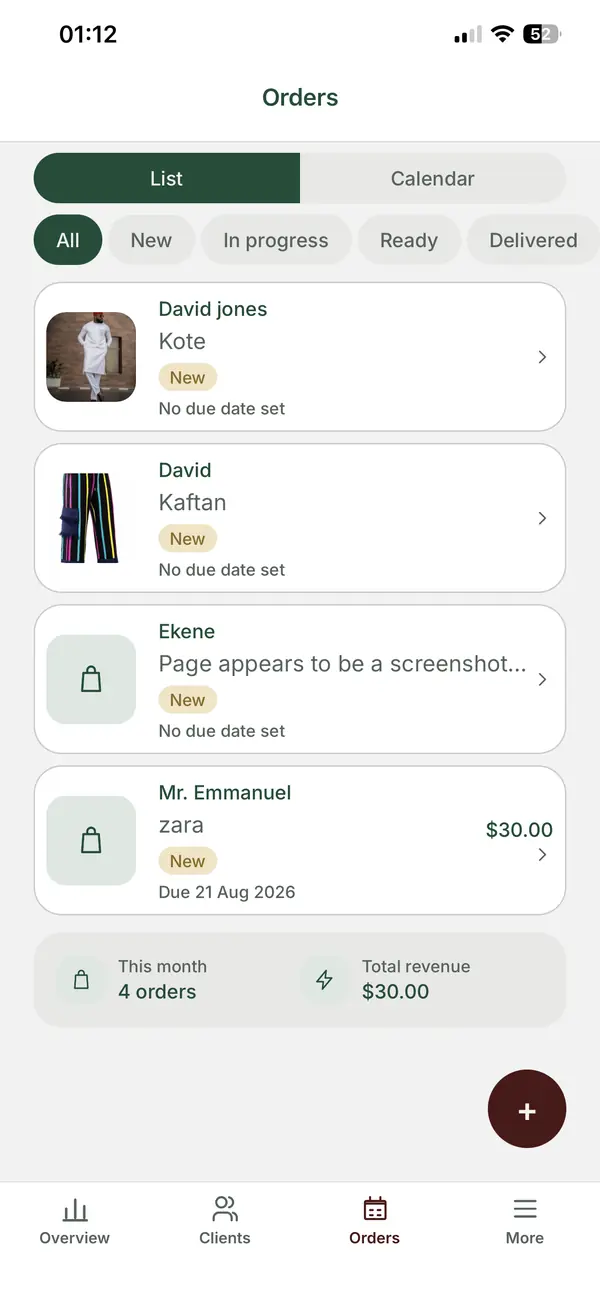
| Working from your phone | Possible, but cramped | ZeDaq Business mobile app for iOS and Android |
| Structure | Whatever you design | Set up for tailoring from the start |
| Cost | Free | Free plan, then paid plans |
The biggest difference is that a tailoring tool connects the steps. The measurements, the order and the invoice belong to the same client record, so you don't copy details between tabs.
How do you tell if you've outgrown Sheets? A quick check
Answer yes or no:
- Do you take more orders a week than you can track from memory?
- Has a client's measurement been lost or mixed up in the last three months?
- Have you missed or nearly missed a due date in the last three months?
- Do you send invoices from a different app than the one you track orders in?
- Does someone besides you need to update order status?
- Do clients ask you to resend their invoice or confirm their balance?
If you answered yes to three or more, a dedicated tool will probably save you more time than it costs.
How do you move from a spreadsheet to a tailoring tool?
You don't have to switch everything in one day.
- Start with new clients. Add every new client to the new tool from today.
- Move active orders. Copy over orders that are in progress, with due dates.
- Move regular clients' measurements. Bring over the latest set for clients who order often.
- Keep the old sheet read-only. Don't delete it. Use it as an archive for old orders.
- Send invoices from the new tool. This is usually where you save the most time.
Choosing an invoicing tool is its own decision. Our roundup of the best invoicing software for tailors compares options. If clients book fittings with you, a booking tool may also help, as covered in appointment booking apps for tailors.
How much does ZeDaq.ai cost compared to a free sheet?
ZeDaq.ai's Free plan includes 3 measurements and 5 invoices a month, along with 3 try-ons. Paid plans are Micro at $14/mo, Starter at $49/mo, Growth at $129/mo and Scale at $299/mo. Every paid plan has a 3-day free trial with no card required.
Compare that cost with the time you spend each week keeping the sheet up to date, fixing errors and making invoices by hand. If the sheet still takes only a few minutes a day, stay with it.
See how tailoring records work in one place
FAQs
Is Google Sheets good enough for a new tailor?
Yes, for a small number of clients. Set it up with linked tabs for clients, measurements, orders and payments, and review it once a week.
Can I share my sheet with my apprentice safely?
Give view-only access by default and protect tabs you don't want changed, such as measurements. Only give edit access to the tabs they need.
Should I delete my spreadsheet after switching?
No. Keep it as a read-only archive. Old orders and measurements are useful when past clients come back.
Can clients fill in their own measurements in a sheet?
They can with a shared form, but you'll get mixed units and formats. A measurement link the client opens on their phone keeps every set in the same place.
Try ZeDaq.ai free
Virtual try-on and Find my size for your store, plus client, order and invoicing tools for tailors, in one subscription.

