
Bespoke Tailor Software for UK Ateliers
By the ZeDaq.ai team · · 6 min read
On this page
- Why does bespoke work need different software from a shop?
- What should bespoke tailor software do?
- How do UK ateliers handle measurements well?
- How should you track fittings and delivery dates?
- How do you invoice UK and overseas clients?
- Do you need a separate system for alterations?
- How do you choose and switch without disrupting the workroom?
- What does ZeDaq.ai cost for an atelier?
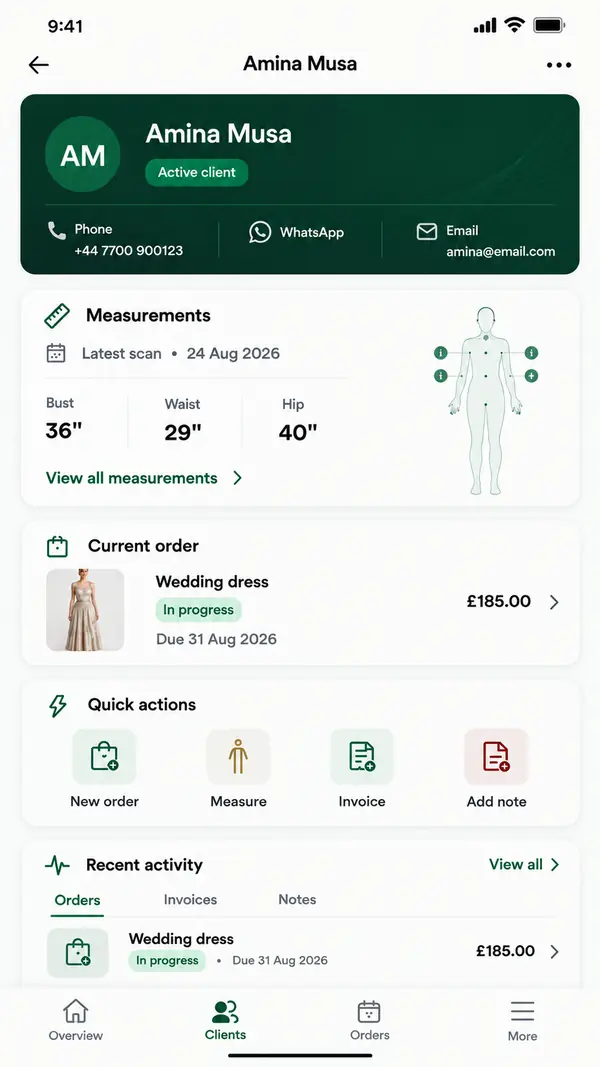
Bespoke tailor software for a UK atelier should hold each client's measurements, every fitting stage, the delivery date and a GBP invoice in one record. The right system replaces the measurement ledger, the diary and the invoice template with something your whole team can open on a desk or a phone.
This guide covers what a bespoke workflow needs from software, how to judge your options and how ZeDaq.ai's tools for tailors fit an atelier that cuts and fits by hand.
Why does bespoke work need different software from a shop?
A ready-to-wear shop sells a product. A bespoke atelier sells a process. One suit can pass through a first measure, a baste fitting, a forward fitting and a final fitting before it leaves the workroom.
That process creates a lot of small records:
- the client's measurements and posture notes
- cloth choice, lining and trim
- which fitting comes next and who is cutting
- the date the client needs the garment
- what has been invoiced and what is still due
General shop software tracks stock and sales. It rarely has a place for a second fitting or a note that the left shoulder sits lower. Simpler tools built for small shops are covered in the guide to tailor management software for small shops. Bespoke houses usually need more depth per client.
What should bespoke tailor software do?
Use this checklist when you compare systems. Each item maps to a real step in a bespoke order.
| Atelier task | What the software should handle |
|---|---|
| First measure | Store full measurements per client, with notes |
| Repeat clients | Keep past measurements so you can compare changes |
| Fittings | Track each order through its fitting stages |
| Workroom planning | Show delivery dates on a calendar |
| Billing | Raise invoices in pounds, and in other currencies for overseas clients |
| Working away from the bench | Let you check a client record from your phone |
A system that covers these six tasks will save time even if you keep your paper ledger as a backup.
How do UK ateliers handle measurements well?
Most bespoke cutters will always take the first measure in person. That is part of the craft, and software should support it rather than replace it.
Where software helps is everything around that appointment:
- Before the first visit, send a measurement link the client opens on their phone. It gives you a starting record and saves time at the appointment.
- During the measure, type the numbers straight into the client record instead of a notebook.
- For repeat orders, compare today's numbers against last year's in seconds.
- For overseas clients, a measurement link lets a returning client update a detail between trips.
ZeDaq.ai includes measurement links as part of the tailor CRM (client relationship manager, meaning your client records). The client opens the link on their own phone, and the measurements land in their record.
How should you track fittings and delivery dates?
Bespoke delays usually come from small slips: a cloth that arrives late, a fitting that gets moved, a client who travels. A calendar view keeps those slips visible.
A simple fitting tracker
Set up each order with these stages, and move it forward after each appointment:
- Measured and cloth chosen
- Pattern cut
- Baste fitting booked
- Forward fitting booked
- Final fitting booked
- Collected or delivered
In ZeDaq.ai, each order sits against a client and a delivery date, and the delivery calendar shows what is due and when. Keep your fitting stages next to each order so the whole team sees where each garment stands.
How do you invoice UK and overseas clients?
Most of your clients will pay in pounds, but bespoke houses often serve visitors and clients abroad. ZeDaq.ai invoices support multiple currencies, including GBP and USD, so you can bill a London client and a New York client from the same system.
If your business is VAT-registered, your invoices need to show certain details. HMRC sets these out in its guide to VAT invoice requirements. Check that any software you choose lets you include them. This is general information, not tax advice.
You also hold personal data, including body measurements, so the UK GDPR applies. The Information Commissioner's Office has a plain guide for small businesses handling personal data. Choose a system that keeps records behind a login rather than in shared notebooks or chat threads.
Do you need a separate system for alterations?
Many ateliers also take alterations, either on their own work or on ready-made garments. These jobs are short and frequent, and they need a different rhythm from a full bespoke commission.
You can run both in one system if each order has its own type and date. If alterations are a big part of your trade, the guide to software for alteration shops covers quick-turnaround tickets in more detail.
Group work is another special case. Wedding parties and events bring several clients, one deadline and many fittings. The guide to managing wedding group orders shows how to keep each person's measurements separate while tracking the group as a whole.
How do you choose and switch without disrupting the workroom?
Switching systems is the hard part, not the software itself. Plan it in small steps.
- List your active orders. Start with what is in the workroom now, not your whole archive.
- Add current clients first. Enter measurements for clients with orders in progress.
- Run both systems for a month. Keep the paper ledger as a backup until you trust the new one.
- Move your diary. Put every delivery date and fitting into the calendar.
- Send your first invoice. Check that it shows your business details and the right currency.
- Add older clients over time. Enter each one when they next book.
Test any system on a phone as well as a laptop. Cutters, fitters and front-of-house staff all need quick access, and the ZeDaq Business app runs on iOS and Android.
What does ZeDaq.ai cost for an atelier?
There is a Free plan with a small monthly allowance for measurements and invoices, so you can test it on a few real clients. Paid plans are Micro at $14 a month, Starter at $49, Growth at $129 and Scale at $299. Every paid plan has a 3-day free trial with no card required.
Prices are in US dollars. Check the current ZeDaq.ai plans to see what each one includes.
See how ZeDaq.ai fits your atelier
FAQs
Will software replace the first measure?
No. Most bespoke tailors still take the first measure in person. Software stores those measurements and helps with everything around the appointment.
Can clients send measurements from abroad?
Yes. You can send a measurement link that the client opens on their phone, and the numbers go into their record.
Can I invoice in pounds and dollars?
Yes. ZeDaq.ai invoices support multiple currencies, including GBP and USD.
Is there a mobile app for my staff?
Yes. The ZeDaq Business app is available for iOS and Android, for tailors and their teams.
Try ZeDaq.ai free
Virtual try-on and Find my size for your store, plus client, order and invoicing tools for tailors, in one subscription.

