
Alteration Shop Software
By the ZeDaq.ai team · · 6 min read
On this page
Alteration shop software logs every job as a ticket that links the client, the garment, the work needed, the price and the date it is due. It replaces paper tags and memory, so you can find any job on the rail and tell a client exactly when it will be ready.
Alteration work is high in volume and short in turnaround. A busy shop may take in dozens of hems, zips and take-ins a week. This guide covers what an alteration tracking app should do, a simple ticket workflow you can copy, and how ZeDaq.ai for tailors handles each step.
What makes alteration work hard to track?
Most alteration jobs are small, but there are many of them. Each one still has a client, a garment, a promise and a payment.
Common problems in shops that run on paper:
- a tag falls off and nobody knows whose trousers they are
- a client calls and you can't find the job
- two staff members quote different prices for the same work
- a deposit was taken but nobody wrote it down
- a regular client's measurements have to be taken again every visit
Each of these costs time at the counter. Software fixes them by giving every job one record that anyone in the shop can look up.
What should an alteration ticket include?
An alteration ticket is the record for one job. Keep it short enough to fill in while the client waits.
| Field | Example |
|---|---|
| Client | Name and phone number |
| Garment | Navy suit trousers |
| Work | Shorten hem, keep original hem finish |
| Measurements | New inside leg, if relevant |
| Price | Agreed at drop-off |
| Paid | Deposit or paid in full |
| Due date | The day you promised |
| Status | Received, in progress, ready, collected |
Write the work in plain words a colleague could follow. "Take in 2 cm each side seam" is clearer than "take in a bit."
How does a simple alteration workflow look?
Here is a five-step method that works for most shops:
- Drop-off. Create the client if new, add the order, note the work and the price.
- Tag the garment. Write the client's name and the due date on a tag that matches the order.
- Schedule it. Put the due date on your calendar so the job shows up in the right week.
- Mark it ready. Update the status and let the client know it is done.
- Collect and invoice. Take the balance and send a receipt or invoice.
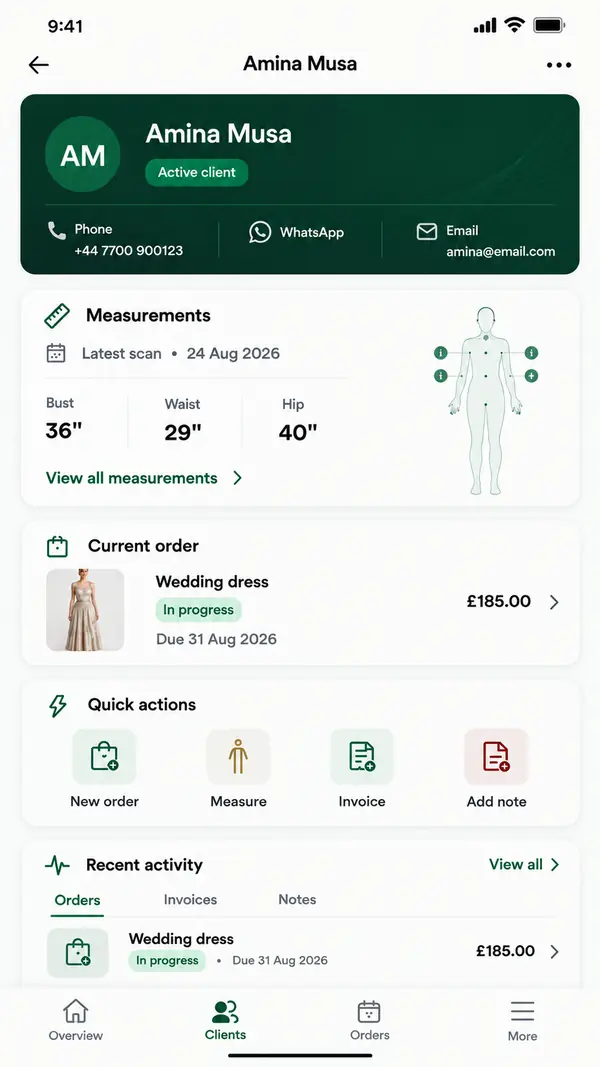
In ZeDaq.ai, orders sit on a delivery calendar, so you can see what is due today and this week. The client record keeps past orders, so a returning client's history is one tap away.
Worked example: a busy Saturday at the counter
Imagine three clients drop off work on the same morning:
- A regular client brings two pairs of trousers to shorten. You find her record, check her saved inside leg, and add a new order with the price and a due date for next week.
- A new client brings a dress with a broken zip. You create his client record, note the work, take a deposit and give him a ticket with the due date.
- A wedding guest needs a jacket taken in by Friday. You add the order, mark the date clearly, and it shows on the calendar for that week.
By Monday, nobody has to remember who said what. Every job has a record, a price and a date.
How do you set realistic due dates?
Promise dates you can keep. A few habits help:
- check the calendar before you agree a date, so you can see how busy that week is
- give rush jobs a separate price, and only take as many as you can handle
- leave a buffer for jobs that need a second fitting
- update the client if a date has to move, before the day arrives
Clients forgive a moved date when you tell them early. They are far less forgiving when they arrive and the job isn't ready.
Do you need an alterations POS?
An alterations POS (point of sale) is a till that takes payment. Some shops need a full till, especially if they also sell retail items.
Many small alteration shops need less. They need to record what was paid, send a clear invoice and see who still owes money. ZeDaq.ai creates invoices in multiple currencies, including NGN, GBP and USD. If you already take card payments through a separate card reader, you can keep it and record the payment against the invoice.
How do you keep measurements for regular clients?
Regular clients come back for the same kinds of work. Saving their measurements means you don't start from zero each time.
With ZeDaq.ai, measurements save to the client record. You can also send a measurement link that the client opens on their phone. That is useful when a client wants to check before visiting, or when someone else is dropping off the garment.
Getting good numbers from clients at home takes some guidance. The tips on accurate measurements from clients at home cover what to tell them.
What should you look for in alteration shop software?
Run any tool through this checklist:
- Can you create a job in under a minute at the counter?
- Can you look up a job by the client's name?
- Does it show jobs by due date?
- Does it keep client history and measurements?
- Can it send invoices in your currency?
- Is there a phone app for checking jobs away from the counter?
- Is there a free plan to test it with real jobs?
ZeDaq.ai covers the client CRM, measurement links, orders with a delivery calendar and invoicing. The ZeDaq Business app runs on iOS and Android.
If wedding work is part of your business, bridal gowns need longer timelines and more fittings. The guide to bridal boutique software covers that workflow.
Can you start with a free plan?
Yes. ZeDaq.ai's Free plan includes 3 measurements a month, which is enough to try the workflow with a few real clients. The guide to what a free tailoring plan covers explains how far it goes.
When you outgrow it, paid plans are Micro at $14 a month, Starter at $49, Growth at $129 and Scale at $299. Every paid plan has a 3-day free trial with no card required.
Run your alteration jobs from one place
FAQs
What is an alteration ticket?
It is the record for one alteration job. It links the client, the garment, the work, the price, the payment and the due date.
Can I see which jobs are due today?
Yes. Orders in ZeDaq.ai sit on a delivery calendar, so you can see what is due today and this week.
Can clients send their own measurements?
Yes. You send a measurement link and the client adds their measurements on their phone.
Do I need a separate till?
Not always. If you only need to record payments and send invoices, ZeDaq.ai's invoicing may be enough. If you sell retail stock, you may still want a till.
Try ZeDaq.ai free
Virtual try-on and Find my size for your store, plus client, order and invoicing tools for tailors, in one subscription.

