
Tailor Management Software for Small Shops
By the ZeDaq.ai team · · 6 min read
On this page
- What should tailor management software actually do?
- How do you know your shop has outgrown notebooks and chats?
- How does ZeDaq.ai cover each job?
- What does a one-week setup look like?
- What should you ask before choosing any tailor software?
- How much does it cost for a small shop?
- How does it help with busy seasons and group orders?
Tailor management software for a small shop is one system that keeps your clients, their measurements, your orders, delivery dates and invoices together, so nothing lives only in a notebook or a chat. For a one- to five-person workroom, the right tool is the one that covers those five jobs simply, works on your phone, and doesn't need a manager to run it.
This guide explains what to look for, how to set it up in a week, and how ZeDaq.ai's tools for tailors handle each job.
What should tailor management software actually do?
A small tailoring shop doesn't need a big business system. It needs a tool that matches how a garment moves from first message to collection.
Here are the five jobs to check for:
- Client records. Name, phone number, notes on style and fit, and every past order.
- Measurements. Stored per client, dated, and easy to update after a fitting.
- Orders. What is being made, fabric, price, deposit paid and status.
- Delivery dates. A calendar that shows what is due this week, so fittings and collections don't clash.
- Invoices. Clear invoices you can send by email or chat, in your client's currency.
If a tool skips one of these, you end up keeping that part on paper. That gap is usually where mistakes happen.
How do you know your shop has outgrown notebooks and chats?
Many small shops run well on a notebook and WhatsApp for years. The signs it is time to switch tend to show up together:
- You scroll back through chats to find a client's measurements.
- Two orders were promised for the same day and one ran late.
- A client says they paid a deposit and you can't confirm it quickly.
- Your apprentice can't see what is due without asking you.
- You rewrite the same invoice details by hand every week.
If three or more sound familiar, the cost of staying on paper is already real. We cover that cost in detail in the hidden cost of WhatsApp and Excel.
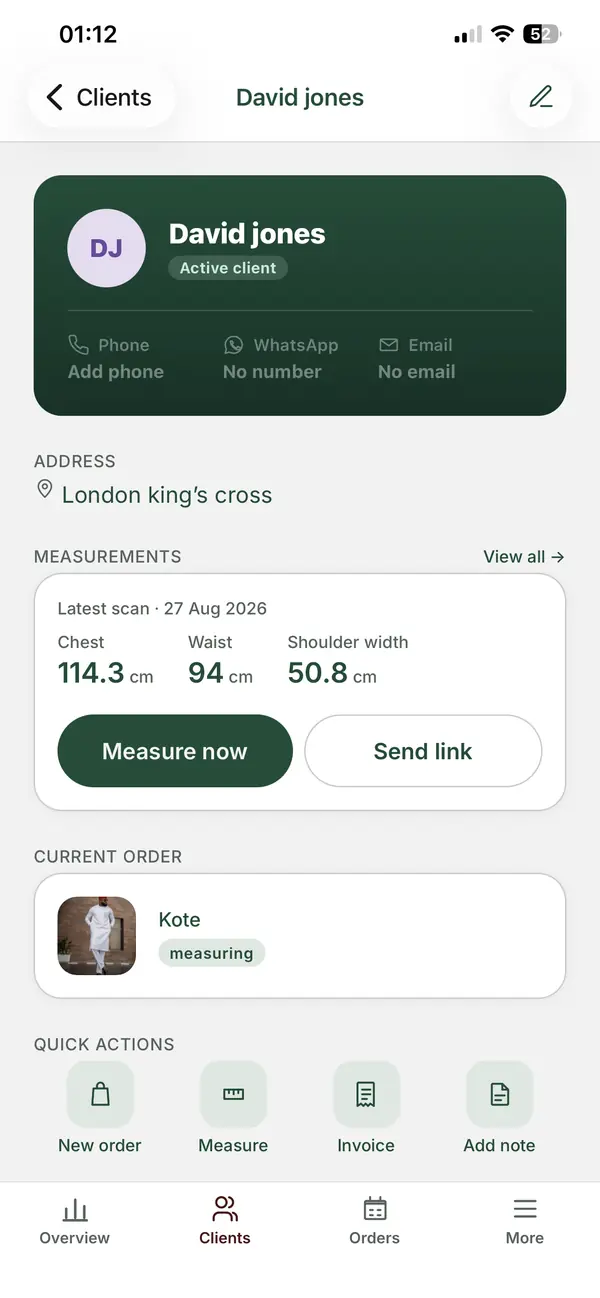
How does ZeDaq.ai cover each job?
ZeDaq.ai includes tailor tools on every plan, including the Free plan, according to its pricing page. Here is how each job maps to a feature:
| Job | ZeDaq.ai feature |
|---|---|
| Client records | Client CRM |
| Measurements | A measurement link the client opens on their phone |
| Orders | Orders |
| Delivery dates | Orders and a delivery calendar |
| Invoices | Invoices in multiple currencies, including NGN, GBP and USD |
You can run it from a computer or from the ZeDaq Business app for iOS and Android. That matters in a small shop, where you are often at the cutting table, not a desk.
Measurement links
Instead of copying numbers from a chat, you send the client a link. They open it on their phone and send their measurements back to you, so you aren't retyping numbers from screenshots.
Multi-currency invoices
If you have clients abroad, you can invoice in their currency. A tailor in Lagos can bill a London client in GBP and a local client in NGN from the same account.
What does a one-week setup look like?
You don't need to move everything at once. A small shop can be up and running in a week with a plan like this:
Day 1: Add your active clients
Start with clients who have an open order. Add their name, phone and any notes you rely on.
Day 2: Enter open orders
For each active client, add the order, the price, the deposit paid and the due date.
Day 3: Check the calendar
Look at the delivery calendar. Spot clashes now, while you can still move a fitting.
Day 4: Send measurement links
For new clients, or clients who need re-measuring, send a measurement link instead of asking for numbers in chat.
Day 5: Send your first invoices
Create invoices for the week's collections. Check how they look on a client's phone.
Days 6 and 7: Add older records
Copy over regular clients from your notebook, starting with the ones most likely to order again.
What setup mistakes should you avoid?
- Entering everything on day one. It is tiring, and many people stop halfway. Follow the daily plan instead.
- Leaving out deposits. If a deposit isn't recorded, the balance on the invoice will be wrong.
- Skipping the calendar check. Due dates only help if you look at them. Make it a habit at the start of each day.
- Keeping the notebook for new orders. Once you start, put every new order in the software so nothing is split across two places.
What should you ask before choosing any tailor software?
Whatever tool you look at, ask these questions before you commit:
- Can I use it on my phone? If not, you will go back to the notebook within a month.
- Can clients send measurements themselves? This saves a lot of back-and-forth.
- Does it handle deposits and balances? Most tailoring work is paid in parts.
- Can I invoice in the currencies I use? This matters if you serve diaspora clients.
- Can I export or keep my data? Your client list is your business.
- What does the free option include? Test it on real orders before you pay.
If you work in Nigeria, our guide to what to look for in tailor apps in Nigeria adds points that matter to Nigerian tailors.
How much does it cost for a small shop?
ZeDaq.ai's tailor tools are part of every plan. The Free plan costs $0. Paid plans are Micro at $14 a month, Starter at $49, Growth at $129 and Scale at $299. Every paid plan starts with a 3-day free trial with no card required.
Invoice limits differ by plan. Micro includes 10 invoices a month and Starter includes 30. Growth and Scale have no invoice limit and add your logo on every invoice. Most small shops can start on Free or Micro and move up when order volume grows.
How does it help with busy seasons and group orders?
Small shops feel the strain most in wedding and festival seasons, when many orders share one deadline. A delivery calendar shows the pile-up early. Client records keep each person's measurements separate, even when they belong to the same party.
If you take group orders, such as matching outfits for a wedding, see our guide on managing aso ebi group orders.
See how ZeDaq.ai runs a tailoring shop
FAQs
Do my clients need to download an app?
No. Clients open the measurement link in their phone's browser. Only you, as the tailor, use the ZeDaq Business app.
Is the Free plan enough for a small shop?
It is enough to test the tools on real clients. Tailor tools are included on Free, and you can move to a paid plan when your invoice volume grows.
Do I need a computer to use it?
No. You can run the shop from the ZeDaq Business app on an iOS or Android phone, and use a computer when it suits you.
Which currencies can I invoice in?
ZeDaq.ai supports invoicing in multiple currencies, including NGN, GBP and USD.
How long does it take to learn?
Most tailors learn the basics while following the one-week plan above. Starting with active orders means you practice on real work from the first day.
What if a client prefers to send measurements by chat?
That is fine. You can type them into the client's record yourself, so they are stored with the order instead of lost in the chat.
Try ZeDaq.ai free
Virtual try-on and Find my size for your store, plus client, order and invoicing tools for tailors, in one subscription.

