
Tailor App for Android: Features That Matter
By the ZeDaq.ai team · · 6 min read
On this page
The features that matter most in a tailor app for Android are client records, measurements you can collect remotely, orders with deposits and due dates, reminders before delivery, and invoices you can send from your phone. If an app does those five things well, it can replace the notebook and the chat threads.
This guide explains what each feature should do, then how to check an app before you trust it with your clients. You can see how ZeDaq.ai handles them on the tailor tools overview.
What should a tailor app on Android actually replace?
Most tailors start with a measurement book, a calculator and a chat app. That works until you have dozens of clients, a wedding season and three deposits to chase in one week.
A good app replaces these jobs:
- the measurement book, with one record per client
- the order notebook, with prices, deposits and due dates
- the wall calendar, with reminders before each delivery
- handwritten or typed invoices
If you still track everything in spreadsheets, the comparison of ZeDaq.ai and Excel for tailors shows where a spreadsheet stops helping.
Which features matter most?
Here is a checklist you can use with any Android tailoring app.
| Feature | What good looks like | Why it matters |
|---|---|---|
| Client records | Contact details, address and fit notes in one place | You find a client in seconds, not pages |
| Measurement capture | Manual entry plus a link the client can open | You can take orders from clients who can't visit |
| Orders | Price, deposit and due date per order | You know what is owed and when |
| Delivery calendar | All due dates on one view, with reminders | Fewer missed deadlines in busy weeks |
| Invoices | Your logo and bank details, sent by email or WhatsApp | Clients pay faster when the bill is clear |
| Currencies | The currency your client pays in | You can serve clients abroad |
| Same account on the web | Work from the phone or a computer | Bigger tasks are easier on a larger screen |
Client records
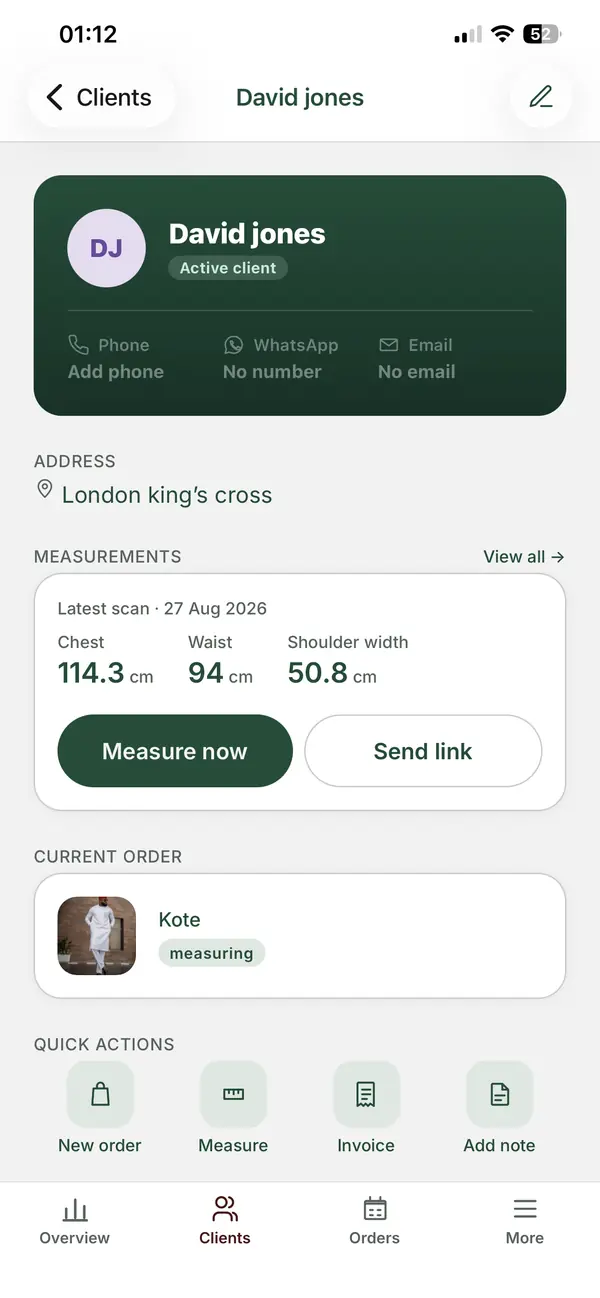
Each client should have one record with contact details, delivery address and fit preferences. Notes such as "prefers a loose sleeve" save you from asking the same questions every season.
Measurements by link
This is the feature that saves the most travel. With ZeDaq.ai, you send the client a measurement link by WhatsApp or email. They open it on their own phone, follow guided photos, and the measurements save to their profile. The client doesn't need to install anything.
You can still type measurements in by hand. Many tailors use both: a link for clients who live far away, and a tape measure for clients in the shop.
Orders, deposits and due dates
Every order should show the agreed price, the deposit paid and the delivery date. On ZeDaq.ai, orders sit on a delivery calendar, and the app sends push reminders as due dates get closer. You choose the reminder time, and you can also back reminders up to your phone's calendar.
Invoices in more than one currency
If you sew for clients in different countries, your invoices need their currency. ZeDaq.ai invoices support NGN, GBP, USD and other currencies, and you can add your logo and bank details. Invoices go out by email or WhatsApp.
Why does Android matter for tailors?
Many tailors run the business from one phone. Android phones come in a wide range of prices, so for a lot of small workshops the business phone is an Android one.
That makes three practical points worth checking:
- Find the real app. Search by the developer name, not just "tailor app". The ZeDaq Business listing is on Google Play.
- Read the permissions. A tailoring app may ask for camera access for photos and notifications for reminders. Be wary of requests that don't fit what the app does.
- Read the data safety section. Google Play shows how each app says it handles data. Your clients' names, addresses and measurements are personal data, so take it seriously.
If you also have an iPhone in the workshop, the guide to the tailor app for iPhone covers the same checks on iOS. ZeDaq Business is available on both.
How do you test a tailor app before you commit?
Don't move every client in on day one. Run a short, real test instead.
- Install the app and sign in.
- Add five current clients with full measurements.
- Create one order for each, with a deposit and due date.
- Send a measurement link to one client who lives far away.
- Send one real invoice by WhatsApp.
- Wait for the first reminder to arrive before a due date.
- Ask yourself whether it was faster than your old method.
If the reminder arrives on time and the invoice looks right to your client, the app is doing its job. If you are in Nigeria, the guide to tailor apps in Nigeria adds points on local payments and currency.
What mistakes do tailors make when moving to an app?
Most problems come from the switch, not the app. Avoid these:
- Moving every client at once. Start with clients who have open orders. Add older records when those clients order again.
- Keeping two systems running. If you still write new orders in the book, the app's calendar will be incomplete. Pick a start date and stop using the book for new work.
- Turning off notifications. Reminders only help if your phone lets the app send them. Check your notification settings after you install.
- Not telling clients. Send a short message explaining that measurement links and invoices will now come from your business. Clients trust a link more when they expect it.
- Saving measurements without dates. Note when each set was taken, so you know when a client needs measuring again.
What does ZeDaq Business cost?
The ZeDaq Business app is free with any ZeDaq.ai plan, including the Free plan. Plans differ in how many measurements and invoices you get each month.
| Plan | Price | Measurements a month | Invoices a month |
|---|---|---|---|
| Free | $0 | 3 | 5 |
| Micro | $14/mo | 30 | 10 |
| Starter | $49/mo | 100 | 30 |
| Growth | $129/mo | Unlimited | Unlimited |
| Scale | $299/mo | Unlimited | Unlimited |
Every plan includes the tailor tools: clients, orders and the calendar. Each paid plan has a 3-day free trial with no card required. Prices and limits were checked in November 2026 on the ZeDaq.ai pricing page, so check it for any offers before you buy.
See the tailor tools on your own phone
FAQs
Do my clients need to install an app for measurements?
No. They open the measurement link in their phone's browser, follow the guided photos, and the measurements save to their profile in your account.
Can I send invoices on WhatsApp from Android?
Yes. ZeDaq.ai invoices can be sent by WhatsApp or email, with your logo and bank details on them.
Is the ZeDaq Business app free?
Yes. The app is free with any ZeDaq.ai plan. Your plan sets your monthly measurement and invoice limits.
Can I use the same account on Android and iPhone?
ZeDaq Business is on both Google Play and the App Store. You sign in with your ZeDaq.ai account on either one.
What should I do with my old measurement book?
Keep it as a backup while you move over. Add each client to the app when they next place an order, starting with your regulars.
How long does it take to set up a tailor app?
Most of the work is adding clients. If you start with the five-client test above, you can see how the app fits your week within a few days.
Try ZeDaq.ai free
Virtual try-on and Find my size for your store, plus client, order and invoicing tools for tailors, in one subscription.

