QuickBooks for Fashion Designers: Accounting Tool or Business Suite?
By the ZeDaq.ai team · · 8 min read
On this page
- What is QuickBooks Online built to do?
- What does each QuickBooks plan cost?
- What does QuickBooks do well for a fashion business?
- Where does QuickBooks stop for a designer?
- What's the difference between an accounting tool and a business suite?
- How does one commission flow through both tools?
- Should a fashion designer use both?
- How do you decide? A short checklist
- How do you move from spreadsheets to proper tools?
- What does ZeDaq.ai cost alongside QuickBooks?
QuickBooks for fashion designers is an accounting tool first: it keeps your books, tracks income and expenses, and sends invoices, but it doesn't manage measurements, fittings, client style notes or a production calendar. Most designers who sew to order end up using QuickBooks, or an accountant who does, alongside a tool built for running the studio day to day.
This guide explains what QuickBooks Online covers, what each plan costs, where it stops, and how it fits next to a tailoring tool such as ZeDaq.ai for tailors and designers. It's written for independent designers and small studios.
What is QuickBooks Online built to do?
QuickBooks Online, from Intuit, is cloud accounting software for small businesses. Its job is your money: what came in, what went out, what you owe and what you're owed.
For a fashion designer, that means:
- Bookkeeping. Recording sales and expenses, such as fabric, trims and machine repairs.
- Invoicing. Sending invoices and tracking who has paid.
- Reports. Profit and loss, and other statements your accountant needs.
- Tax preparation. Organized records make tax time easier.
That's valuable work. But it's a different job from running fittings and production.
What does each QuickBooks plan cost?
Here's what Intuit's QuickBooks pricing page showed for the US, checked November 2026.
| Plan | List price | Price shown with promo | Users | Notable features for designers |
|---|---|---|---|---|
| Free | $0/mo | No promo listed | 1 | Two invoices a month, or unlimited invoices with QuickBooks Payments enabled |
| Simple Start | $38/mo | $19/mo (50% off for 3 months) | 1 | Invoicing and getting paid |
| Essentials | $85/mo | $42.50/mo (50% off for 3 months) | 3 | Adds time on invoices and bulk invoice creation (beta) |
| Plus | $140/mo | $70/mo (50% off for 3 months) | 5 | Adds inventory tracking and project profitability |
| Advanced | $340/mo | $170/mo (50% off for 3 months) | 25 | Adds batch invoices and expenses, and advanced project financials |
The page also mentions a 30-day free trial. Prices and promos change, so check the page before you subscribe. Prices outside the US differ.
What the promo means in practice
A promo price applies for a set period, then the list price applies. Budget for the list price, not the first three months.
What does QuickBooks do well for a fashion business?
It keeps your accountant happy
If you work with an accountant, they likely already know QuickBooks. Paid plans on the pricing page include accountant access, so your accountant can log in directly.
It shows whether you're making money
Recording every fabric purchase and every sale gives you a real profit figure, not a guess. That helps you price your work properly.
It tracks inventory on higher plans
The Plus plan lists inventory tracking. If you sell ready-to-wear in set sizes, that can help you see stock levels.
It handles project profitability on Plus
For a large commission, such as a bridal party, tracking it as a project shows whether that job actually made a profit after materials and hours.
Where does QuickBooks stop for a designer?
QuickBooks doesn't claim to be a fashion tool, and these gaps show it.
| Job | QuickBooks | What you'd need instead |
|---|---|---|
| Client body measurements | Not a feature on the pricing page | A measurement record per client |
| Collecting measurements remotely | Not a feature on the pricing page | A link the client fills in |
| Fittings and delivery dates | Not a feature on the pricing page | An order calendar |
| Style notes and preferences | Not a feature on the pricing page | A client record built around fit and style |
| Orders through production stages | Not a feature on the pricing page | Order tracking by stage |
These are the daily tasks of a made-to-measure studio. An accounting tool isn't designed for them.
What's the difference between an accounting tool and a business suite?
An accounting tool answers "how is the money doing?" A business suite for tailors and designers answers "what's happening with each client and order?"
| Accounting tool (QuickBooks) | Tailoring business suite (ZeDaq.ai) | |
|---|---|---|
| Main question | Are we profitable? | What's due, for whom, and is it paid? |
| Core record | Transactions | Clients and orders |
| Invoicing | Yes | Yes, in multiple currencies including NGN, GBP and USD |
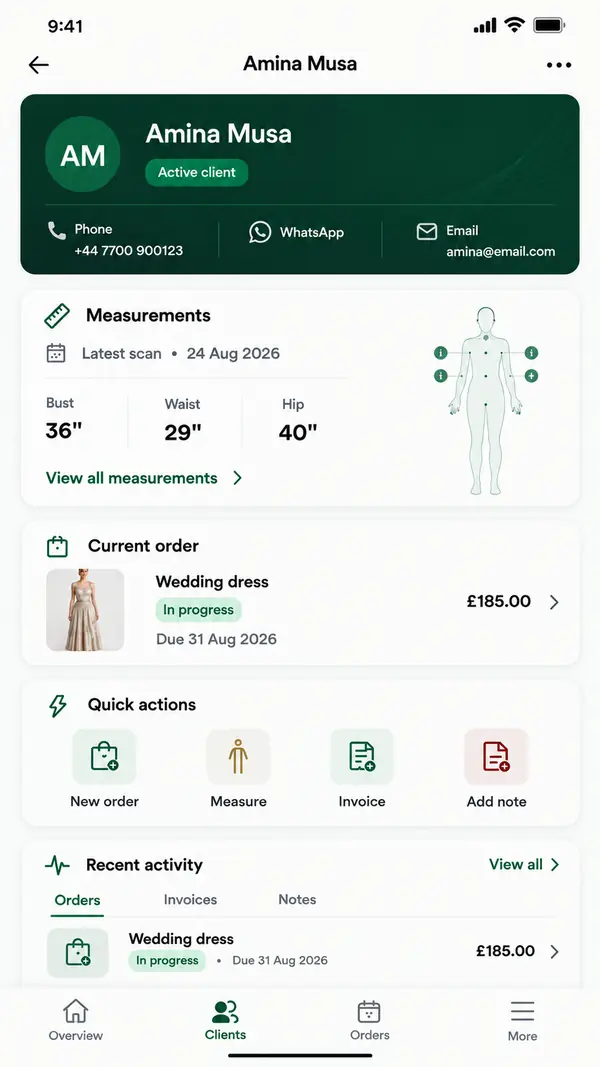
| Measurements | No | Yes, collected through a link the client opens on their phone |
| Client CRM | Customer list | Client CRM |
| Delivery calendar | No | Orders and a delivery calendar |
| Mobile | Check Intuit's site | ZeDaq Business app for iOS and Android |
| Who uses it daily | Owner or bookkeeper | Owner and studio team |
For more on how these categories differ, see tailor apps versus a full business suite. If you mainly need to organize clients, the guide to the best CRM for fashion designers compares options focused on client records.
How does one commission flow through both tools?
Here is a worked example. A designer takes a commission for a bride and four bridesmaids.
In the studio tool
- The designer adds the bride and each bridesmaid as clients.
- Each one gets a measurement link on their phone and fills in their own measurements.
- The designer creates five orders with fitting dates and one delivery date, which appear on the calendar.
- A deposit invoice goes to the bride, who is paying for the whole party.
- After the final fitting, a balance invoice goes out.
In QuickBooks, or the accountant's system
- The fabric, lace and lining purchases are recorded as expenses.
- The deposit and balance payments are recorded as income when they reach the bank.
- On the Plus plan, the whole commission could be tracked as one project to see its profit.
What the example shows
Nothing is typed twice. Measurements and dates stay in the studio tool. Costs stay in the books. At the end, the designer knows both that every dress was delivered on time and whether the commission made money.
Try mapping your own last big order the same way. Wherever you find yourself copying the same detail into two places, decide which tool should own it.
Should a fashion designer use both?
Often, yes. Here's how the work can split:
- The studio tool runs the day. Client details, measurements, orders, fittings and invoices to clients.
- QuickBooks, or your accountant's system, keeps the books. Expenses, bank reconciliation and year-end reports.
- Totals move between them. At the end of each week or month, record studio sales in your books.
The aim is to enter each detail once. Measurements live only in the studio tool. Expense receipts live only in the accounting tool.
Who needs only one of them?
- A designer with a few clients a month and an accountant who handles the books may only need a studio tool.
- A ready-to-wear label with stock, wholesale buyers and several staff may lean more on accounting and inventory, with less need for measurement tools.
- A made-to-measure studio usually benefits most from a studio tool and gets the most from QuickBooks at tax time.
How do you decide? A short checklist
Tick the ones that are true for you:
- Most of my work is made to measure.
- I lose time finding client measurements.
- I've missed or nearly missed a fitting or delivery date.
- My accountant asks for organized income and expense records.
- I hold stock of finished pieces in set sizes.
- More than one person needs to see the books.
If the first three are ticked, start with a studio tool. If the last three are ticked, an accounting tool matters too. If you tick both groups, plan for both.
How do you move from spreadsheets to proper tools?
Many designers start with spreadsheets for everything. Switching both studio and accounting at once can be a lot. A gentler order:
- Move clients and measurements first, because these are used every day.
- Start invoicing from the studio tool, so invoices match orders.
- Then set up accounting, or hand organized records to your accountant.
The step-by-step guide to moving from Excel to a business suite covers this in more detail.
What does ZeDaq.ai cost alongside QuickBooks?
ZeDaq.ai's Free plan includes 5 invoices and 3 measurements a month, plus 3 try-ons. Paid plans are Micro at $14/mo, Starter at $49/mo, Growth at $129/mo and Scale at $299/mo. Every paid plan has a 3-day free trial with no card required.
ZeDaq.ai doesn't replace your accounting system or produce tax reports. It covers the studio side, so your books get cleaner sales data.
Run fittings, orders and invoices in one studio tool
FAQs
Is QuickBooks free for fashion designers?
QuickBooks lists a Free plan for one user on its US pricing page, checked November 2026. It includes two invoices a month, or unlimited with QuickBooks Payments enabled.
Can QuickBooks store client measurements?
Measurements aren't listed as a feature on the QuickBooks pricing page. Designers usually keep them in a separate tool or record.
Does ZeDaq.ai connect to QuickBooks?
No integration is listed. Record your studio sales in QuickBooks, or pass organized records to your accountant.
Do I still need an accountant if I use QuickBooks?
QuickBooks organizes your records, but it doesn't replace professional advice. Many small businesses use both.
Try ZeDaq.ai free
Virtual try-on and Find my size for your store, plus client, order and invoicing tools for tailors, in one subscription.

