
monday.com for Fashion Studios: How It Compares
By the ZeDaq.ai team · · 7 min read
On this page
- What is monday.com, and why do fashion studios try it?
- What does monday.com cost for a small studio?
- Where does monday.com work well for fashion?
- Where does it fall short for bespoke and made-to-measure studios?
- How does monday.com compare with a tailoring tool?
- Which kind of studio should use which?
- How would you set up monday.com for client orders, if you choose it?
- Do fashion studios also need try-on or sizing tools?
- What does ZeDaq.ai cost?
monday.com compares well for fashion studios that run collections, production calendars and team tasks, because its boards can model almost any workflow. For bespoke and made-to-measure studios, it compares less well: you have to build client records, measurement fields and order stages yourself, and it has no measurement capture or tailoring invoices.
This guide looks at what monday.com offers a fashion studio, what it costs per seat, and when a tool built for tailors and designers fits better. To compare as you read, see ZeDaq.ai for tailors and designers.
ZeDaq.ai publishes this blog. monday.com details come from monday.com's own pricing page, checked November 2026.
What is monday.com, and why do fashion studios try it?
monday.com is a work management platform. You build boards with rows for items and columns for owners, dates, statuses and notes. Teams use it to plan projects, assign tasks and see what is late.
Fashion studios usually try it for jobs like these:
- Collection planning: one row per style, with columns for design, sampling, fabric and production status.
- Production calendars: dates for each stage of a drop.
- Team task lists: who is cutting, sewing, finishing or photographing.
- Content and launch planning: shoots, lookbooks and social posts.
For those jobs, a flexible board is a natural fit. The question is whether it also fits the client side of a studio.
What does monday.com cost for a small studio?
When we checked the monday.com pricing page in November 2026, it showed prices in British pounds for our location. The work management plans were:
| Plan | Price per seat per month, billed annually | Notes from the page |
|---|---|---|
| Free | £0 | Up to 2 seats, up to 3 boards and 3 Docs |
| Basic | £8 | Unlimited items |
| Standard | £11 | |
| Pro | £17 | 14-day free trial of Pro available |
| Enterprise | Custom |
The same page's FAQ says paid plans "start from 3 users," and the pricing examples were shown for groups of seats. A separate product, monday CRM, was listed from £10 per seat on its Basic plan.
Your price may show in another currency where you are, so check the page yourself. The key point for small studios is that paid plans are priced per seat with a minimum, so a solo designer still pays for several seats.
Where does monday.com work well for fashion?
Collections with many moving parts
A collection has dozens of styles, each at a different stage. A board with a status column shows at a glance which styles are stuck in sampling.
Teams that need shared visibility
When five people touch each garment, a shared board stops work from falling through the cracks. Everyone sees who owns the next step.
Studios that like to design their own system
monday.com is very flexible. If you enjoy setting up boards and columns, you can shape it around your studio exactly.
Planning beyond the garment
Shoots, wholesale deadlines, trade shows and launches all fit on boards. One tool can hold most of a studio's non-sewing work.
Where does it fall short for bespoke and made-to-measure studios?
No built-in measurement records
You can add columns for bust, waist and hip, but you design and maintain them. There is no measurement link for clients and no measurement history per person unless you build one.
Client records are something you build
monday.com sells a separate CRM product. In work management boards, a "client" is just a row you create yourself.
No tailoring invoices
Boards track work, not billing. You still need an invoicing tool, especially if you bill in naira, pounds and dollars.
Per-seat pricing for small teams
A two-person bespoke studio can use the free plan's 2 seats, but with only 3 boards. Once you need more, paid plans start from 3 users according to the pricing FAQ.
Setup takes time
Flexibility has a cost. Every board, column and status is yours to plan. For a tailor who wants to log a client and an order between fittings, that setup can stall.
How does monday.com compare with a tailoring tool?
| Need | monday.com work management | ZeDaq.ai for tailors |
|---|---|---|
| Collection and production planning | Strong, with custom boards | Not the focus |
| Team task assignment | Yes | Not listed |
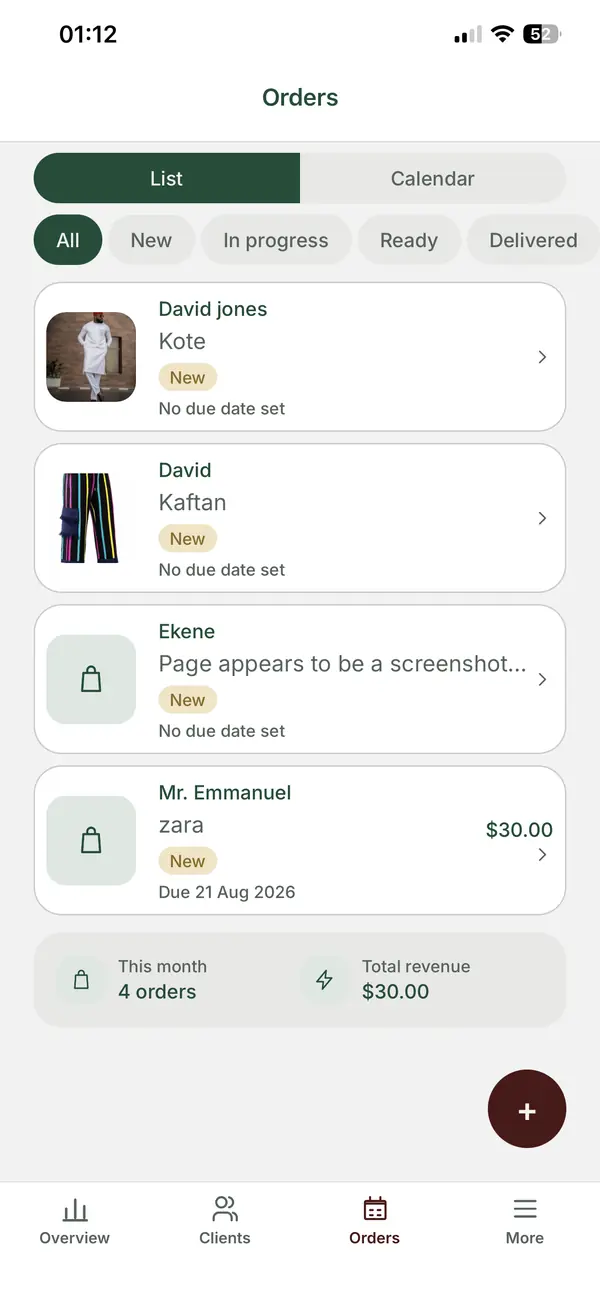
| Client records | Build your own, or add monday CRM | Client CRM |
| Body measurements | Custom columns you set up | Measurement link the client opens on their phone |
| Orders and delivery dates | Build your own board | Orders and a delivery calendar |
| Invoices | Not a work management feature | Yes, in multiple currencies including NGN, GBP and USD |
| Mobile app | Check monday.com's site | ZeDaq Business for iOS and Android |
| Pricing model | Per seat, paid plans from 3 users | Per plan: Free, then $14 to $299 a month |
The two tools answer different questions. monday.com asks "what is the team working on?" A tailoring tool asks "what does this client need, and when?"
For a closer look at how a tailoring order should be tracked, our guide to deposits, due dates and delivery calendars walks through each stage.
Which kind of studio should use which?
Ready-to-wear studio with a team
monday.com is a strong choice. Your work is collections, production and launches, and your team needs shared boards.
Bespoke or made-to-measure studio
A tailoring tool usually fits better. Your daily work is clients, measurements, fittings and delivery dates, which come built in.
Studio doing both
Some studios use monday.com for collection and production planning, and a tailoring tool for private clients. That split keeps each tool simple.
Studio watching costs
Count seats, not just the headline price. Compare per-seat costs with flat plan prices, and include the invoicing tool you'll still need. Our comparison of Wave invoicing for tailors covers one common billing add-on.
How would you set up monday.com for client orders, if you choose it?
If you go with monday.com, plan the client side carefully so it doesn't turn into a messy spreadsheet.
- Create a Clients board. One row per client, with phone, email and city.
- Add measurement columns. Add one column per measurement, and name each with its unit, such as "Waist (cm)."
- Add a "measured on" date column. You need to know how fresh each set of numbers is.
- Create an Orders board. One row per garment, with the client's name, the stage and the due date.
- Add statuses that match your process. For example: Measured, Cutting, First fitting, Final fitting, Ready, Collected.
- Pick one billing tool. Decide where invoices live, and note the invoice number on each order.
This works, but notice how much you are building yourself. A tailoring tool ships with most of these pieces already joined up.
Questions to answer before you build
- Who updates the board? If only you do, a shared board may be more than you need.
- Where do measurements come from? Clients still have to send them somehow, so plan that step.
- How will you spot late orders? Decide which view or column shows what is due this week.
- What happens when someone leaves? A clear board structure helps a new hire pick up where the last person stopped.
If you can't answer these in a sentence each, spend an hour sketching the process on paper first. A tool can only organize a process you have already decided on.
A worked example
Amara runs a studio with three staff. She makes a small ready-to-wear line twice a year and takes about 15 bespoke orders a month.
For the ready-to-wear line, monday.com boards help the team move 30 styles through sampling and production. For bespoke clients, Amara needs each bride's measurements, fitting dates and balance owed. She could build that in monday.com, or keep the bespoke side in a tailoring tool and leave monday.com for collections.
Do fashion studios also need try-on or sizing tools?
If your studio sells ready-to-wear online, the problem after production is helping shoppers pick the right size and see the fit. That is a separate category of software.
Our guide to virtual try-on app prices compares what those tools cost, if that is the next step for your label.
What does ZeDaq.ai cost?
ZeDaq.ai's Free plan costs $0 and includes 3 try-ons, 3 measurements and 5 invoices a month. Paid plans are Micro at $14 a month, Starter at $49, Growth at $129 and Scale at $299, priced per plan rather than per seat.
Every paid plan includes a 3-day free trial with no card required. See the ZeDaq.ai price list for current details.
Run bespoke clients without building boards
FAQs
Does monday.com have a free plan for fashion studios?
Yes. The pricing page we checked in November 2026 showed a free plan for up to 2 seats, with up to 3 boards and 3 Docs.
Is monday.com good for tailors?
It can be, if you are willing to build your own client, measurement and order boards. Tailors who want those ready-made often prefer a tool built for tailoring.
Can monday.com send invoices?
Invoicing is not part of the work management plans we reviewed. Most studios pair it with a separate invoicing tool.
Can I use monday.com and ZeDaq.ai together?
Yes. A common split is monday.com for collections and team tasks, and ZeDaq.ai for clients, measurements, orders and invoices.
Try ZeDaq.ai free
Virtual try-on and Find my size for your store, plus client, order and invoicing tools for tailors, in one subscription.

