Customer Fit Profiles: Storing Preferred Sizes
By the ZeDaq.ai team · · 4 min read
On this page
- What goes into a fit profile?
- Where can you store a profile?
- How do you learn what actually fit?
- How can a size scan feed a profile?
- What about privacy and consent?
- What does a simple profile look like?
- How do you use the profile on the product page?
- How do profiles help with returns?
- What mistakes should you avoid?
- How do you start small?
A customer fit profile is a small record of the sizes and fit notes that work for a shopper, stored so they can reuse them on later orders. The goal is to stop the same shopper guessing again, which is a common cause of wrong-size orders.
This guide covers what to keep, where to keep it and how to treat the data. It builds on AI size recommendation for fashion stores, which explains where the first size suggestion comes from.
What goes into a fit profile?
Keep it short. Every extra field is one more thing to maintain and one more piece of personal data to protect.
- Usual size per garment type. For example tops, bottoms and dresses, because one person can wear different sizes.
- Fit preference. Fitted, regular or roomy.
- Brand-specific notes. Which of your sizes worked, such as "M in knit, L in woven".
- Optional body measurements. Only if the shopper chose to give them.
Avoid free-text fields that invite sensitive details. A drop-down is safer than an open box.
Where can you store a profile?
You have three practical options.
| Option | Good for | Watch out for |
|---|---|---|
| Customer account | Returning shoppers who log in | Guests can't use it |
| Order history | Inferring what a shopper bought | Doesn't show whether the size fit |
| Shopper's own device | Quick, no account | Lost when they clear their browser |
An account is the usual choice. It stays with the shopper across devices, and you can ask for a rating of fit after delivery.
How do you learn what actually fit?
Past purchases show what someone bought, not what fit. Add a short question after delivery, such as "Did it fit as expected?", with three answers: small, right, large.
That answer is the most useful field in the profile. It also helps you tell fit problems from other issues, as explained in telling quality complaints from fit complaints.
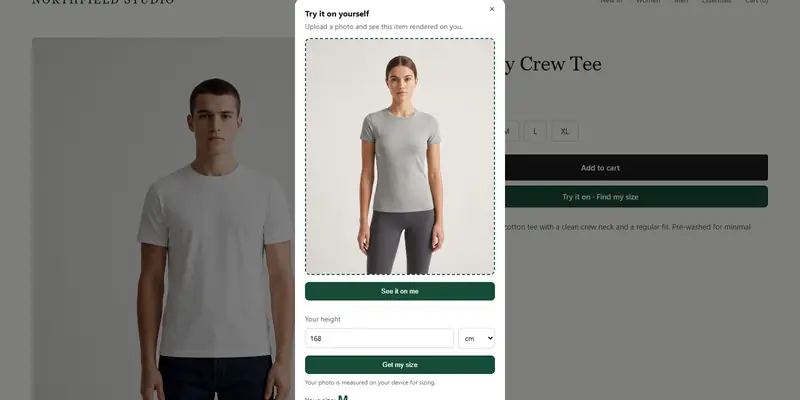
Try a size scan on yourself
Try it on yourself
Live renderUpload a photo, pick a piece, see it rendered on you.
Pick something to try on
How can a size scan feed a profile?
A scan gives a shopper a first size without a tape measure. With ZeDaq.ai, the shopper uploads one photo and types their height, and the result is a size from your own chart. The shopper doesn't need an account to use it.
If you want to save that result to a profile, do it with the shopper's clear agreement, and tell them what you keep. ZeDaq.ai doesn't need you to build a profile for the scan to work.
What about privacy and consent?
Treat body data as personal data. Ask before you store it, say what you keep and let shoppers delete it. Keep your own legal obligations in mind, and check the rules where your shoppers live with an official regulator or a qualified adviser.
Collect the minimum. A size label such as "M" carries much less risk than a full set of body measurements.
What does a simple profile look like?
Here is an example record for one shopper. It is a made-up illustration of the fields, not real data.
| Field | Example value |
|---|---|
| Tops | M |
| Bottoms | 30 |
| Dresses | UK 10 |
| Fit preference | Regular |
| Last fit feedback | Right |
| Consent to store | Yes, on the order date |
Notice that it records labels and a consent date. It does not need a photo or detailed measurements.
How do you use the profile on the product page?
Show the saved size first, with a short note: "Your usual size in tops: M". Let the shopper change it in one tap, because a saved size can be wrong for one style.
If a product runs small or large, say so next to the size. A profile that ignores fit notes can push a shopper to the wrong size.
How do profiles help with returns?
Shoppers who order two sizes "just in case" are a sign they don't trust the size guide. A saved, confirmed size gives them a reason to order one. Our guide to bracketing and what stores can do covers that pattern.
Good size information at the start also matters. See how to write size guides that reduce returns for the groundwork a profile builds on.
What mistakes should you avoid?
A few habits make profiles worse, not better:
- Assuming a past purchase fit when the shopper never said so.
- Applying one saved size to every garment type.
- Keeping data long after a shopper stops buying.
- Hiding what you store in a long policy nobody reads.
How do you start small?
You don't need a big system to begin.
- Add a size chart per garment type.
- Let shoppers use the scan on the product page.
- Ask a one-question fit survey after delivery.
- Store the answer with the customer, if they agree.
Give shoppers a size they can trust
FAQs
Is a fit profile the same as a size chart?
No. A size chart belongs to your store. A fit profile belongs to one shopper and records what works for them.
Do shoppers need an account to get a size?
Not with ZeDaq.ai. Saving a profile across visits usually needs an account or similar storage.
Should I store body measurements?
Only if the shopper agrees and you need them. A size label is often enough.
Can I delete a shopper's profile?
You should be able to. Build a way to remove it on request.
Try ZeDaq.ai free
Virtual try-on and Find my size for your store, plus client, order and invoicing tools for tailors, in one subscription.