Best Measurement Apps for Tailors Compared
By the ZeDaq.ai team · · 8 min read
On this page
- What should a measurement app do for a tailor?
- Which kinds of measurement apps can tailors use?
- Which measurement apps are worth comparing?
- How do these measurement apps compare?
- Which app fits which kind of tailor?
- How do you switch from a paper measurement book?
- What mistakes should you avoid when choosing?
The best measurement app for tailors is the one that stores every client's measurements in one place and lets you collect new ones without a second fitting. For most small workshops, that means a tailor tool with measurement records built in. For brands that need dozens of body points from a phone scan, a dedicated scanning service such as 3DLOOK Mobile Tailor may suit better.
ZeDaq.ai publishes this blog. Competitor details come only from each company's own public page, checked November 2026. If you want to see how measurements fit into client and order management, our tools for tailors and designers page shows the full workflow.
What should a measurement app do for a tailor?
A measurement app replaces the paper book on your cutting table. It should make three jobs easier: taking measurements, finding them later and using them on an order.
Look for these basics:
- One record per client. Measurements should sit next to the client's name, phone number and past orders.
- Custom fields. Agbada, kaftan, suit and bridal work all need different points. You should be able to add your own.
- Remote collection. A client abroad or across town should be able to send measurements without visiting.
- History. Bodies change. You need to see last year's waist next to this year's.
- Units. Some clients think in inches, others in centimeters. The app should handle both.
- Phone access. You measure standing next to the client, not at a desk.
If any of these is missing, you end up copying numbers between apps, which is where mistakes creep in.
Which measurement points should each record hold?
Before you test any app, list the points you actually use. This example template shows what a general workshop might record per garment. It is an illustration only, so adjust it to your own cutting method.
| Garment | Points to record |
|---|---|
| Shirt or buba | Neck, chest, shoulder, sleeve length, round sleeve, top length |
| Trousers or sokoto | Waist, hip, thigh, knee, ankle opening, outseam, inseam |
| Dress or gown | Bust, under-bust, waist, hip, shoulder to waist, full length |
| Agbada or kaftan | Shoulder, chest, full length, sleeve width, neck |
Then try to enter one real client into each app you are considering. If you can't add a point such as "round sleeve" or "under-bust," the app will slow you down every day. Also check whether you can add a free-text note, such as "prefers loose fit" or "left shoulder lower," because those notes often matter as much as the numbers.
Which kinds of measurement apps can tailors use?
Tailors use three broad kinds of tools. Each solves a different problem.
Phone body-scan services
These tools measure the client from photos taken on a phone. They suit brands that sell made-to-measure clothing at scale, where the client is rarely in the shop.
Tailor management tools with measurement records
These tools store measurements as part of a client CRM, alongside orders, delivery dates and invoices. They suit independent tailors and small studios who measure in person most of the time and occasionally remotely.
General notes and spreadsheet apps
Phone notes, spreadsheets and photo albums are free and familiar. They work for a handful of clients but get hard to search once you have hundreds of records.
Which measurement apps are worth comparing?
3DLOOK Mobile Tailor
3DLOOK's Mobile Tailor page (checked November 2026) describes a body-measuring tool that builds a 3D body model from a phone scan. The client opens a scanning link in their phone browser and takes a front photo and a side photo, guided by voice instructions.
The page says the tool returns "80+ body measurements" and lists made-to-measure and luxury tailoring brands, bridal and tuxedo shops, and uniform makers among its users. It offers a 7-day trial on that page but doesn't show prices, so you need to ask for a quote.
This is a strong fit if you sell custom suits or uniforms online and need a large set of body points. It is more than a small neighborhood workshop usually needs.
Bodygram
Bodygram's homepage (checked November 2026) describes a platform that collects body data, including 35 body measurements, from a phone scan. It names retailers, uniform makers and fashion brands among its users.
The homepage doesn't mention tailors or made-to-measure work directly. It offers a free account to start but doesn't list paid prices. Bodygram looks best suited to businesses building sizing into their own product, rather than a tailor recording client measurements day to day.
If you are a developer weighing scan services for your own software, our guide to body measurement API providers goes deeper on that choice.
ZeDaq.ai tailor tools
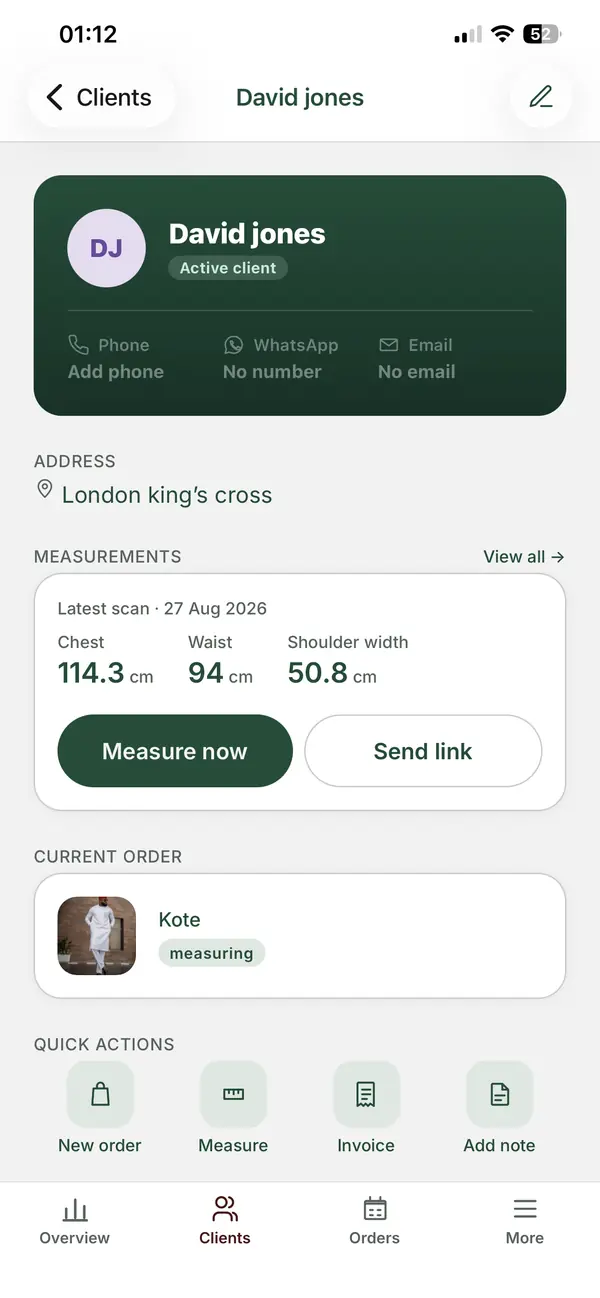
ZeDaq.ai is a tailor tool rather than a standalone scanner. Measurements live inside a client CRM, next to orders, a delivery calendar and invoices.
Here is what it includes:
- Client CRM. Each client has one record with their measurements and order history.
- Measurement links. You send a link, and the client opens it on their phone to submit their measurements.
- Orders and a delivery calendar. Each measurement record connects to the garment you are making.
- Invoicing in multiple currencies, including NGN, GBP and USD.
- The ZeDaq Business mobile app for iOS and Android, so records come with you to fittings.
The Free plan includes 3 measurements and 5 invoices a month. Paid plans start with Micro at $14 a month, and every paid plan has a 3-day free trial with no card required. See ZeDaq.ai pricing for the full list.
Notes apps and spreadsheets
A phone notes app or a shared spreadsheet costs nothing and needs no training. Many tailors start here.
The limits show up as you grow. Searching "Mrs. Bello, wrapper skirt, 2025" across hundreds of notes is slow. Spreadsheets don't link to orders or invoices, and photos of paper pages can't be searched at all.
How do these measurement apps compare?
Competitor details come from each linked page, checked November 2026.
| Tool | How measurements are taken | Stored with orders and invoices | Remote collection | Listed price |
|---|---|---|---|---|
| 3DLOOK Mobile Tailor | Two-photo phone scan, 80+ points | Not described on the page | Yes, by scanning link | Not shown, 7-day trial |
| Bodygram | Phone scan, 35 measurements | Not described on the page | Yes | Free start, paid not shown |
| ZeDaq.ai | Tape in person, or a link the client opens on their phone | Yes, in the client CRM | Yes, by measurement link | Free to $299/mo |
| Notes or spreadsheet | Typed by hand | No | Only by message | Free |
Which app fits which kind of tailor?
Match the tool to how most of your measurements are taken today.
| Your situation | Best starting point | Why |
|---|---|---|
| You measure almost every client in person | A tailor CRM with measurement records | You need fast lookup and order links more than scanning |
| Many clients live in another city or country | A tool with remote measurement links | Clients send numbers without a visit |
| You sell made-to-measure suits online at scale | A dedicated scan service | You need many body points with no fitting room |
| You have under a few dozen clients | A notes app, for now | Low cost while you test demand |
Booking matters too. If clients often miss fittings, pair your measurement tool with one of the appointment booking apps for tailors so measurement days are planned.
How do you switch from a paper measurement book?
Moving years of records feels like a big job. Do it in stages so the shop keeps running.
- Start with active clients. Enter anyone with an open order or a fitting in the next month.
- Add regulars next. Clients who order every season come second.
- Use one template per garment. Set up fields for trousers, shirts, kaftans or dresses before you type.
- Record the date. Note when each measurement was taken, so you know when to remeasure.
- Keep the book as a backup. Don't throw it away until the new records have been checked.
Our step-by-step guide on digitising your old measurement book covers templates, photos of old pages and how to check entries.
What mistakes should you avoid when choosing?
A few common traps cost tailors time after they switch:
- Choosing a scanner when you need a record system. A scan gives you numbers, but you still need somewhere to keep them with the order.
- Ignoring the phone experience. If the app is awkward on a phone, staff go back to paper.
- Skipping custom fields. Fixed templates built for Western suits may not cover agbada, buba or bridal measurements.
- Forgetting currency. If you bill clients abroad, check the tool can invoice in their currency.
- Not testing with real clients. Run a free plan or trial with three or four clients before moving everything.
See how measurements, orders and invoices fit together
FAQs
Can a phone scan replace a tape measure for tailoring?
For many ready-to-wear and made-to-measure orders, a scan gives a useful starting point. Most tailors still confirm key points such as shoulder and inseam at the first fitting.
Do clients need to download an app to send measurements?
With ZeDaq.ai, no. The client opens a link on their phone. The ZeDaq Business app is for you and your staff, not for clients.
Can I add my own measurement fields?
Check this before you choose any tool. Tailors who make traditional or bridal wear usually need fields that standard templates don't include.
Is a spreadsheet good enough to start?
Yes, if you have a small number of clients. Move to a dedicated tool once searching for records or linking them to orders starts to slow you down.
Try ZeDaq.ai free
Virtual try-on and Find my size for your store, plus client, order and invoicing tools for tailors, in one subscription.

