
What Should a Fashion Designer App Do?
By the ZeDaq.ai team · · 6 min read
On this page
- What problem should a fashion designer app solve?
- Which core jobs should the app handle?
- How do you judge a designer business app?
- How should measurement collection work?
- How should pricing and invoicing work?
- What does ZeDaq.ai cover, and what doesn't it?
- What mistakes do designers make when choosing an app?
- What should you ask before switching apps?
A fashion designer app should run the business side of your work: client records, measurements, orders, delivery dates and invoices, all in one place on your phone. A good one replaces the notebook, the chat history and the spreadsheet, so you spend less time searching and more time designing.
This guide sets out the jobs a designer business app should handle, a checklist to judge any app against, and the questions to ask before you switch. If you want to see one option as you read, ZeDaq.ai's tools for tailors and designers cover most of the points below.
What problem should a fashion designer app solve?
It should solve the problem of scattered information. Many designers keep measurements in a book, orders in chat messages, due dates in their head and invoices in a separate tool.
Each of those works on its own. Together, they cause lost measurements, missed deadlines and unpaid balances. The article on why designers still use fragmented tools looks at how that pattern starts and why it is hard to break.
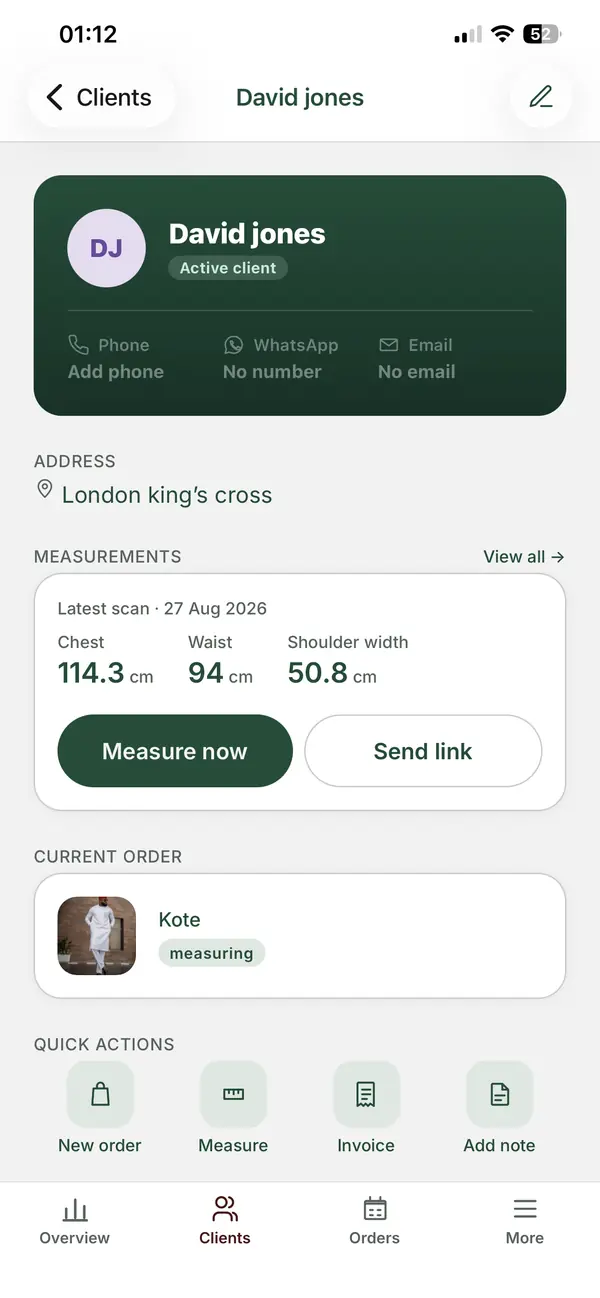
A business app earns its place when one client's whole story sits on one screen: who they are, their measurements, what they ordered, when it is due and what they still owe.
Which core jobs should the app handle?
Judge any app against these five jobs. If it misses one, you will still need a second tool for it.
1. Client records
Each client needs a profile with contact details, notes and order history. You should be able to search by name or phone number in a few seconds.
2. Measurements
Measurements are the heart of a designer's work. The app should store them per client, with dates, so you can see when someone's size changed.
Remote capture matters too. If a client can't visit, you need a way to collect measurements without a tape-measure video call.
3. Orders
Each order should link to a client and hold the style, fabric notes, price, deposit and status. You should see at a glance what is waiting, in progress or ready.
4. Delivery dates
A calendar view of due dates helps you plan the week. It also stops two big events landing on the same day without warning.
5. Invoices
You should be able to send a clear invoice from the order, without retyping details. If you have clients abroad, the app should invoice in their currency.
How do you judge a designer business app?
Use this checklist. Tick each point before you commit.
| Question | Why it matters |
|---|---|
| Does it work on your phone? | Most client contact happens on the move |
| Is there an app for both iOS and Android? | You and any staff may use different phones |
| Can clients send their own measurements? | Saves trips and calls |
| Does each order link to a client and a due date? | Keeps the calendar accurate |
| Can it invoice in more than one currency? | Needed if you sell to clients abroad |
| Can you export or view your data easily? | You own your client list |
| Is there a free way to test it? | You can try it on real orders first |
How should measurement collection work?
The best approach lets the client do the work from home. You send a link, the client opens it on their phone, and their measurements arrive in their profile.
ZeDaq.ai works this way. You send a measurement link, and the client opens it on their own phone. The results are saved to that client's record, ready for the order.
Home measurements are only useful if they are accurate. The guide to getting accurate measurements at home covers clothing, posture and lighting tips to share with clients before they start.
How should pricing and invoicing work?
Your app should make it easy to send an invoice the moment you agree a price. The invoice should show the item, the deposit paid and the balance due.
Currency is the other big point. A designer in Lagos with clients in London needs to invoice in both naira and pounds. ZeDaq.ai invoices in multiple currencies, including NGN, GBP and USD.
An app can send an invoice, but it can't set the right price for you. If you are unsure whether your rates are fair, compare them with typical UK alteration prices before you build your price list.
What does ZeDaq.ai cover, and what doesn't it?
Here is how ZeDaq.ai maps to the core jobs above:
| Job | ZeDaq.ai |
|---|---|
| Client records | Client CRM |
| Measurements | Measurement links the client opens on their phone |
| Orders | Orders linked to clients |
| Delivery dates | Delivery calendar |
| Invoices | Multi-currency invoices, including NGN, GBP and USD |
| Mobile | ZeDaq Business app for iOS and Android |
It is a business tool, not a design tool. It doesn't draw sketches, draft patterns or plan cutting layouts, so keep your usual tools for that creative work.
The Free plan includes 3 measurements a month, so you can test it on a few real clients. Paid plans start with Micro at $14/mo. Every paid plan has a 3-day free trial with no card required.
What mistakes do designers make when choosing an app?
Designers often pick an app for the wrong reasons. Watch for these:
- Choosing on looks alone. A polished screen matters less than whether the app covers all five core jobs.
- Testing with made-up orders. A fake client won't show you where the app slows you down. Use a real order from start to finish.
- Ignoring the client's side. If sending measurements is hard for clients, they will go back to typing numbers into chat.
- Expecting a design tool. A business app keeps records. Your sketching and pattern tools still have their place.
- Forgetting staff. If an assistant takes orders or messages clients, they need to be comfortable with the app too.
What should you ask before switching apps?
Moving your business to a new app takes effort. Ask these questions first:
- How will I move my old records? Plan to add your active clients first, then older ones over time.
- Will my clients need to do anything? With measurement links, they only open a link. They don't need an account or an app.
- Who else will use it? If you have staff, check that each person can use it on their own phone.
- What happens to my data if I leave? Ask before you start, not after.
- Can I test it on one order? Run a real order from measurement to invoice before you move everything.
See how it fits your workflow
FAQs
Is a fashion designer app different from a tailor app?
They overlap a lot. Both need clients, measurements, orders and invoices. Designers often care more about collections and multiple currencies, while tailors may handle more alterations.
Do my clients need to download the app?
No. The ZeDaq Business app is for you and your team. Clients only open a measurement link on their phone.
Can I use the app on Android?
Yes. ZeDaq Business is available for both iOS and Android.
Can one app replace WhatsApp completely?
Not always. You may still chat with clients there. The app keeps the records, so measurements and orders don't get lost in chat history.
How do I get clients to use the measurement link?
Send it with a short message that explains what it is and why you need it. Share the home-measuring tips first, so their numbers are accurate from the start.
Try ZeDaq.ai free
Virtual try-on and Find my size for your store, plus client, order and invoicing tools for tailors, in one subscription.

