Tailornova vs ZeDaq.ai: Pattern Design vs Business Tools
By the ZeDaq.ai team · · 7 min read
On this page
- What is Tailornova?
- What is ZeDaq.ai for tailors?
- How do the two compare side by side?
- Who should use Tailornova?
- Who should use ZeDaq.ai?
- How can a tailor use both together?
- What should you check before buying a pattern tool?
- What should you check before buying a business tool?
- What should you record about every client, beyond measurements?
- What about other general tools?
- How do you decide what to buy first?
- What does ZeDaq.ai cost?
Tailornova and ZeDaq.ai solve different problems, so most tailors and designers don't need to choose between them. Tailornova is pattern design software that turns a design and a body into a made-to-measure pattern, while ZeDaq.ai handles the business around the garment: client records, measurements, orders, a delivery calendar and invoices.
This guide explains what each tool does, who each one suits, and how they can work side by side. For the business tools in detail, see ZeDaq.ai for tailors and designers.
ZeDaq.ai publishes this blog. Tailornova facts come from Tailornova's own homepage, checked November 2026.
What is Tailornova?
When we checked the Tailornova homepage in November 2026, it described itself as "patent-pending" online fashion design software for indie designers, boutiques and sewing hobbyists. The main features it listed were:
- Smart design templates. The site says they let you "create original designs with a single click in seconds."
- 3D garment samples and flat sketches so you can preview a design.
- A 3D FitModel™ that can "replicate any figure, measurements, height, and a body shape."
- Made-to-measure patterns generated from that fit model.
- Patterns "ready to download, cut and sew," which you can "print at home or on a plotter."
The homepage listed a subscription price of $49 a month and linked to a separate pricing page for details. Check that page for what the subscription includes.
What is ZeDaq.ai for tailors?
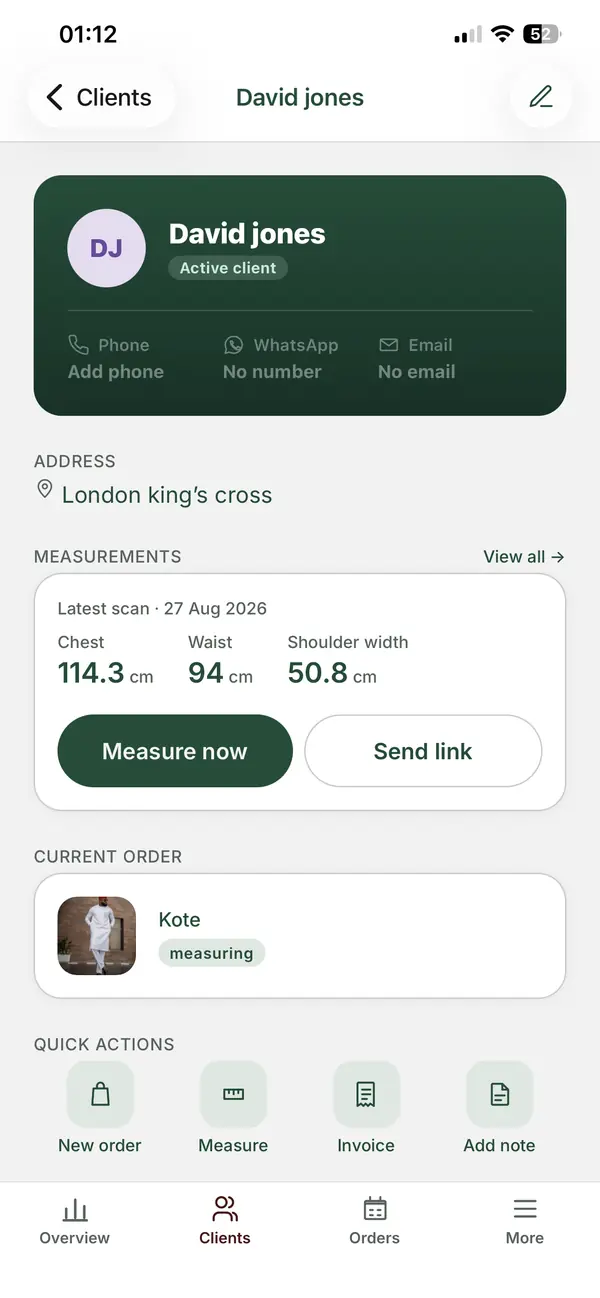
ZeDaq.ai is built around the client and the order, not the pattern. Its tailor tools include:
- A client CRM for contact details and notes.
- Measurements through a link the client opens on their own phone.
- Orders and a delivery calendar.
- Invoicing in multiple currencies, including NGN, GBP and USD.
- The ZeDaq Business mobile app for iOS and Android.
ZeDaq.ai doesn't draft patterns or create 3D garment samples. It helps you run the shop that makes the garments.
How do the two compare side by side?
| Tailornova | ZeDaq.ai | |
|---|---|---|
| Main job | Design garments and generate patterns | Run clients, measurements, orders and invoices |
| Who it's for, per each site | Indie designers, boutiques, sewing hobbyists | Tailors and fashion designers running client work |
| Design templates | Yes | No |
| 3D preview of the garment | 3D samples and flat sketches | No |
| Made-to-measure patterns | Yes, from a 3D fit model | No |
| Client records | Not described on the homepage | Client CRM |
| Collecting client measurements | You enter them into the fit model | Link the client opens on their phone |
| Orders and due dates | Not described on the homepage | Orders and a delivery calendar |
| Invoices | Not described on the homepage | Yes, multi-currency |
| Price | $49/mo subscription listed | Free plan; paid from $14/mo |
The table shows little overlap. One tool lives at the cutting table. The other lives at the front desk.
Who should use Tailornova?
Tailornova suits people whose bottleneck is drafting.
- Designers who don't draft patterns by hand, or want to draft faster.
- Boutiques making small made-to-measure runs who want a pattern for each client's body.
- Home sewists who want patterns sized to their own figure.
- Designers exploring ideas who want to preview a style in 3D before cutting fabric.
If you spend most of your time drafting and redrafting, a pattern tool addresses that directly.
Who should use ZeDaq.ai?
ZeDaq.ai suits people whose bottleneck is everything around the sewing.
- Tailors with many repeat clients whose measurements live in notebooks.
- Shops that miss or nearly miss delivery dates.
- Designers serving clients abroad who need measurements sent remotely and invoices in other currencies.
- Owners who run the business from their phone between fittings.
If you can draft a pattern in your sleep but can't find last year's measurements, a business tool addresses that.
How can a tailor use both together?
For a made-to-measure designer, the two tools can form one workflow.
- Record the client in ZeDaq.ai. Add their name, phone and notes to the client CRM.
- Send a measurement link. The client opens it on their phone and sends their measurements.
- Create the order with its style notes and delivery date on the calendar.
- Enter the measurements into Tailornova's fit model and generate a made-to-measure pattern for the chosen design.
- Cut, sew and fit, updating the order as the garment moves through stages.
- Send the invoice from ZeDaq.ai in the client's currency.
You type the measurements into two places, but each tool does a job the other doesn't attempt.
Keep measurements consistent between tools
When you copy numbers from one tool to another, small errors creep in. A few habits help:
- Use the same units in both tools, centimeters or inches.
- Copy measurements in the same order every time.
- Double-check the measurements that drive fit most, such as bust, waist, hip and back length.
- Note the date measured, so you know which set the pattern was made from.
What should you check before buying a pattern tool?
Pattern software changes how you work at the cutting table, so test it on real garments before you commit. Use this checklist during any trial.
- Draft one style you already know well. Compare the generated pattern with your own. Look at ease, dart placement and seam allowances.
- Try a client with a less common figure. A pattern tool earns its keep on bodies that standard blocks don't fit.
- Print a full pattern. Check how pages line up at home, or what a plotter print costs near you.
- Sew a toile. A muslin test shows whether the fit matches the preview.
- Time the whole process. Include entering measurements, choosing the design, printing and taping.
- Check how changes work. After a fitting, can you adjust the pattern quickly, or do you start again?
What should you check before buying a business tool?
The same idea applies to a client and order tool. Test it with a real week of work.
- Add your ten most active clients. See how long it takes and how easy they are to find later.
- Send a measurement link to a friendly client. Watch how easy they find it on their phone.
- Enter every open order with its due date. Check that the delivery calendar matches your wall calendar or notebook.
- Send one invoice in each currency you use. Make sure the totals and currency look right to the client.
- Use the mobile app at the shop for a day. Admin happens between fittings, so the phone experience matters.
If both trials go well, you will know exactly what each tool adds, and whether you need one or both.
What should you record about every client, beyond measurements?
A pattern tool needs the body. A business needs the person. Our guide on what to record for every tailoring client covers fit preferences, posture notes, past orders and how they like to be contacted.
Those details rarely belong in a pattern tool, but they shape every fitting.
What about other general tools?
Some designers try to run the business side in a general workspace instead. Our comparison of ZeDaq.ai with Notion and Airtable looks at that build-it-yourself route.
If you also sell ready-to-wear online, sizing is a third, separate problem. Our look at Easysize and ZeDaq.ai sizing tools covers how online stores recommend sizes to shoppers.
How do you decide what to buy first?
If your budget allows one tool this month, start with your biggest time drain.
- Track your hours for one normal week.
- Note how long you spend drafting patterns.
- Note how long you spend finding measurements, confirming dates, chasing payments and writing invoices.
- Buy the tool that fixes the bigger number first.
A worked example
Lola is a bridal designer with an assistant. She drafts every gown by hand, which takes her about a day per client. She also keeps 200 clients' measurements across notebooks and WhatsApp chats.
During a busy season, Lola misses a fitting because the date was only in a chat. For her, the business tool fixes the more expensive problem first. Later, a pattern tool could shorten her drafting day. She ends up using both: one at the front desk, one at the cutting table.
What does ZeDaq.ai cost?
ZeDaq.ai's Free plan costs $0 and includes 3 try-ons, 3 measurements and 5 invoices a month. Paid plans are Micro at $14 a month, Starter at $49, Growth at $129 and Scale at $299.
Every paid plan has a 3-day free trial with no card required. The ZeDaq.ai pricing page lists the current plans.
Run the business side of every made-to-measure order
FAQs
Is Tailornova a replacement for ZeDaq.ai?
No. Tailornova focuses on design and made-to-measure patterns. ZeDaq.ai focuses on clients, measurements, orders, a delivery calendar and invoices.
Does ZeDaq.ai make sewing patterns?
No. ZeDaq.ai doesn't draft patterns or create 3D garment samples. Use a pattern tool or draft by hand for that step.
How much does Tailornova cost?
Tailornova's homepage listed a subscription price of $49 a month when we checked in November 2026. See its pricing page for current details.
Can I send Tailornova measurements from ZeDaq.ai?
There is no listed integration between the two. You would copy the measurements from the client's ZeDaq.ai profile into Tailornova's fit model.
Try ZeDaq.ai free
Virtual try-on and Find my size for your store, plus client, order and invoicing tools for tailors, in one subscription.

