How to Send a Measurement Link to a Client
By the ZeDaq.ai team · · 4 min read
On this page
To send a measurement link to a client, create the link from the client's profile or order, then share it on WhatsApp or by email. Your client opens the link on their phone, takes two guided photos with their height for scale, and the measurements save to their record.
This guide walks through each step in ZeDaq.ai and covers how to prepare your client so the result is useful. For the full set of tools for your workshop, see ZeDaq.ai for tailors and designers.
Why send a link instead of measuring in person?
A link saves a trip when a client can't come to you. It suits:
- Distant clients, including diaspora customers ordering from abroad.
- Repeat clients whose body has changed since their last fitting.
- Busy clients who would rather measure at home than book a visit.
- Group orders, such as a wedding party, where many people need measuring at once.
You can still measure in person and enter numbers by hand. The link is one more option, not a replacement.
How do you create and send the link?
Step 1: Open the client
In your dashboard, open Clients and pick the client. You can also start from an order. If the client is new, you can create the link first and save them later.
Step 2: Create the link
Click Send measurement link, then Create link. When you start from a client profile, the link is saved under that client, so the results land in the right place.
Step 3: Edit the message
The dashboard drafts a short message with the link. Edit it so it sounds like you, and add any instructions you want the client to follow.
Step 4: Share it
- WhatsApp: add the client's number to open a chat with them directly, then tap send in your own WhatsApp app.
- Email: type the client's email address and send it straight from the dashboard.
The client doesn't need to download an app or create an account.
What does the client do when they open the link?
The client opens the link on their phone and gives camera access. They take two guided photos and enter their height, which sets the scale.
The photos are measured on the client's own phone. Only the resulting numbers, such as chest, waist and height, are sent and saved to their profile. This is worth telling clients who worry about sending photos.
How do you get accurate results from a remote scan?
Most problems come from the photo setup, not the tool. Send your client this checklist with the link:
- Wear fitted clothing, such as leggings and a fitted top.
- Stand against a plain wall with good light.
- Ask someone to take the photos, or prop the phone at waist height.
- Keep the whole body in frame, from head to feet.
- Enter height carefully, since it sets the scale for everything else.
When the numbers arrive, compare them with what you'd expect for that client. If something looks off, ask them to scan again or follow up with a quick video call.
A shared space where clients can see their own orders and details builds trust too. Our guide to what clients should see in a tailor portal covers what to share.
What happens after the measurements arrive?
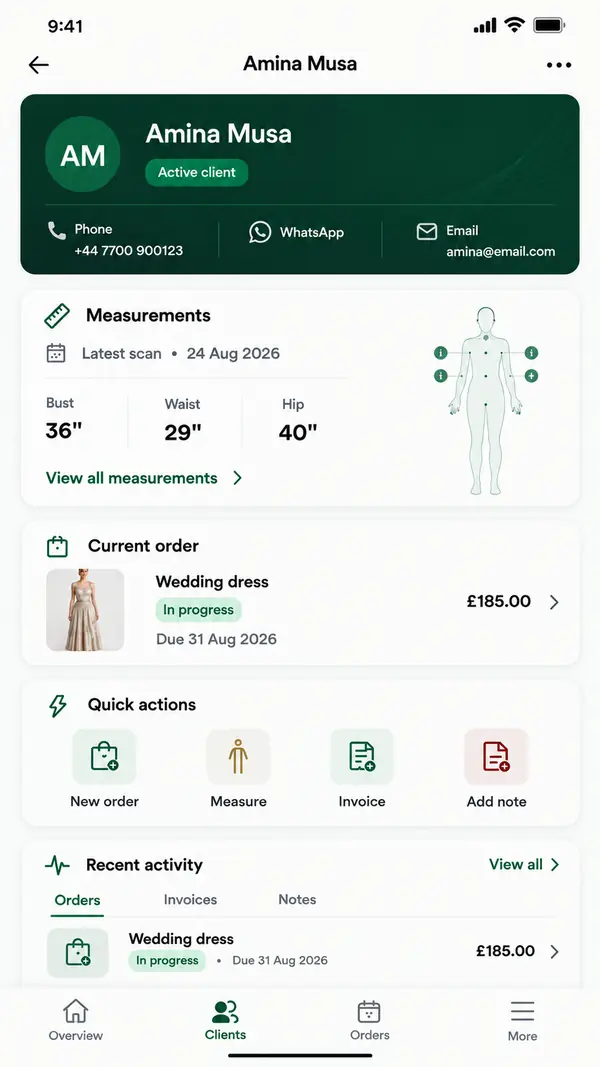
The measurements appear on the client's profile. From there you can attach them to an order, plan the delivery date on your calendar and send an invoice.
Fast, professional replies help win new work too. Remote measuring is one of the ideas in our guide on how tailors can get more clients online.
If you still track measurements in a spreadsheet, compare the two approaches in ZeDaq.ai vs Excel for tailors.
Which plan do you need to send measurement links?
Each client measurement submission counts as one measurement on your monthly plan. The Free plan is $0 and includes 3 try-ons, 3 measurements and 5 invoices a month.
Paid plans are Micro at $14 a month, Starter at $49, Growth at $129 and Scale at $299. Every paid plan has a 3-day free trial with no card required. Check the plan limits on our pricing page to see which one fits how many clients you measure.
Send your first measurement link today
FAQs
Does my client need to install an app?
No. The client opens the link in their phone's browser. Only you use the dashboard or the ZeDaq Business app.
Can I send the link by SMS instead?
The dashboard shares by WhatsApp or email. You can also copy the link and paste it into any message app you use.
Are my client's photos stored?
No. The photos are measured on the client's own device, and only the numbers are saved to their record.
What if the client sends measurements that look wrong?
Ask them to scan again using the photo checklist. For important garments, confirm key measurements on a short video call.
Try ZeDaq.ai free
Virtual try-on and Find my size for your store, plus client, order and invoicing tools for tailors, in one subscription.

