How to Analyze Return Reasons by Product
By the ZeDaq.ai team · · 5 min read
On this page
To analyze return reasons by product, export your returns, match each one to a product and size, group the reasons into a few clean codes, and compare each product against its own sales. The products where one reason keeps repeating are where you should act first.
This guide uses a spreadsheet, so you do not need special software. It fits stores that want to cut fit-related returns, as covered in AI size recommendation for fashion stores.
What data do you need?
Export these columns from your store or returns tool:
- Order date and return date
- Product name and variant (size and color)
- Quantity sold and quantity returned
- The reason the customer gave
- Any notes from your team
If your reasons are free text, you will clean them in step 2.
Go back far enough to include a full season or at least several weeks of sales. A very short window gives you too little data. Returns arrive after sales, so leave out the most recent weeks, or you will see low return rates simply because customers have not sent items back yet.
Keep the raw export untouched in one tab and do your work in a copy. That way you can always return to the original if you make a mistake while cleaning. If you want a cleaner system from now on, read how to set up return reason codes.
How do you run the analysis step by step?
Step 1: Join returns to sales
Put sales and returns in one sheet, with one row per product variant. Add a column for sales and a column for returns.
Step 2: Clean the reasons
Group every free-text reason into a short list. A simple set works well:
| Code | Covers |
|---|---|
| Too small | "Tight", "too snug", "ran small" |
| Too large | "Baggy", "too big" |
| Length | "Too long", "too short" |
| Not as pictured | Color, fabric or style differs from photos |
| Quality | Stitching, damage, fabric flaws |
| Changed mind | No fault with the item |
| Other | Anything else |
Keep notes on anything you put under Other, and review them every month.
Step 3: Calculate a return rate per product
Divide returns by sales for each product. Compare each product with your store's overall rate, and look at the products that sit well above it.
A product with few sales can look worse than it is. Wait for a reasonable number of orders before you draw conclusions.
Here is a worked example with made-up units. Suppose a dress sold in sizes small, medium and large. In your sheet, you see that most of the returns for the dress are in the medium, and almost all are marked "too small". The dress is not the issue. The medium is. Check your chart's range for that size before you change the photos or pull the product.
Now suppose another product is returned across all sizes with the reason "not as pictured". That points to photos, color or fabric, and a new size chart will not help. Treating the two products differently is the point of this analysis.
Step 4: Split by size
Open the worst products and group their returns by size. If one size causes most of the returns, the problem may be your size chart or the cut of that size, not the whole product.
Step 5: Read the patterns
Match each pattern to a likely cause.
| Pattern | Likely cause | First fix |
|---|---|---|
| One size returned as "too small" | Chart runs generous | Update that size's range |
| All sizes "not as pictured" | Photos or color mismatch | Reshoot or retouch photos |
| "Length" across sizes | No length info | Add length and model height |
| "Quality" on one batch | Production issue | Talk to your maker |
The guide to fit-related returns goes deeper on the fit causes.
When should you pull a product?
If a product keeps returning for the same fixable reason, fix it first. If it keeps returning for quality, consider pausing sales. The guide to product-level return rates explains how to decide.
How can you stop the same reasons repeating?
Fix the cause on the product page, not just in the report.
- Size charts: rewrite them as body measurements. See how to write size guides that reduce returns.
- Fit notes: add "runs small" or "relaxed fit" in plain words.
- Photos: show the garment on a real body and give the model's height and size.
- Size help: let shoppers check their size before they buy.
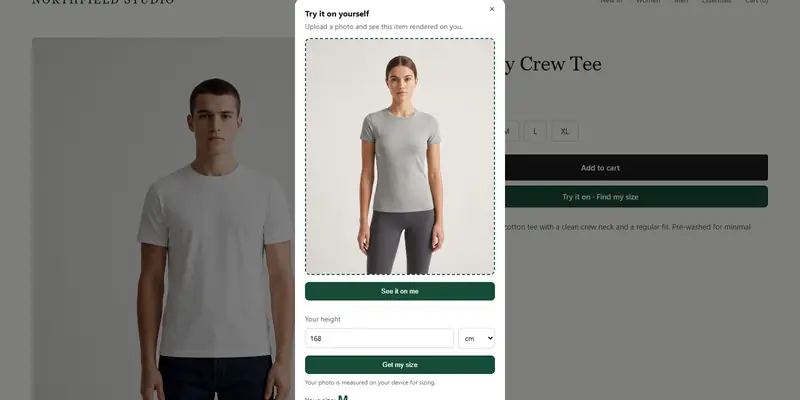
ZeDaq.ai offers size recommendation from a 30-second body scan and virtual try-on that shows your real garment on the shopper. Both are available as a Shopify app, and the Free plan includes 3 try-ons and 3 measurements a month so you can test them. We do not claim any return result, so measure the change in your own data.
Check how a size recommendation feels
Try it on yourself
Live renderUpload a photo, pick a piece, see it rendered on you.
Pick something to try on
How often should you review returns?
Review once a month, using the same sheet each time. Keep a log of the changes you made, so you can see whether returns for that product moved afterward.
Share the sheet with whoever writes your product pages and handles customer messages. They often know why a pattern exists, such as a batch with a different cut, and they can fix the copy quickly.
Add two more columns over time: the action you took, and the date you took it. A year of notes becomes a record of what works for your store and your customers.
Avoid changing several things at once. If you change the chart, the photos and the price together, you will not know which one worked.
Test size help on your own products
FAQs
What is a good return rate for clothing?
It varies by store and category, so compare a product with your own average rather than an outside figure.
Should I trust the reasons customers give?
Use them as a guide, but check them against the size and the product. "Too small" in one size only points to the chart.
Do I need software for this?
No. A spreadsheet with sales and returns per variant is enough to start.
How long should I wait before judging a product?
Wait until you have a reasonable number of orders. Early returns on a handful of sales can mislead you.
Try ZeDaq.ai free
Virtual try-on and Find my size for your store, plus client, order and invoicing tools for tailors, in one subscription.