
Dressmaker Software: Managing Clients, Fittings and Orders
By the ZeDaq.ai team · · 6 min read
On this page
- What problems does dressmaker software solve?
- What should a dressmaker look for in software?
- How should you organize client records?
- How do you manage measurements without a tape-measure appointment?
- How do you track fittings and orders?
- How do you handle invoices and payments?
- What does a weekly routine with software look like?
- How does ZeDaq.ai compare with other options?
Dressmaker software keeps every client's measurements, fittings, orders, due dates and invoices in one record you can open from your phone or computer. It replaces the mix of notebooks, chat threads and memory that most dressmakers start with.
This guide walks through how a dressmaking business can organize clients, fittings and orders, with a weekly routine you can copy. It also shows where ZeDaq.ai for tailors and dressmakers fits in.
What problems does dressmaker software solve?
Most dressmakers don't struggle with sewing. They struggle with the admin around it.
Common problems look like this:
- A client's bust measurement is in a notebook at the studio, and you're at the fabric market.
- Two brides want the same Saturday, and you only notice on Thursday.
- A client says she paid, and you can't find the message.
- A returning client asks you to "use my measurements from last time", and they're from three notebooks ago.
Software won't sew faster, but it stops these small losses. Each one costs time, and some cost a client.
What should a dressmaker look for in software?
Use this checklist to compare any tool, including ours.
| Need | What to check |
|---|---|
| Client records | Name, phone, notes and style preferences in one place |
| Measurements | Easy to record, easy to find, kept per client |
| Remote measuring | A way for clients to send measurements from home |
| Orders | Each dress linked to a client, with fabric and style notes |
| Fittings and due dates | A calendar showing what is due and when |
| Invoices | Clear, professional invoices in your currency |
| Mobile access | A phone app for when you're away from the studio |
If a tool misses more than one of these, you'll end up keeping a notebook alongside it.
How should you organize client records?
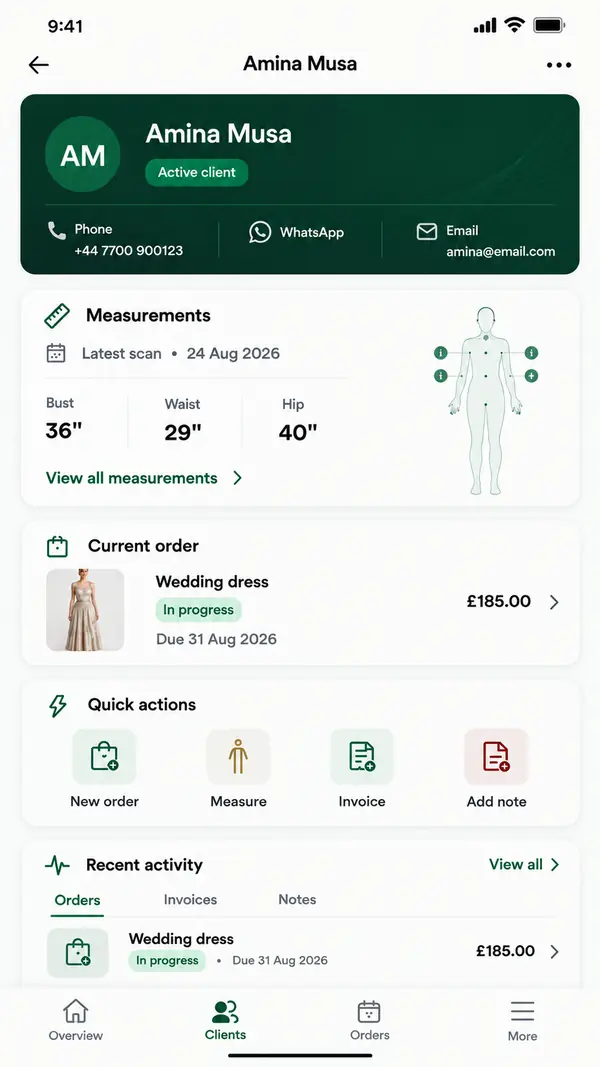
Start with one record per client, and put everything about that person in it. A good client record holds:
- contact details and preferred way to be reached
- current measurements, with the date taken
- past orders, so you can see what she has worn before
- notes on fit preferences, such as "likes a looser waist" or "prefers sleeves"
The aim is that anyone in your studio can open the record and understand the client. That consistency is a big part of looking professional to clients, even if you work alone.
In ZeDaq.ai, the client CRM (client relationship manager, meaning your list of client records) holds each client's details, measurements and orders together.
How do you manage measurements without a tape-measure appointment?
You'll still take most measurements in person, especially for fitted bridal and evening wear. But some clients can't come in, or only need an update.
ZeDaq.ai lets you send a measurement link. The client opens it on her phone, and the measurements land in her record. This helps when:
- a client lives in another city or abroad
- a repeat client wants to confirm her size before a new order
- you want a starting point before the first fitting
Always check remote measurements at the first fitting. A dress that fits well still depends on your eye and your pins.
How do you track fittings and orders?
Every dress moves through stages. Writing them down stops orders from stalling.
A simple order flow for dressmakers
- Consultation. Agree on the style, fabric and due date.
- Measurements. Record them in the client's file.
- Cutting. Note when the fabric is cut.
- First fitting. Book it and record changes.
- Second fitting. Book it if the garment needs it.
- Finishing. Hem, press and final checks.
- Collection. Hand over and send the final invoice.
In ZeDaq.ai, each order is tied to a client and a delivery date. The delivery calendar shows every due date, so you can see a busy week coming before it arrives.
Order-tracking mistakes to avoid
- Booking the last fitting too close to the due date. Leave time after it for changes, finishing and pressing.
- Not recording changes. Write down every change agreed at a fitting, so you don't rely on memory when you sew.
- Updating stages only at the end. If you only mark an order once it is finished, the calendar can't warn you about delays.
- Treating every dress the same. A simple skirt may need one fitting, while a bridal gown needs several. Plan fittings order by order.
Planning around busy seasons
Weddings, graduations and festive seasons bunch orders together. Look at your calendar at the start of each month. If too many orders share a week, move fittings earlier or stop taking new orders for that date.
How do you handle invoices and payments?
Send an invoice for every order, even for friends and repeat clients. It records what was agreed and what is still owed.
A clear invoice includes:
- your business name and contact details
- the client's name
- a short description of the garment
- the price and any amount already paid
- the balance and when it's due
ZeDaq.ai invoices work in multiple currencies, including NGN, GBP and USD. That helps if you sew for clients in more than one country. Designers who also sell ready-made pieces can read how to manage clients, orders and invoices across both sides of the business.
What does a weekly routine with software look like?
A short routine keeps the system useful. Try this every week:
| Day | Task |
|---|---|
| Monday | Check the delivery calendar for the next two weeks |
| Tuesday | Confirm upcoming fittings with clients |
| Wednesday | Send measurement links to new clients |
| Thursday | Update order stages after fittings |
| Friday | Send invoices for finished orders and follow up on balances |
Ten focused minutes a day is usually enough. The point is that nothing important lives only in your head.
How does ZeDaq.ai compare with other options?
ZeDaq.ai brings together a client CRM, measurement links, orders with a delivery calendar, and multi-currency invoices. The ZeDaq Business app runs on iOS and Android, so you can check a client's measurements from the fabric market.
Other dressmakers use spreadsheets, chat apps or general business tools. Our guide to choosing tailor and designer software compares these options fairly.
ZeDaq.ai has a Free plan to try it with a few clients. Paid plans are Micro at $14 a month, Starter at $49, Growth at $129 and Scale at $299, each with a 3-day free trial and no card required. See the current plan details for what each includes.
Organize your dressmaking business
FAQs
Is dressmaker software only for large studios?
No. It's often most helpful for solo dressmakers, who have no one else to remember dates and balances.
Do my clients need to download an app?
No. Clients open the measurement link on their own phone. The ZeDaq Business app is for you and your team.
Can I keep my old measurement notebooks?
Yes. Keep them as a backup, and add each client to the software when she next places an order.
Can I invoice clients in Nigeria and the UK?
Yes. ZeDaq.ai invoices support multiple currencies, including NGN, GBP and USD.
How do I record changes from a fitting?
Add a short note to the order straight after the fitting, such as "take in waist" or "shorten hem." The next time you open the order, the changes are there.
Can I see the week's work in one place?
The ZeDaq.ai delivery calendar shows every order's due date on one view. You can also add fitting dates to your phone's calendar, so both are easy to check.
Try ZeDaq.ai free
Virtual try-on and Find my size for your store, plus client, order and invoicing tools for tailors, in one subscription.

