Size Recommendation for Activewear Brands
By the ZeDaq.ai team · · 6 min read
On this page
- Why is activewear harder to size than regular clothing?
- How does a body-scan size finder work for gym wear?
- How should you write size charts for leggings and tights?
- What about sports bras and fitted tops?
- How do you handle different body shapes in activewear?
- Where should the size finder go on an activewear product page?
- How do you know if your activewear recommendations are working?
Activewear size recommendation works when the tool matches each shopper's body measurements to a size chart written for stretch and compression fit, not a generic clothing chart. For activewear brands, that means separate charts for leggings, tops and layers, with ranges that reflect how snug each piece is meant to feel.
This guide covers how to set that up, what is different about gym wear, and how a body-scan tool like ZeDaq.ai's "Find my size" fits in. For the wider picture of how these tools work, see our guide to AI size recommendation for fashion stores.
Why is activewear harder to size than regular clothing?
Activewear is meant to fit close to the body. A pair of jeans can be a little loose and still look fine. Leggings that are a little loose can sag at the knee or slide down during a squat.
A few things make it tricky:
- Stretch hides the real size. Fabric with a lot of stretch can fit more than one body size, but it feels different on each one.
- Compression levels vary. A light-support yoga legging and a high-compression running tight can share a size label but fit very differently.
- Movement matters. The fit has to work when the shopper bends, lifts and runs, not just when they stand still.
- Shoppers already have a favorite brand. They compare your medium with someone else's medium, and those rarely match.
All of this means your size chart carries more weight than usual. A good recommendation tool can only be as good as the chart behind it.
See how Find my size works for shoppers
Try it on yourself
Live renderUpload a photo, pick a piece, see it rendered on you.
Pick something to try on
How does a body-scan size finder work for gym wear?
ZeDaq.ai's "Find my size" uses one full-length photo plus the shopper's height. The measurement happens on the shopper's own device. The tool then matches those measurements to your store's own size chart and returns one of your size labels.
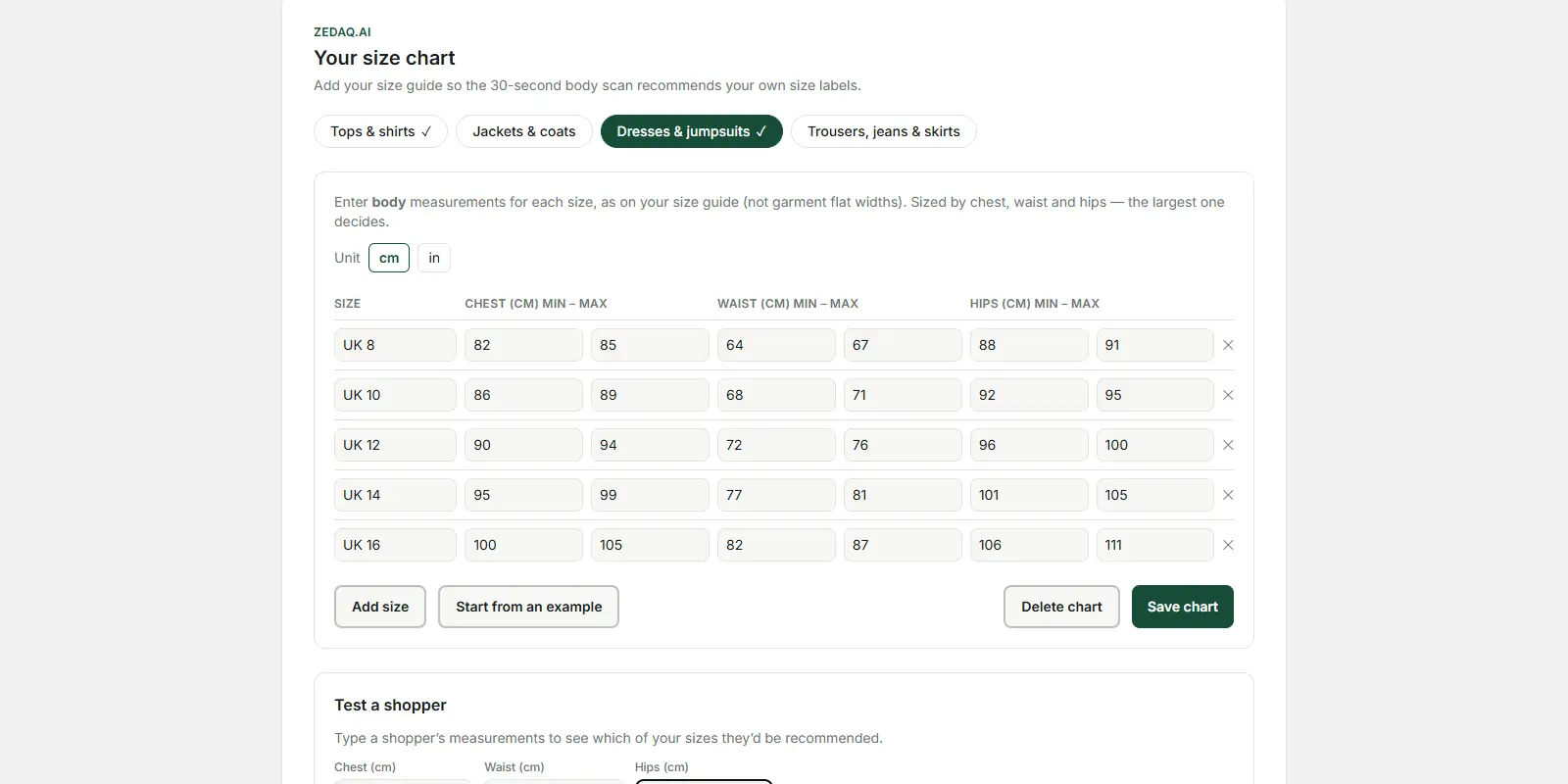
You set up one chart per garment type:
| Garment type | Activewear examples |
|---|---|
| Tops | Sports tops, tanks, fitted tees, long sleeves |
| Outerwear | Running jackets, zip hoodies, windbreakers |
| Dresses | Tennis dresses, active dresses |
| Bottoms | Leggings, shorts, joggers, running tights |
Example mapping only. Group your own products by how they fit.
When a shopper falls between two sizes, the tool sizes up. That suits most layers and loose tops. For compression pieces, you may want to adjust your ranges so the recommendation lands where you want it. More on that below.
How should you write size charts for leggings and tights?
Start with body measurements, not garment measurements. A legging that looks narrow when laid flat can fit a much larger body because of stretch. Your chart should say which body each size is made for.
Step 1: Measure your fit models
Measure the people who fit each size well, wearing the product the way it is meant to be worn. Record waist and hips at minimum.
Step 2: Set ranges that meet
Make each range end where the next one starts. If a gap sits between medium and large, shoppers in that gap get pushed up a size.
Step 3: Split by compression level
If you sell both high-compression and relaxed styles, don't force them into one bottoms chart. Treat them as separate product lines in your size guide, so each one has ranges that match its feel.
Step 4: Decide your between-sizes rule
Because "Find my size" sizes up when a shopper is between sizes, tighten the upper edge of each range for compression pieces if you want shoppers nearer the snug end.
Step 5: Test with real people
Use the chart's test option with a set of measurements from your team. Check that the suggested size matches what you would pick in person.
What about sports bras and fitted tops?
Fitted tops are straightforward. Your tops chart uses chest, and the scan matches the shopper's chest to your ranges.
Sports bras are harder. Many brands size them in letter sizes (XS to XL), which map well to a chest-range chart. Others use band and cup sizes, which follow a different system. If you sell band-and-cup sports bras, keep your own bra size guide on the page alongside the size finder, and make clear which products the recommendation covers.
Whatever you sell, add a short fit note to each product. Something like "high support, fits snug, size up for a relaxed feel" helps the shopper read the recommendation in context.
How do you handle different body shapes in activewear?
Activewear shoppers come in every body type, and a narrow chart leaves many of them out.
- Extend your range. If you sell extended sizes, add them to the same chart so the tool can recommend them.
- Watch the hip-to-waist ratio. Shoppers with a larger hip-to-waist difference may fit one size at the waist and another at the hips. The tool sizes up to the larger relevant measurement, which protects against a legging that is tight across the hips.
- Consider rise. High-rise leggings sit differently on different torsos. A fit note helps here more than a chart does.
For more on sizing a wide range of bodies, see size recommendation for plus-size stores. If you also sell men's training gear, the guide on sizing for menswear stores covers chest and waist priorities.
Where should the size finder go on an activewear product page?
Put it near the size selector. Shoppers make their size decision there, so the button should be in reach at that moment.
A simple product page layout for activewear:
- Product photos, including a shot in motion if you have one.
- Product name, price and color.
- Size selector with the "Find my size" button next to it.
- A short fit note: support level, compression and how it should feel.
- Fabric details and care.
- Your full size guide, for shoppers who want to check numbers themselves.
On Shopify, ZeDaq.ai adds "Find my size" through an app embed in the Theme Editor. On WooCommerce, Wix, Squarespace or a custom site, you paste the script tag <script src="https://www.zedaq.ai/widget/zedaq.js" data-key="…" defer> into the product template. The key is locked to your store's domain.
How do you know if your activewear recommendations are working?
Track what you can see in your own store data. You don't need complex tools to start.
- Return reasons. If your returns form asks why, look at "too small" and "too big" by product.
- Exchanges by size. If many shoppers swap medium for large on one legging, that range needs adjusting.
- Customer messages. Questions like "is this true to size?" tell you where shoppers still feel unsure.
- Your own tests. Every new style, run a few team members through the size finder and compare with their real fit.
Review your charts each season. Fabric changes between collections can shift the fit, even when the pattern stays the same.
Activewear shares a lot with modest fashion, where fit and coverage matter as much as size. Our guide to modest fashion store sizing covers looser silhouettes and layering.
Test Find my size on your activewear range
FAQs
Can the size finder handle leggings with a lot of stretch?
Yes, as long as your chart is written in body measurements for that style. The tool matches the shopper's body to your ranges, so the stretch has to be reflected in how you set them.
Do shoppers need to wear tight clothing for the scan?
Fitted clothing gives the clearest outline in a full-length photo. Loose layers can hide the body's shape and make the result less reliable.
Does the scan give sports bra cup sizes?
The scan matches body measurements to your chart's ranges. If your sports bras use band and cup sizes, show your own bra size guide alongside it.
What does it cost to try?
ZeDaq.ai has a Free plan with 3 try-ons and 3 measurements a month. Paid plans start at $14 a month with a 3-day free trial.
Try ZeDaq.ai free
Virtual try-on and Find my size for your store, plus client, order and invoicing tools for tailors, in one subscription.

